


Modern security mechanisms of advertising platforms (Facebook, Google, TikTok) have become extremely sensitive to any inconsistencies in user data. Today, simply hiding your IP is not enough — anti-fraud systems scan hundreds of parameters of your "digital fingerprint": from audio card noise to the battery firmware version.
An anti-detect browser is your primary working tool. It creates isolated profiles, each of which appears to the advertising network as a real device with unique "hardware" and browsing history.
What should a top-tier "anti-detect" be able to do?
When choosing a browser, we relied on four critical criteria:
Fingerprinting quality: How deeply and correctly the browser modifies parameters like Canvas, WebGL, Audio, WebRTC, and fonts.
Teamwork: Availability of flexible roles, the ability to transfer profiles, and shared proxy management.
Automation: Availability of an API and RPA (Robotic Process Automation) functionality for account farming without human intervention.
Kernel stability: Frequency of Chromium engine updates. The fresher the version, the less suspicion it raises with Google.
TOP-6 Anti-detect Browsers for Media Buying
1. Dolphin{anty} — Choice #1 for Facebook
A browser created by affiliates for affiliates. The most popular solution in the CIS for working with social networks.
Pros: Perfectly tailored for FB and TikTok. Built-in auto-upload, bulk management of proxies and extensions. Account statuses ("Farm," "Ban," "Ready") can be changed directly in the interface.
For whom: Optimal for teams working with large volumes on social networks.
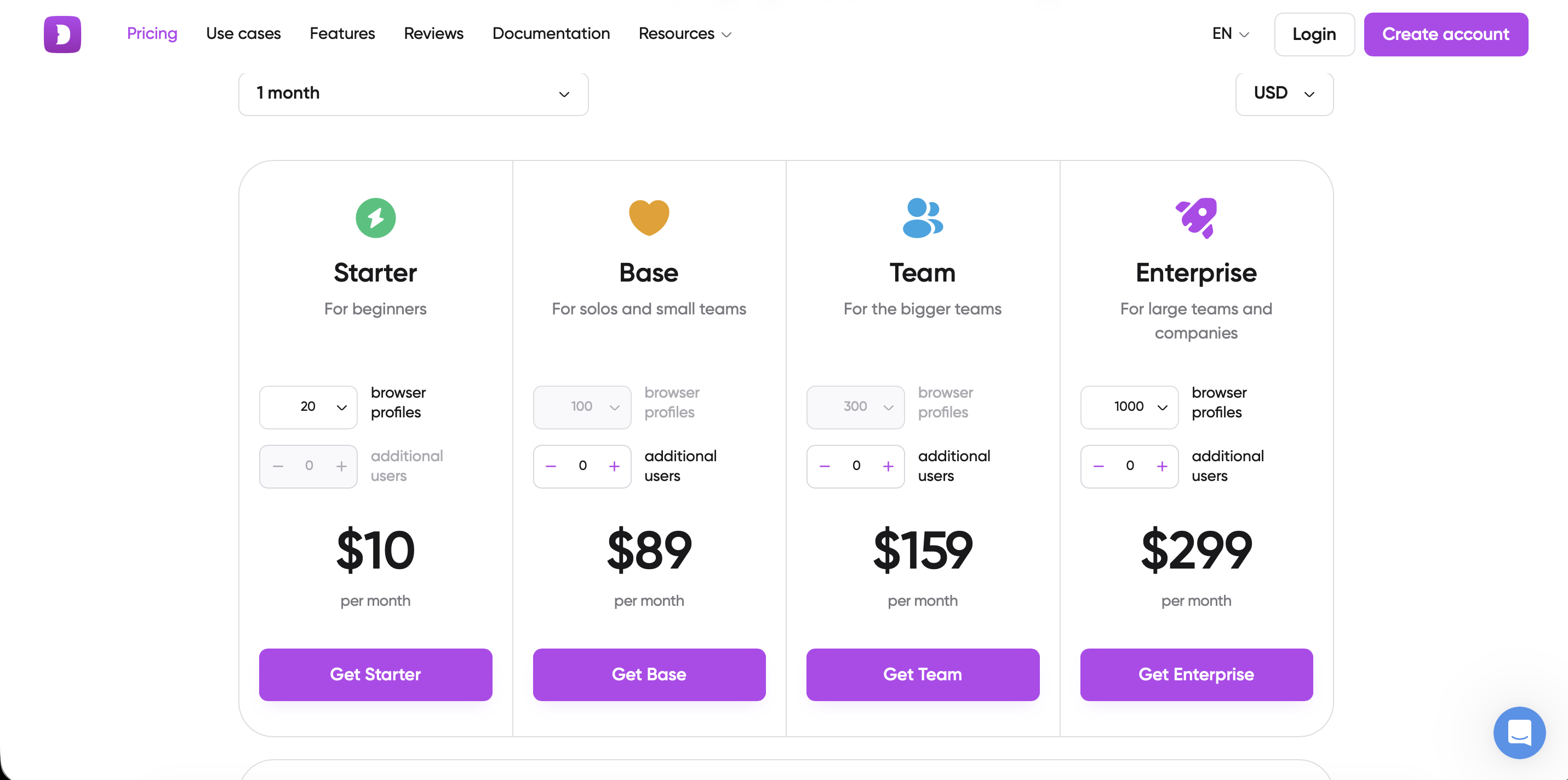
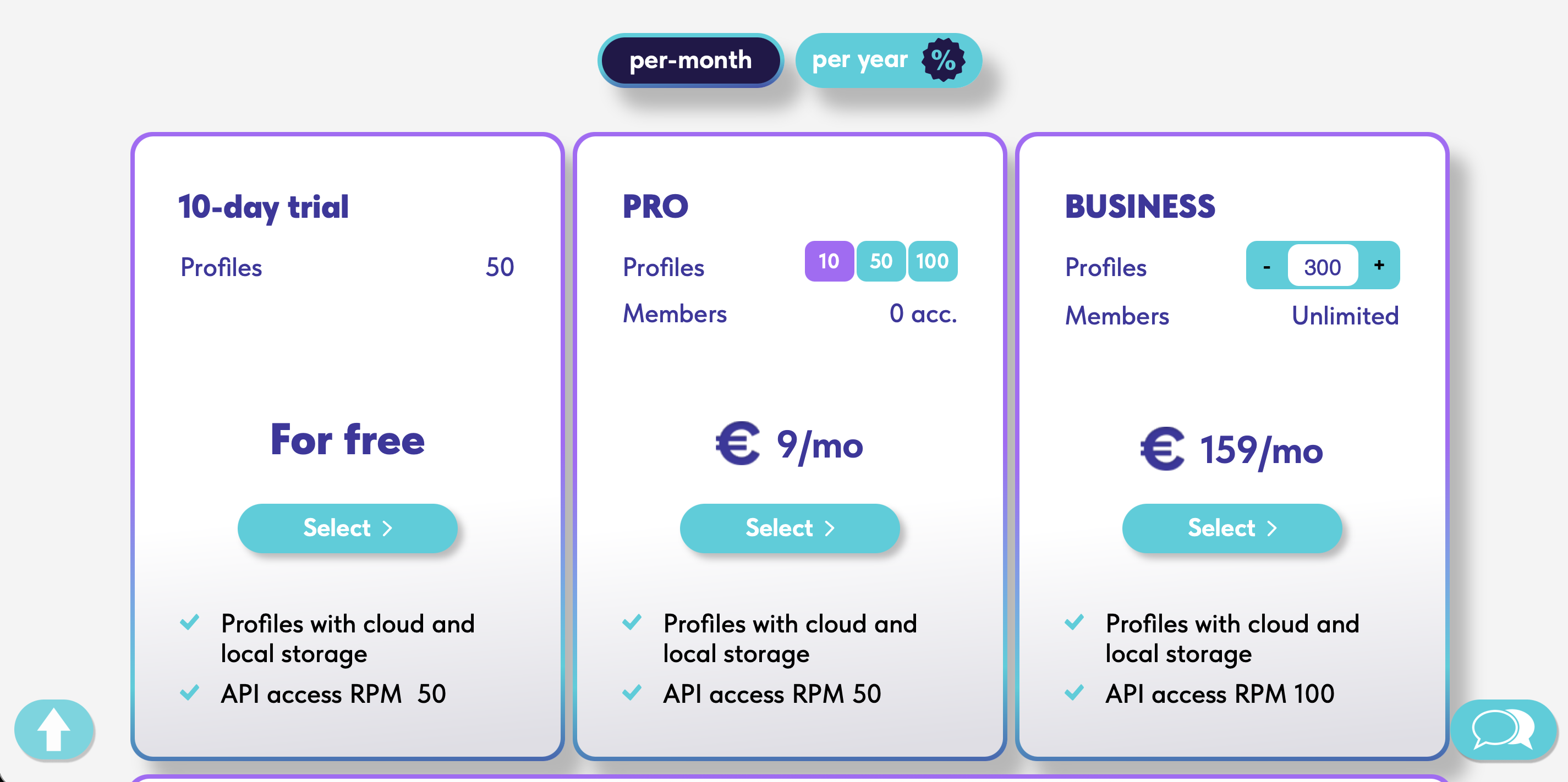
Price: There is a free plan for 10 profiles. Paid plans start from $89/mo.
2. AdsPower — The King of Automation
A global service famous for its automatic action builder, which requires no coding knowledge.
Pros: Most powerful RPA functionality. You can set up a scenario: "Log into FB -> Scroll feed -> Like 3 posts -> Click on an ad." Indispensable for warming up accounts.
For whom: For those who automate farming and work with Google Ads or crypto projects.
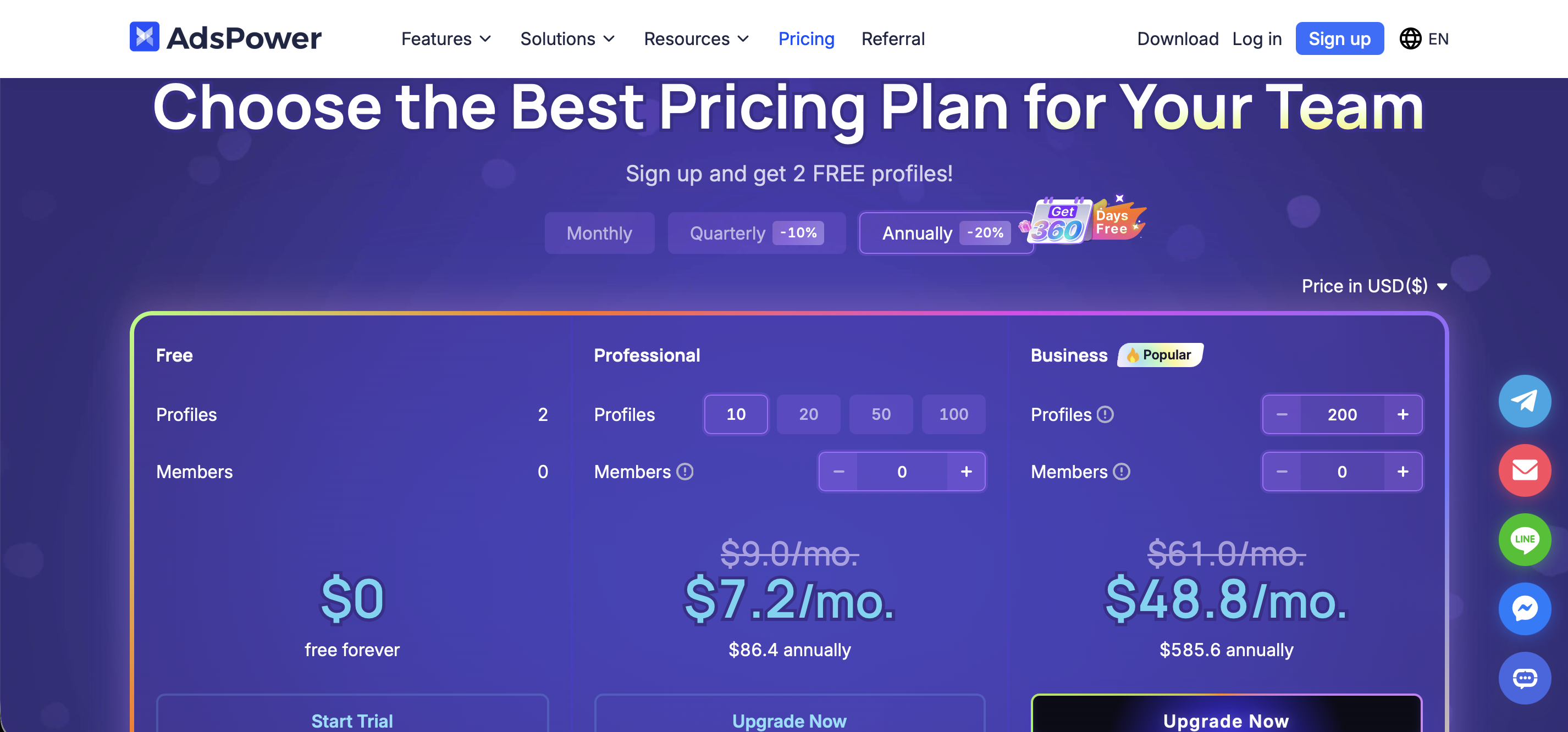
Price: Flexible pricing — payment depends on the number of users and profiles.
3. Octo Browser — Speed and Kernel Quality
A browser with one of the "cleanest" and fastest kernels on the market. It passes Pixelscan and CreepJS checks without errors.
Pros: High operation speed. Profiles do not take up much space and sync instantly. Works "out of the box" on default settings.
For whom: For professionals in Google Ads and complex niches (Gambling/Betting) where perfect fingerprint purity is essential.
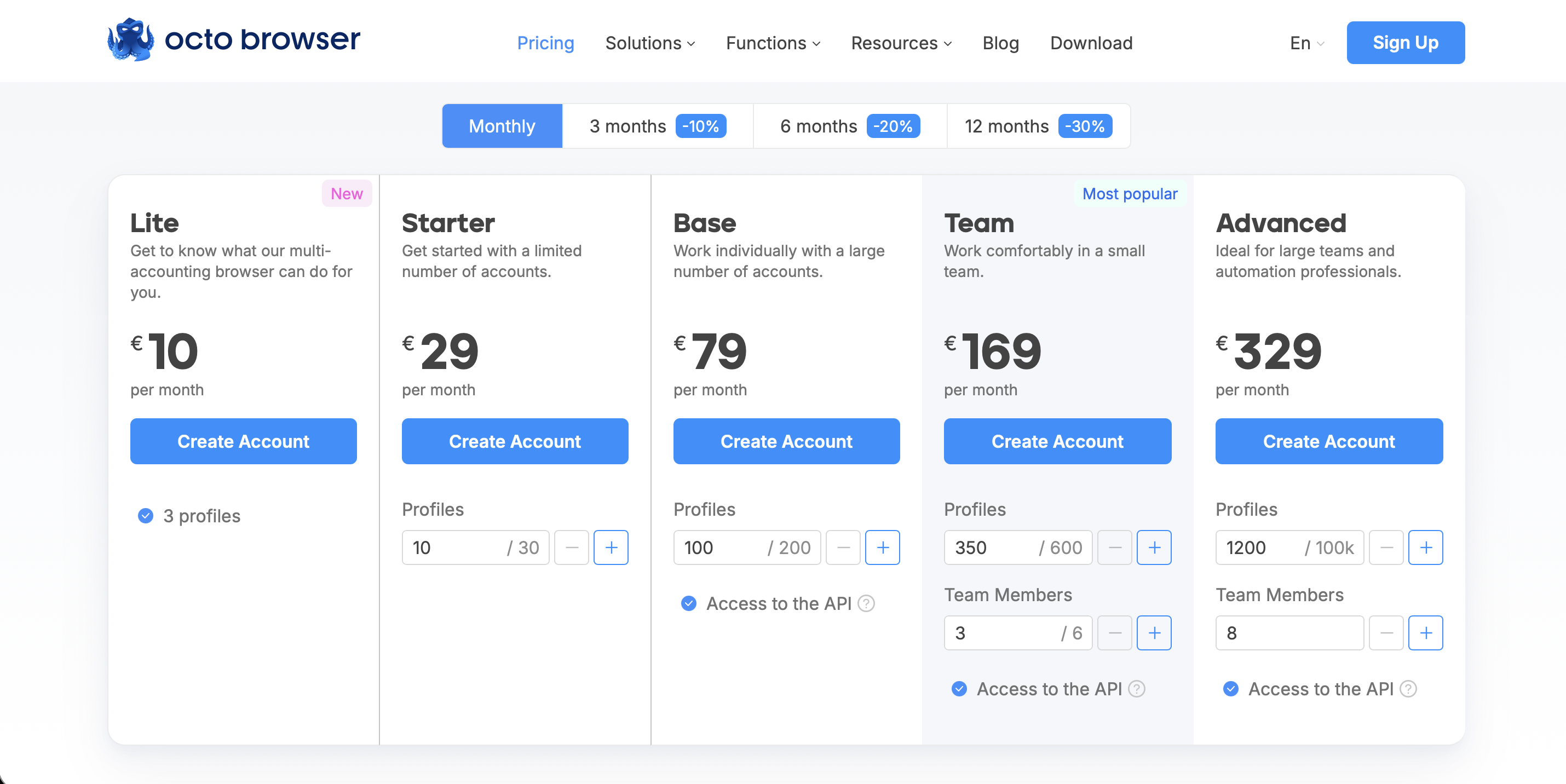
Price: Plans start from €29 for 10 profiles.
4. Indigo Browser — Stability and Trust
A product based on Multilogin's infrastructure, making it one of the most reliable tools in the world.
Pros: A database of real fingerprints collected from live devices. This eliminates the creation of a "synthetic" fingerprint that is easily detected by systems.
For whom: For those who value account longevity. Ideal for Google and working with marketplaces.
5. Undetectable — Flexibility and Local Storage
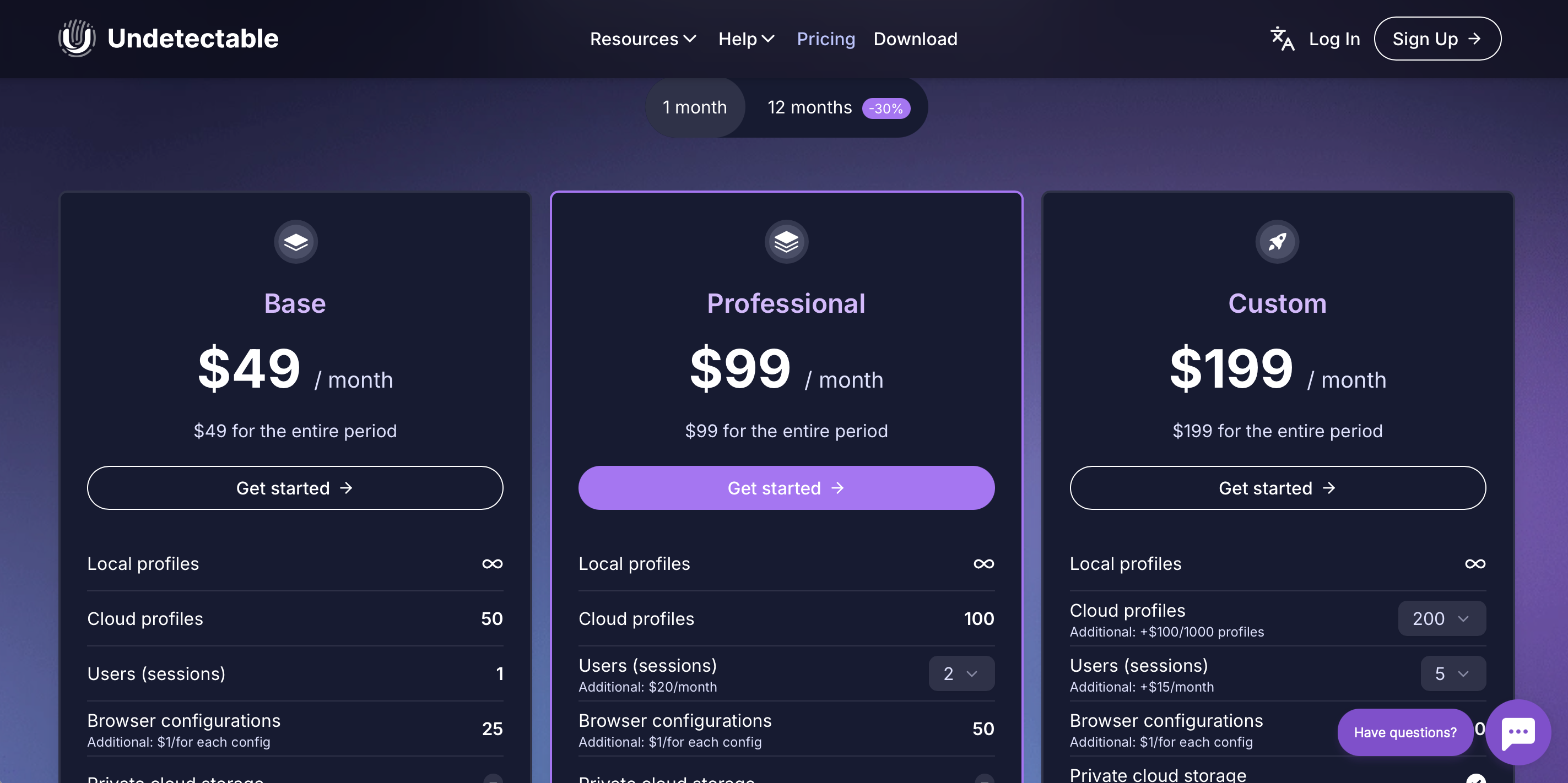
A browser offering the unique ability to store profiles directly on your PC rather than on the company's servers.
Pros: Ability to create an unlimited number of local profiles. Features a built-in Cookie Robot for automatic cookie warming on popular sites.
For whom: For solo buyers and those who want to save on cloud costs while maintaining fingerprint quality.
6. GoLogin — Simplicity and Cloud Solutions
An intuitively clear interface backed by the powerful Orbita engine.
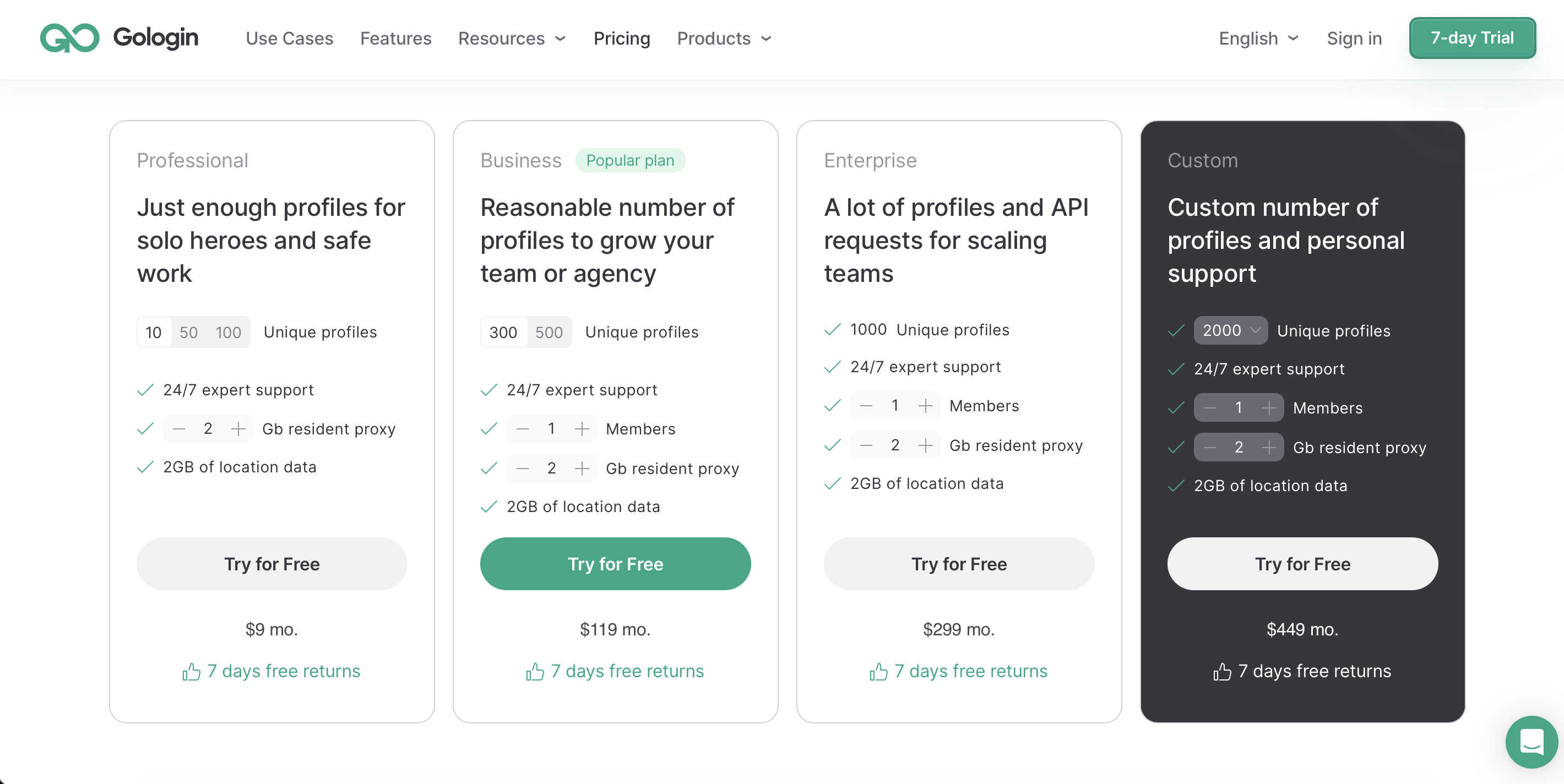
Pros: Ability to launch profiles in the cloud through a regular browser (without installing software). Convenient for quick account checks.
For whom: Beginners and teams who need access to profiles from any device.
Checklist: How to check a profile before running traffic?
Even a top-tier browser can fail due to poor proxies. Before attaching a card and launching a stream in Cloaking.House, check the profile using these checkers:
Pixelscan.net — checks for fingerprint uniqueness and "humanness."
Whoer.net — checks IP matching, time zone, and presence in blacklists.
Browserleaks.com — deep analysis of WebRTC, font, and WebGL leaks.
Integration: How to Get Started?
Many beginners confuse the tasks of these tools. Remember: An anti-detect browser protects your account (hides your identity from Google/FB), while Cloaking.House protects your link (hides the offer from the moderator).
The Ideal Workflow:
Profile Setup: Create a profile in the anti-detect, attach a proxy, and warm up the account (cookie warming, visiting websites).
Landing Preparation: Create a flow in Cloaking.House to filter unwanted traffic.
The Connection: Take the PHP file or link from Cloaking.House and specify it in the advertising cabinet inside the anti-detect browser.
The Result: When a moderator checks the ad, Cloaking.House detects them and shows a White Page. A real customer sees your offer.
Quick Start in Cloaking.House
Creating a flow takes no more than 2 minutes:
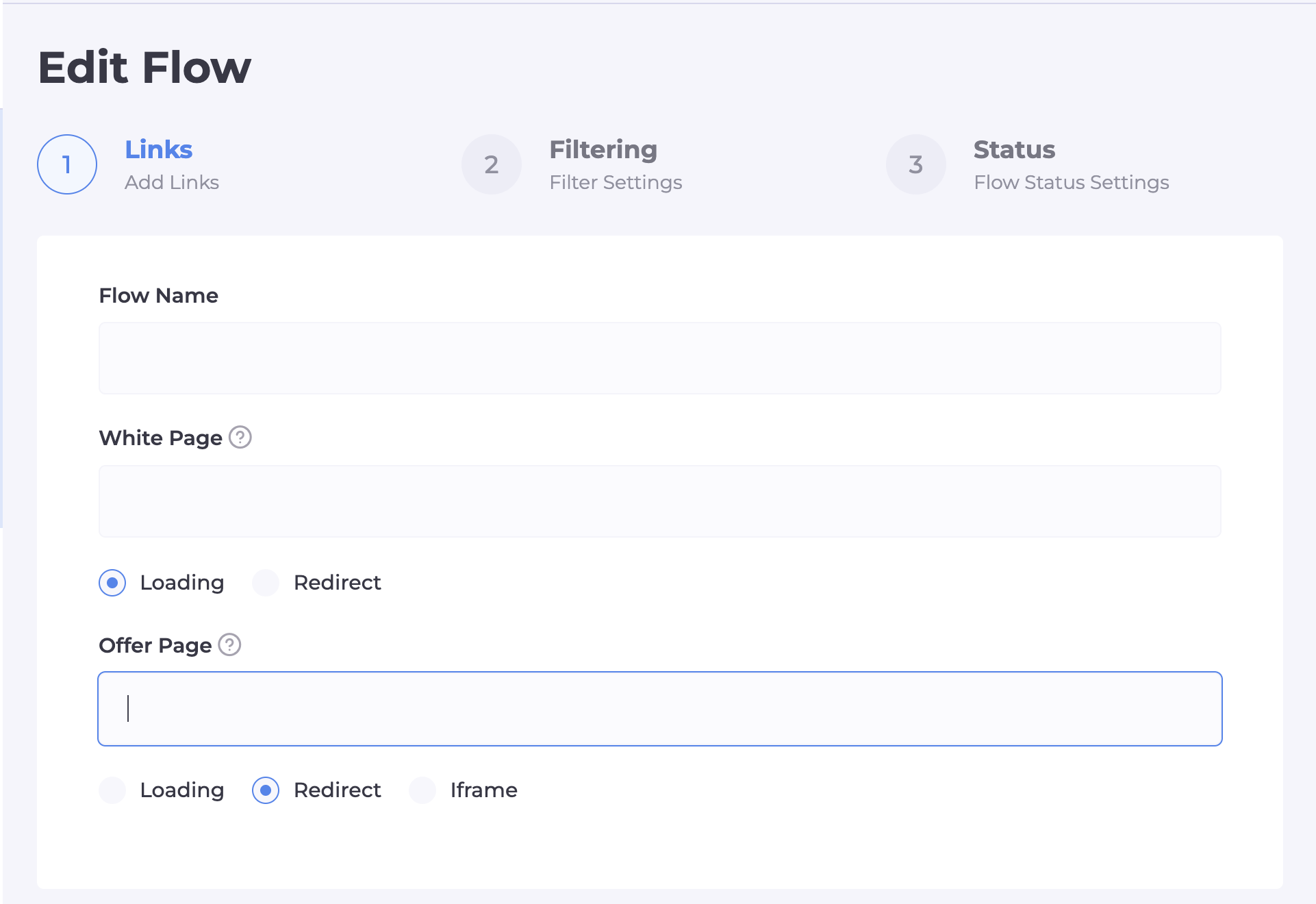
Step 1 (Paths): Specify the URL of the "White Page" and the address of your offer. Use the Loading method — this way, the URL in the browser bar does not change, which is critical for platform trust.
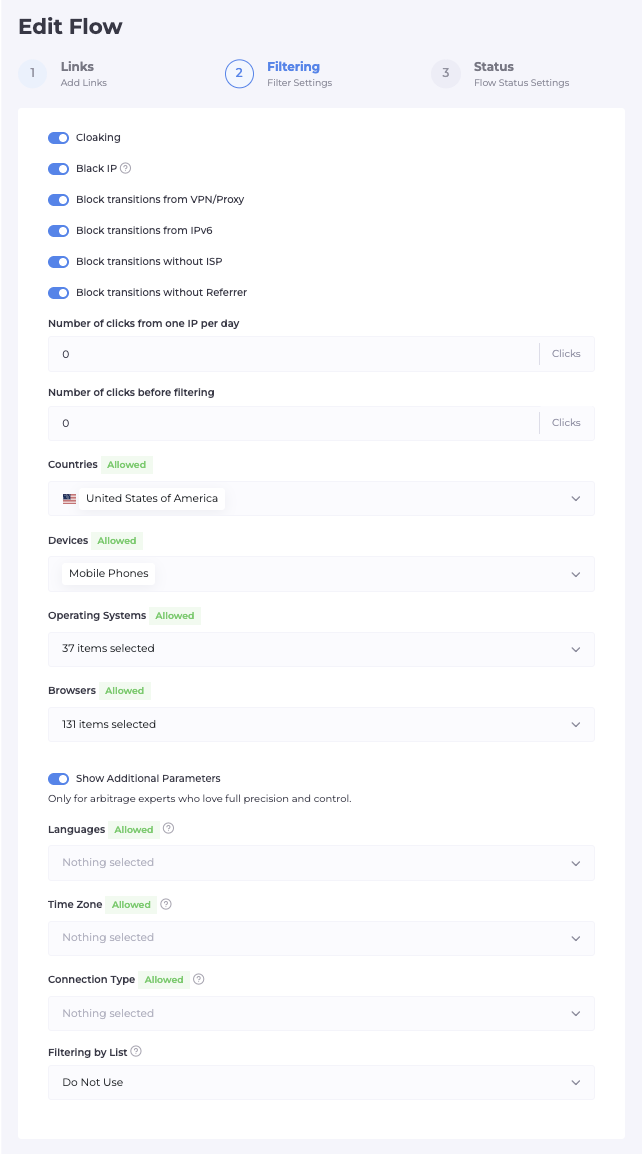
Step 2 (Filters — Maximum Protection): At the start, we recommend activating all available filtration toggles. Important: After launch, monitor the "Clicks" section. If you see that real target audience members are being filtered, you can always selectively disable unnecessary toggles.
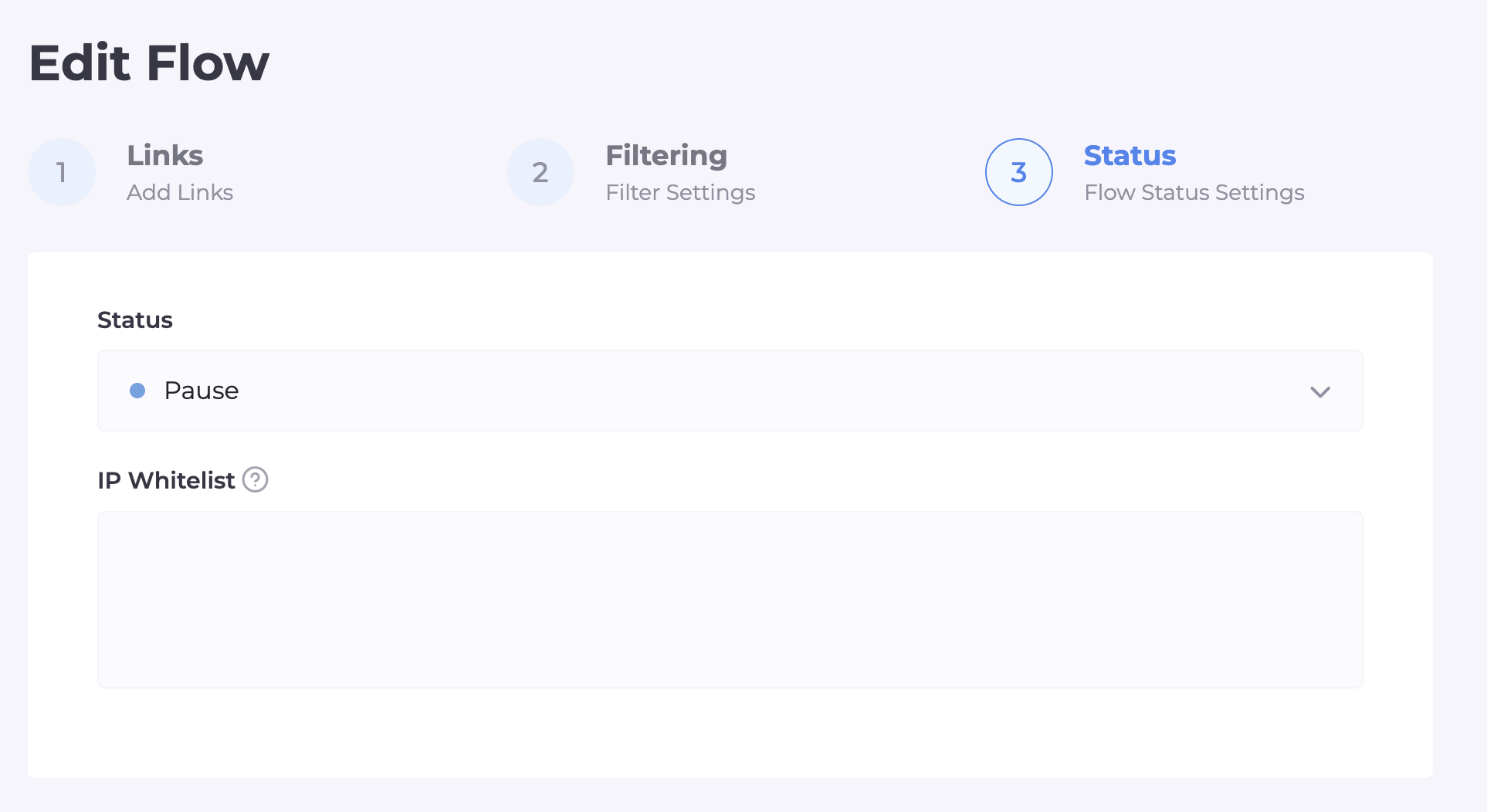
Step 3 (Activation): Add your current IP to the White List to test the offer by bypassing the filters. Save the flow and download the integration file.
How to integrate Cloaking.House into your website?
Once you have created and configured the flow, you need to "bring it to life." The Cloaking.House system provides two main integration methods:
1. Cloaked Link (Direct Link)
The fastest option, which does not require having your own hosting.
How it works: You use the service's domain infrastructure.
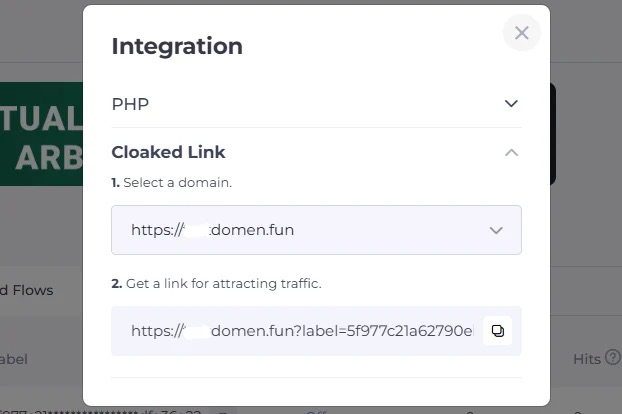
Process: In the flow settings, you can either choose one of the Cloaking.House system domains or park your own domain to our IP. As a result, the system gives you a ready "cloaked" link.
Pros: No need to mess with servers and files. Ideal for quick tests or working with platforms that are lenient toward redirects.
Cons: This method is practically unsuitable for Google Ads, as it requires maximum trust and the absence of unnecessary redirects.

2. PHP Integration (Server Method)
The choice of professionals and a mandatory requirement for passing moderation in Google Ads and Facebook. The entire process takes place on your server, making the content swap invisible to most filters.
Step-by-step algorithm:
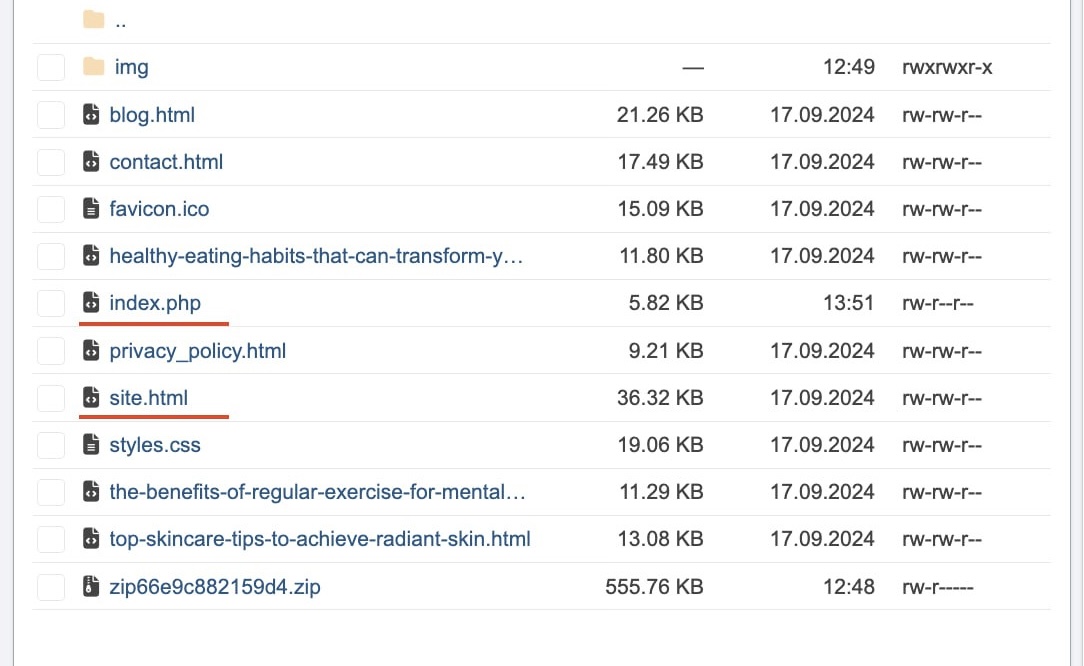
File Preparation: You must have your White Page in the root of your hosting (for example, named site.php or site.html).
Script Upload: Download the index.php file from your Cloaking.House personal account. This is the "brain" of the integration. You need to upload it to the root of your website.
Path Configuration: In the flow settings (Step 1), specify:
White Page: The name of your file (e.g., site.php) and the "Loading" method.
Offer Page: A link to your offer or a local offer file (if it is uploaded to the same hosting).
Result: Now, when accessing the domain, our index.php will trigger first. It will instantly determine the visitor type and either load the content of site.php (for bots) or open the offer (for customers).
Important: With PHP integration, your main domain always remains in the browser address bar, which maximizes trust from advertising networks.
Cost and Bonuses
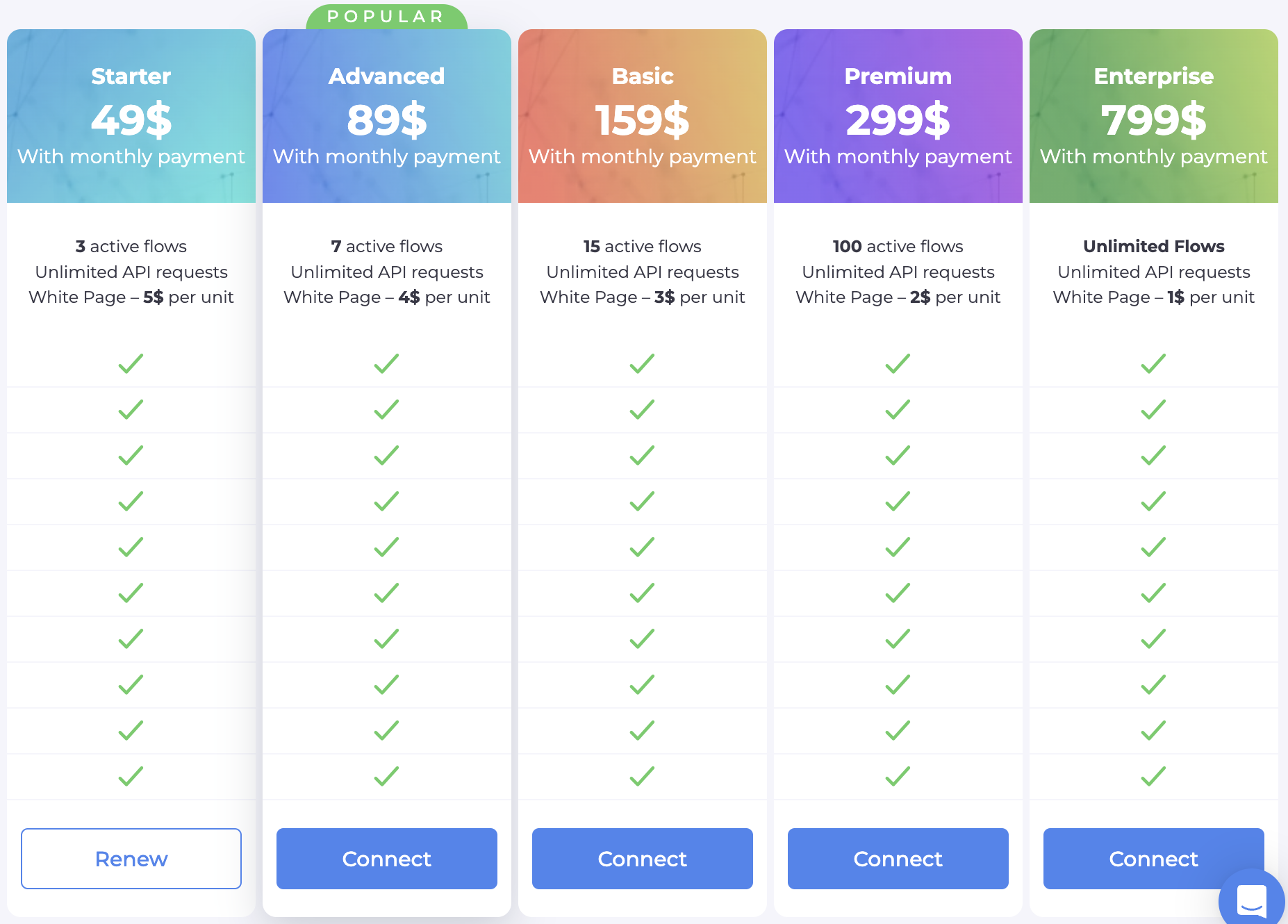
Free Trial: 7 days of full access to all features for every new user. Test any anti-detects along with our cloak for free!
50% Discount: When paying for an annual subscription, the price is reduced by exactly half.
Exclusive Promo Code: Enter BVBV_BRO_30 when paying for any monthly plan and receive a 30% discount.
Conclusion
In today's reality, affiliate marketing is a battle of technologies. Using a high-quality anti-detect browser in conjunction with Cloaking.House is your entry ticket to the world of high ROI.
Remember: accounts are a consumable material, but your technical foundation must be flawless. Choose a browser for your tasks, set up your filters, and run your traffic into the positive!
Grab your 7-day trial at Cloaking.House and start running traffic at a new level!

Be the first to share your opinion!
We value your feedback — share your thoughts.