


The main challenge for any arbitrageur in 2026 is the strict moderation of advertising networks (Facebook, Google, TikTok) and the influx of bots that drain budgets. Cloaking.House comprehensively solves this problem. The service acts as a "smart shield": it analyzes each click in real-time, distinguishing real users from moderators, spies, competitors, and bots.
This solution is a must-have for those working with "gray" verticals (Nutra, Gambling, Crypto), as well as for white advertisers who want to protect their setup from copying and clean their statistics from irrelevant clutter.
Service Advantages: Why Top Affiliates Choose Cloaking.House
1. Machine Learning-Based Filtering: Unlike outdated trackers that work with simple IP address "blacklists", Cloaking.House uses artificial intelligence. The system analyzes digital fingerprints and behavioral factors of each visit. The bot database is updated in real-time: if a Facebook moderator changes proxy or device, the algorithm recognizes them by indirect signs and instantly redirects them to a White Page. This ensures the maximum penetration rate for real people and reliable protection from bans.
2. High Speed and High-Load Handling: Load speed is a critical factor for conversion (CR). The service's infrastructure is designed so that click processing takes fractions of a millisecond. Even with huge traffic volumes (High-Load), the user will not notice delays before transitioning to the offer. This is achieved through a global server network and optimized integration methods (PHP loading without redirects), which is especially important for working with Facebook, which dislikes unnecessary redirects.
3. All-in-One Ecosystem: Cloaking.House covers the technical needs of an arbitrageur in one window. You don't need to look for third-party services: an AI generator for White Pages is already built-in, creating unique sites for moderation in a couple of minutes. You can also buy or park domains directly in the cabinet. This saves dozens of hours of routine work and allows you to launch an ad campaign in just 15 minutes, even if you have no programming skills.
1. Essential Arsenal
For a successful launch and risk minimization (bans, checks), you will need the following set of tools:
Cloaking Service: You will need an account with Cloaking.House.
White Page Generator: Needed for traffic separation: show "white" pages to moderators, offers to target clients.
Domain and Hosting: Any reliable hosting and clean domain.
Payment Method: Bank cards with a good BIN (e.g., UK/EU). We recommend the service Pay2House.
Facebook Account: The ideal option is a King account (manual farming with rest) + linked auto-registrations. Avoid launching with "empty" fresh registrations.
Anti-detect Browser: To hide your real digital fingerprint.
Proxy: Strictly mobile or residential proxies under the GEO of your account. This helps avoid IP overlaps.
2. Preparing the White Page
White Page is a safe page that bots and Facebook moderators will see. It must comply with advertising activity rules.
We will not search and download sites manually but will use the built-in AI generator Cloaking.House.
Additionally, a White Page can be generated on this service Whitepage.House
Generation Process:
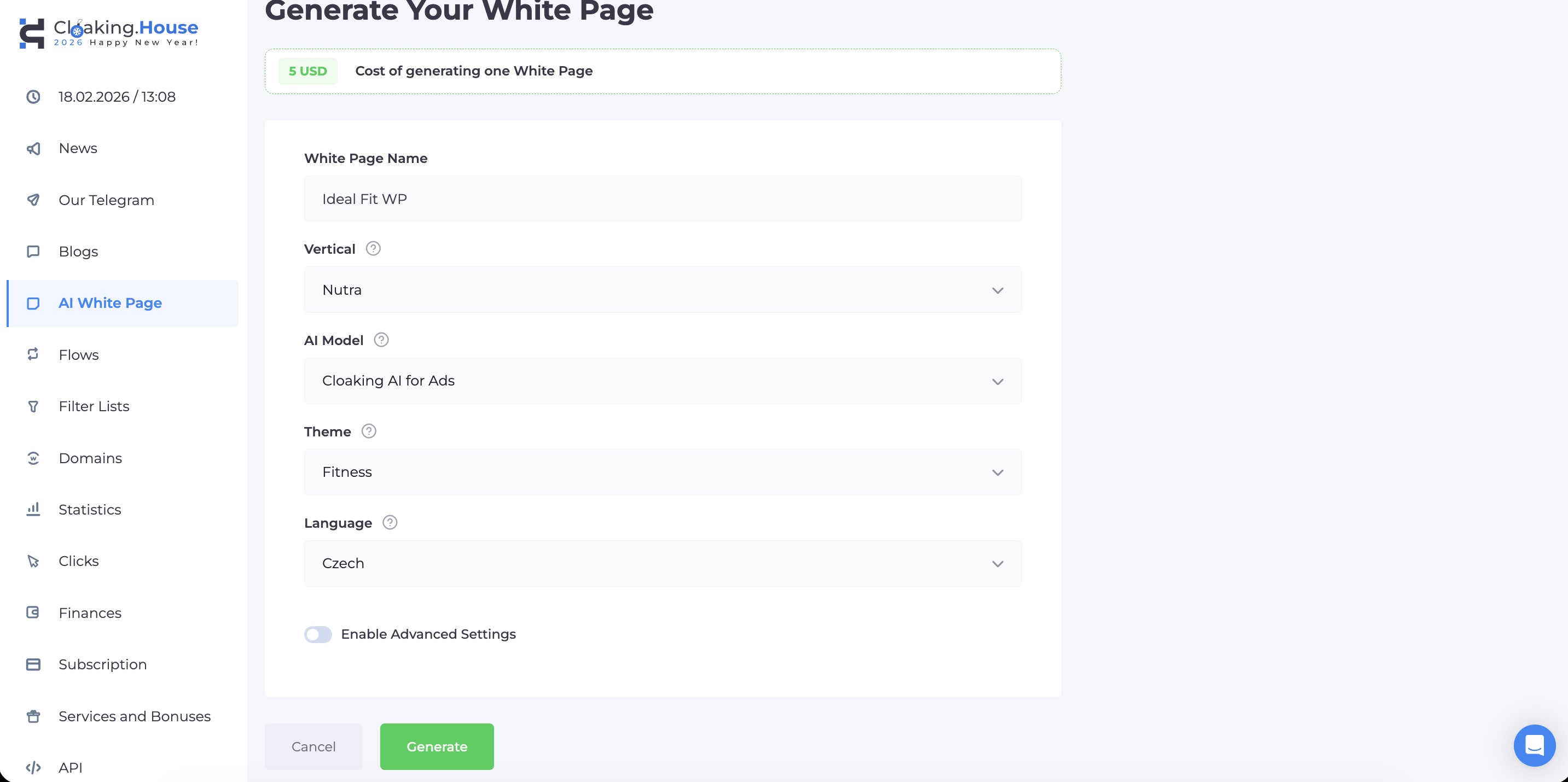
Go to the "White Page" section in your dashboard.
Click the "Create" button.
Enter a name and choose a vertical (e.g., "Health & Beauty") so that the white page theme matches your creative for better trust.
Select an AI model: One Page (landing page), For Apps (for PWAs), or For Ads (a multi-page site, ideal for passing FB moderation).
Choose the language of your target GEO (e.g., Czech) and click the "Generate" button.
Wait 2–5 minutes for the system to build your unique site, then download the finished archive.
Tip: You can unpack the archive on your PC and open the index.html file in a browser to visually assess the result.
3. Setting Up the Flow in Cloaking.House
While the white page is downloading, let's create a technical flow for filtering. Go to the "Flows" section -> "Create Flow".
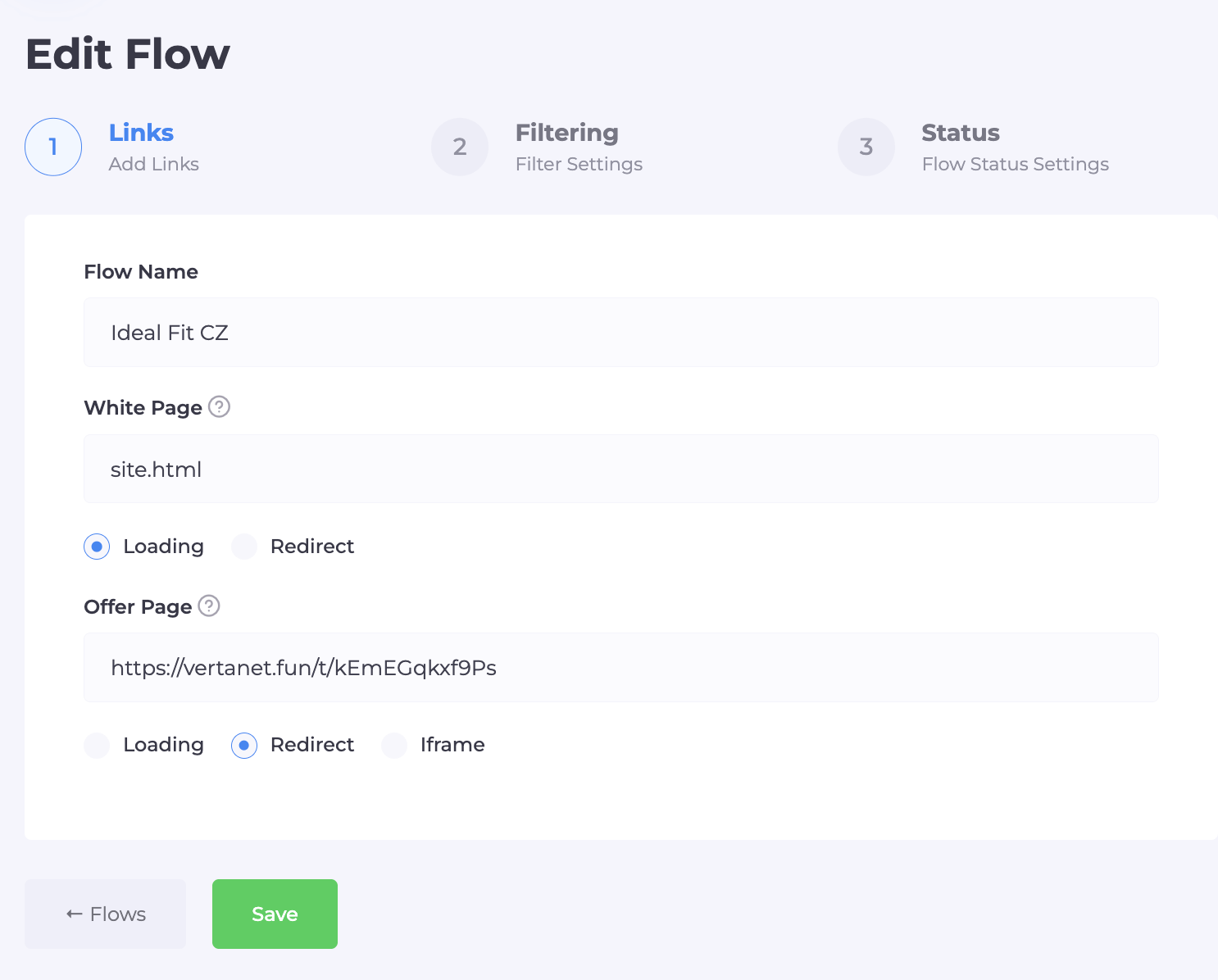
Step 1: Links (Content)
Name: Specify the name of the offer or campaign.
White Page: Choose the "Loading" method.
- In the link field, specify the name of the file to be opened. For example: site.html. (We will rename the white page file later when uploading to hosting).
Offer Page:
- Specify your affiliate link or the path to the local offer file.
- Method: "Redirect" (for affiliate link) or "Loading" (if the offer is a file on hosting).
Step 2: Filtering
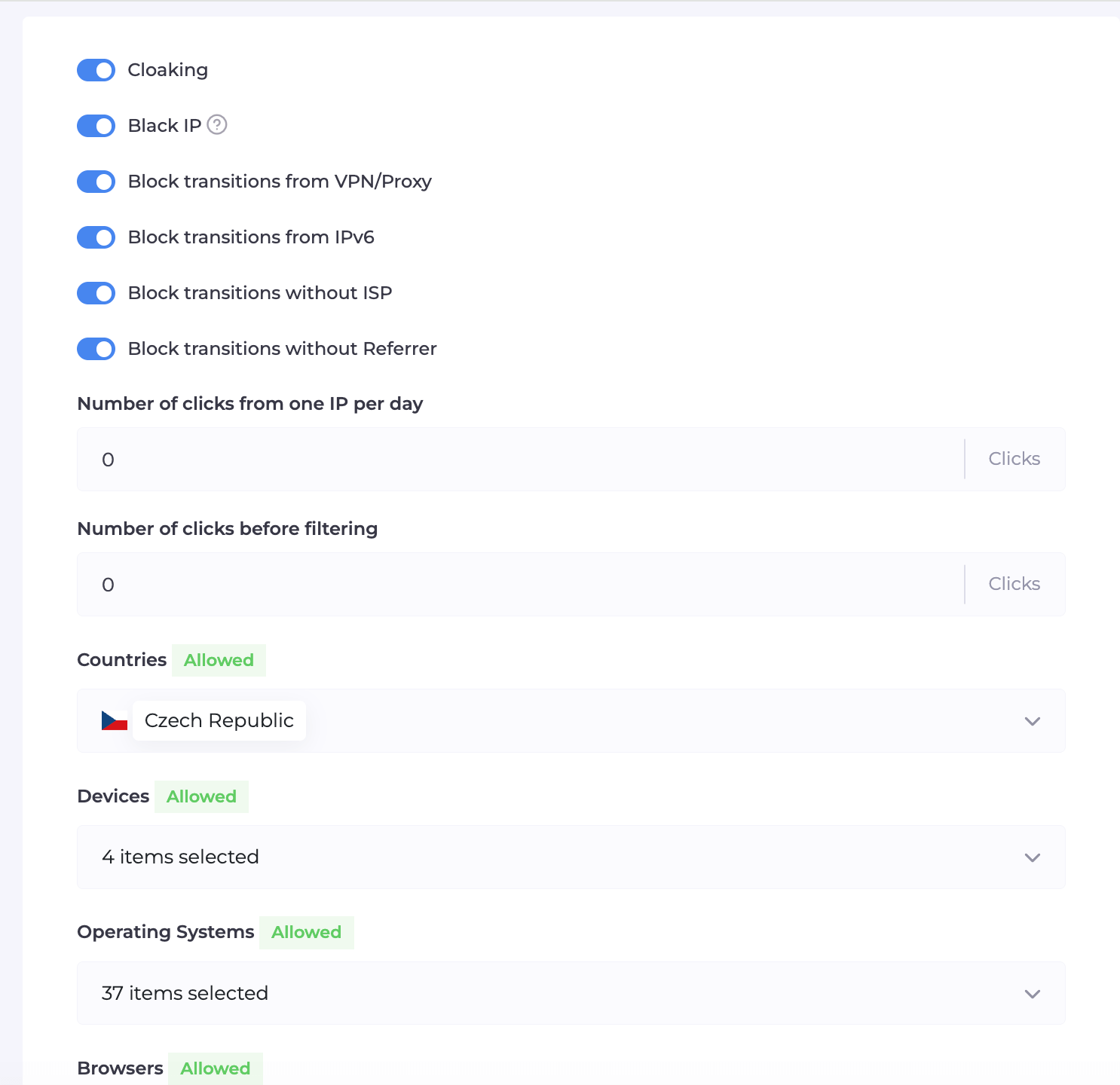
This is the "shield" of your campaign. We recommend enabling the following toggles:
Block VPN/Proxy: Enable (filters out bots and spies).
Block IPv6: Enable (often used by bot farms).
Block without ISP / Referrer: Enable (blocks traffic without provider or referral history).
Click Limit: Set a click limit from one IP (e.g., 1-2) to prevent "click fraud" by competitors.
GEO and Devices: Allow only the country and device types (Mobile/Desktop) that your offer accepts.
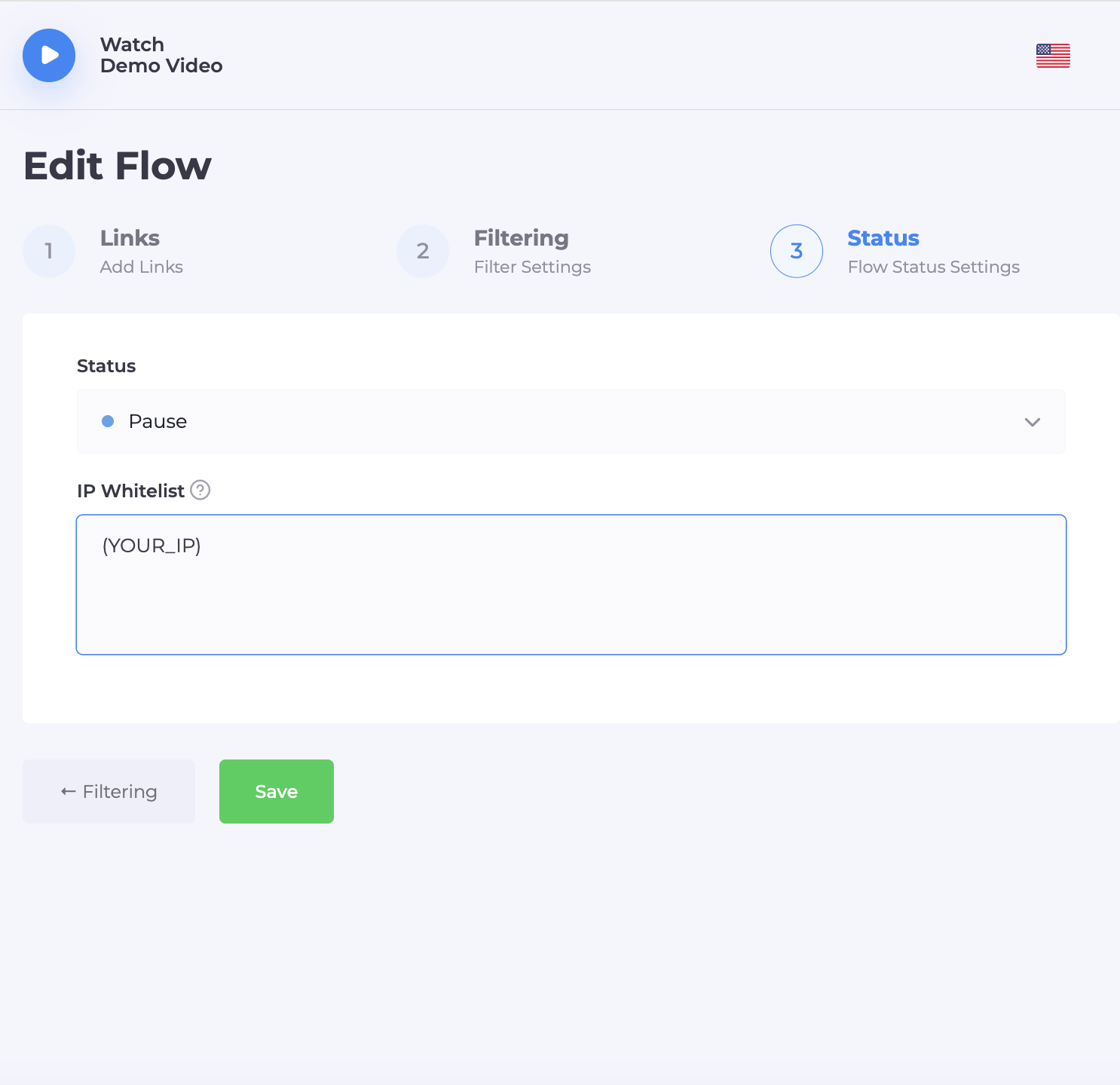
Step 3: Saving
Click "Save". Then download the integration file index.php for the created flow.
4. Uploading to Hosting and Integration
Now let's connect all the components on your hosting. This stage does not require programming skills.
File Manager: Go to the root folder of your domain on hosting (usually public_html).
Upload: Upload two elements there:
- The archive with your White Page (generated by AI).
- The index.php file (downloaded from Cloaking.House).
White Page Setup:
- Unpack the white page archive.
- Find the main site file (usually index.html).
- IMPORTANT: Rename it to site.html (or any other name you specified in the flow settings in step 3).
- Why is this necessary? Because the main file that first meets the visitor should be our filtering file index.php.
SSL Certificate: Be sure to install SSL (https:// protocol). Facebook does not trust sites without a security lock. Set up a redirect from http to https in the hosting panel.
4. Uploading to Hosting and Integration
Before launching the ad, be sure to check the cloaking operation.
Go to Cloaking.House and pause the flow.
- Go to your domain. The White Page (our site.html) should open.
Enter your IP in the WhiteList and go to your site, the Offer Page should open
Check the statistics in the "Clicks" section: clicks should be displayed (clicks may appear after one minute).
6. Account Preparation (Warming Up)
We work through an anti-detect browser.
Profile setup: Create a profile, add a proxy under the account's GEO.
Cookie Import: If you bought an account with cookies (JSON or Netscape), upload them. This will increase trust on the first login.
Warming Up (Day 1): Do not launch ads immediately!
- Log into the account, scroll through the feed.
- Watch videos, join groups, like posts. Mimic real human behavior.
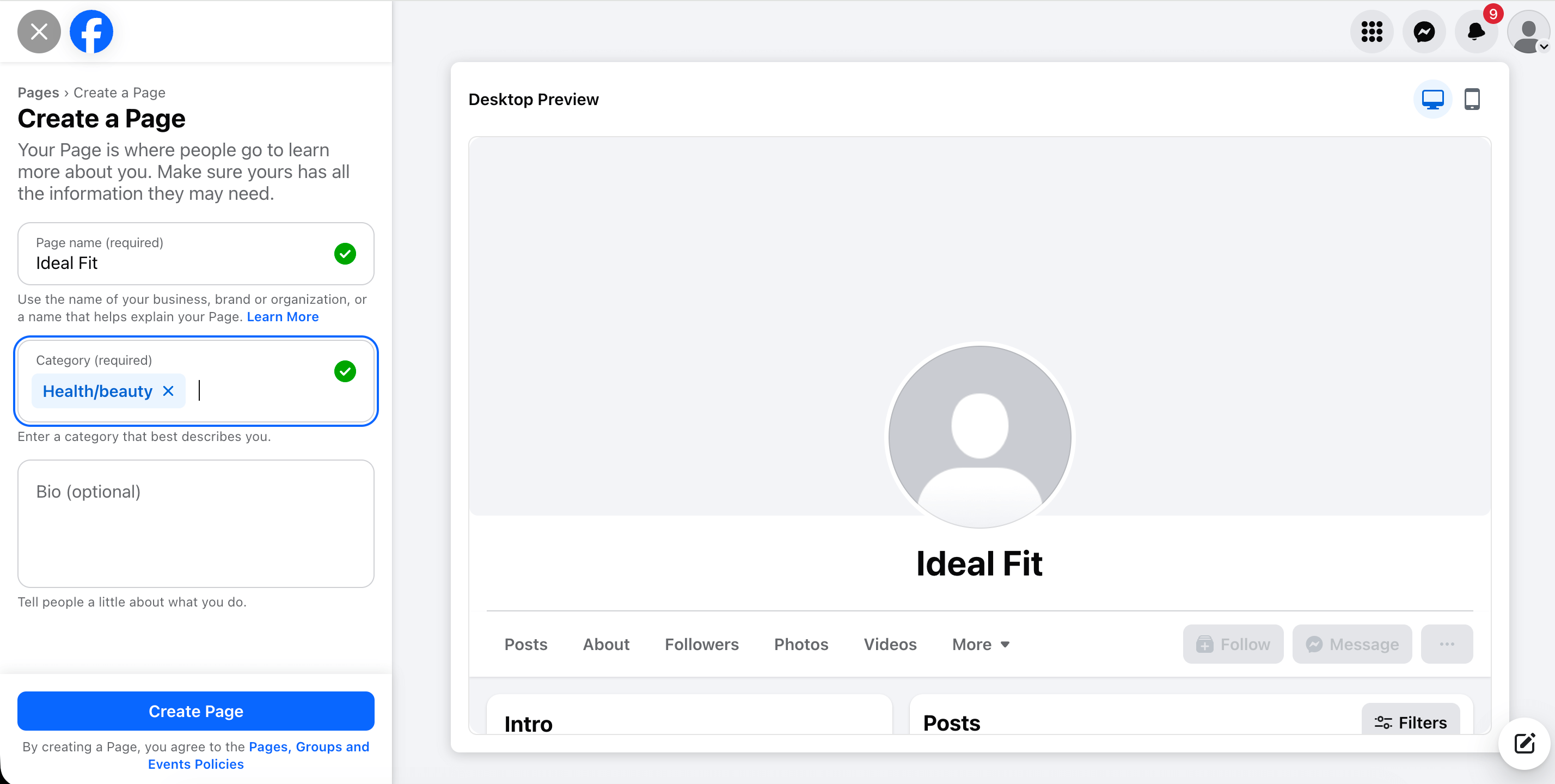
Creating a Fan Page:
- On the second day, create a Fan Page from which the ads will run.
- Fill it out: avatar, cover, neutral name (e.g., "Health Blog"), 3-5 neutral posts.
7. Launching an Ad Campaign in Ads Manager
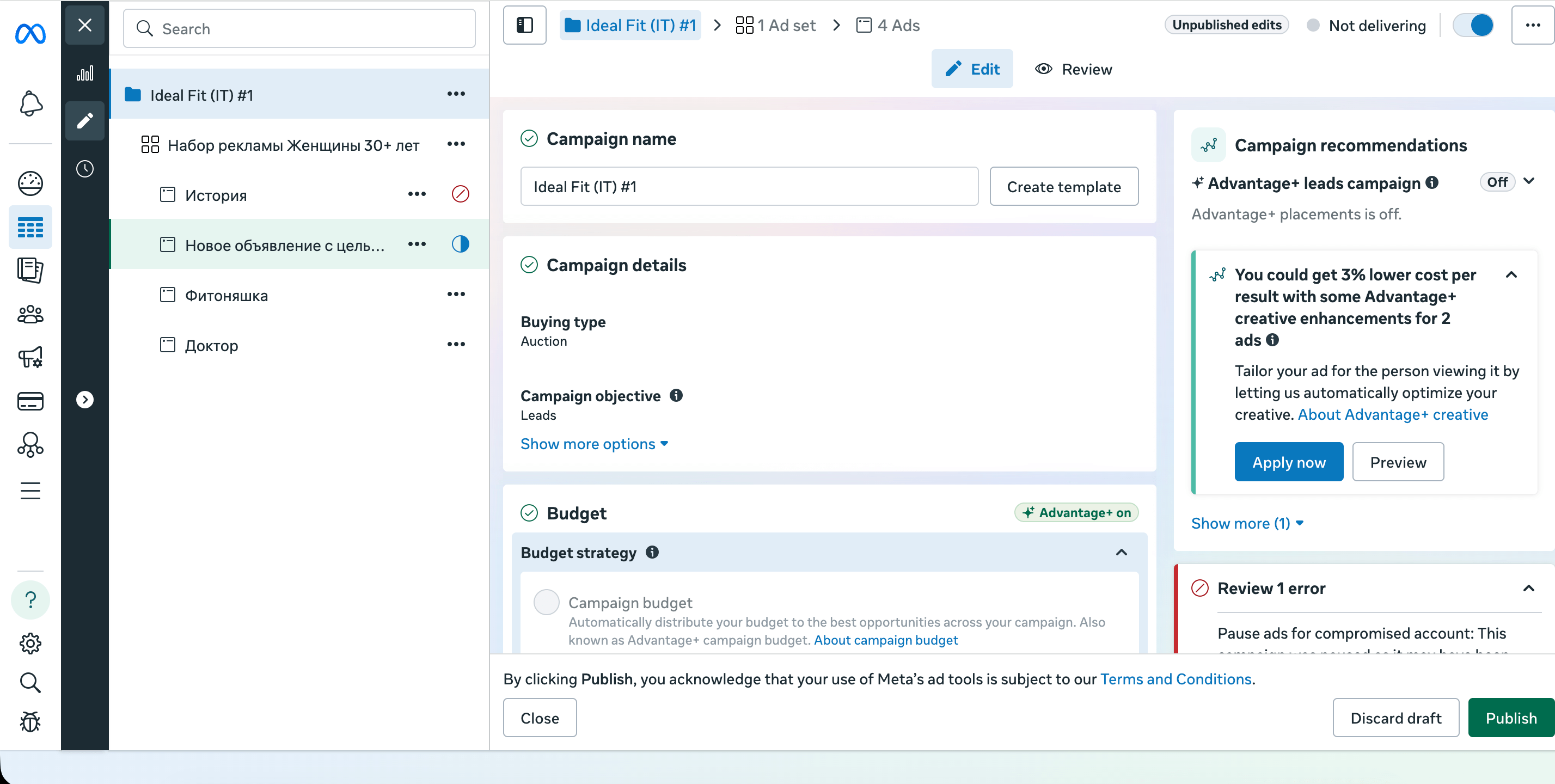
Creating a Campaign:
Go to Ads Manager and click the green +Create button.
Objective (Goal): Choose Leads or Sales. Important: do not choose the Traffic goal, as FB will provide many cheap clicks from bots that do not convert.
Campaign Name: Enter any convenient name.
Categories: Leave blank (if the offer is not related to politics or credit).
Ad Set Setup:
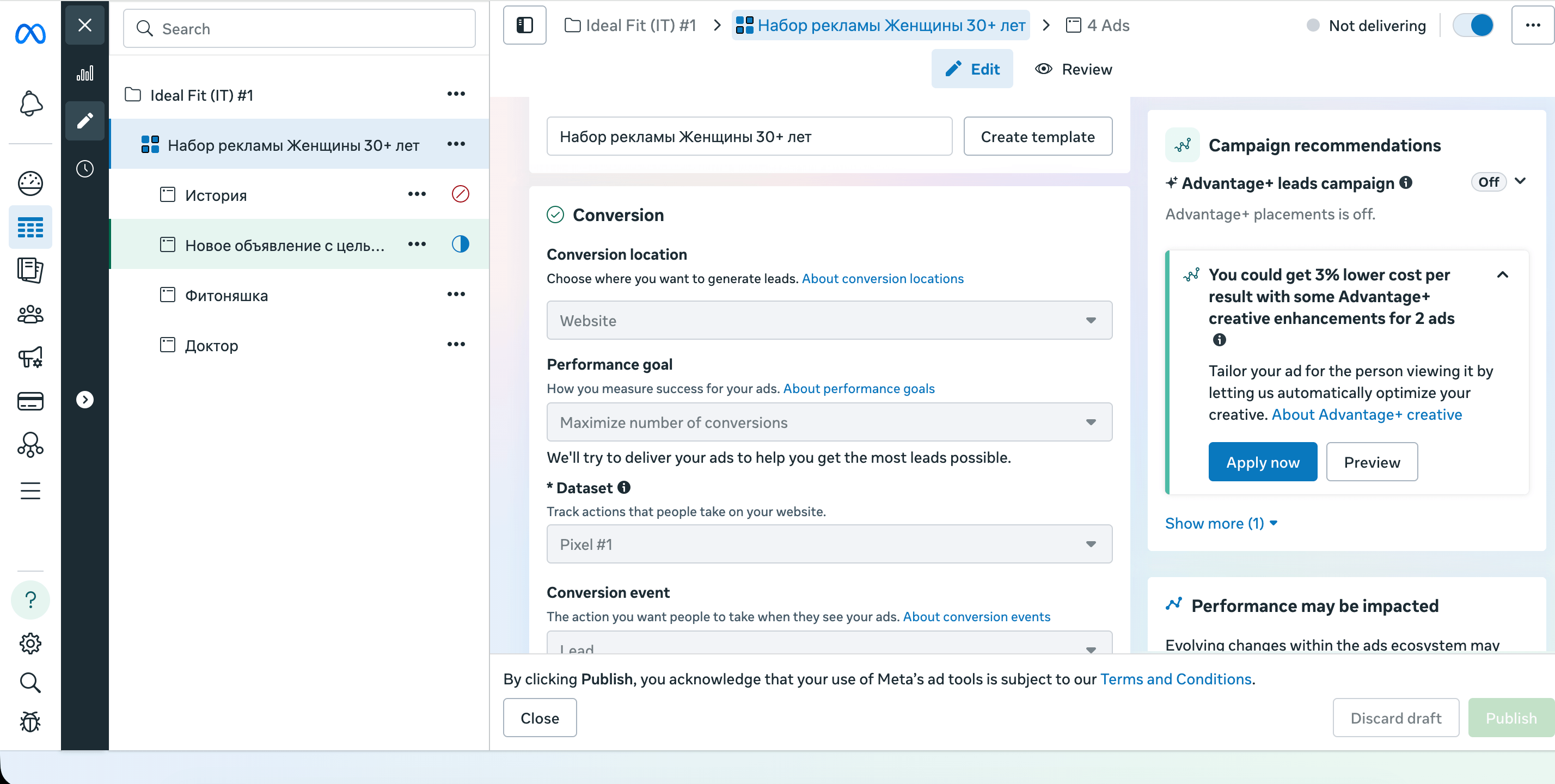
Conversion Location: Choose "Website".
Pixel: Choose the created pixel and conversion event (usually Lead).
Budget: Set a daily budget.
Audience: We recommend clicking "Switch to original audience options" to manually set targeting (GEO, age, gender). Automatic algorithms (Advantage+) often perform worse on gray offers.
Placements: Choose Manual placements. Check only Facebook Feed and Instagram Feed. Disable Audience Network – there is a lot of junk traffic.
Ad Setup:
Identity: In the "Facebook Page" field, select the Fan Page you created and warmed up.
Creatives: Upload a video or image.
- Where to get creatives? You can create unique ones yourself, find ideas in the Facebook Ads Library, or use a spy service (e.g., Spy.House).
- Tip: Be sure to make downloaded creatives unique (clean metadata, apply filters) so FB does not recognize them as duplicates.
Primary Text: Write a selling text in the GEO language.
Destination (Link): In the Website URL field, paste the link to your domain (the one where the index.php file is set up and your White Page is located).
Publication:
- Click Publish.
What Happens Next?
After clicking "Publish", moderation begins:
Moderation: Immediately after publication, Facebook's bot moderators visit your link. Cloaking.House instantly recognizes them by digital fingerprints (Machine Learning) and shows them the generated White Page. The moderator sees a "white" site that complies with the rules and approves the ad.
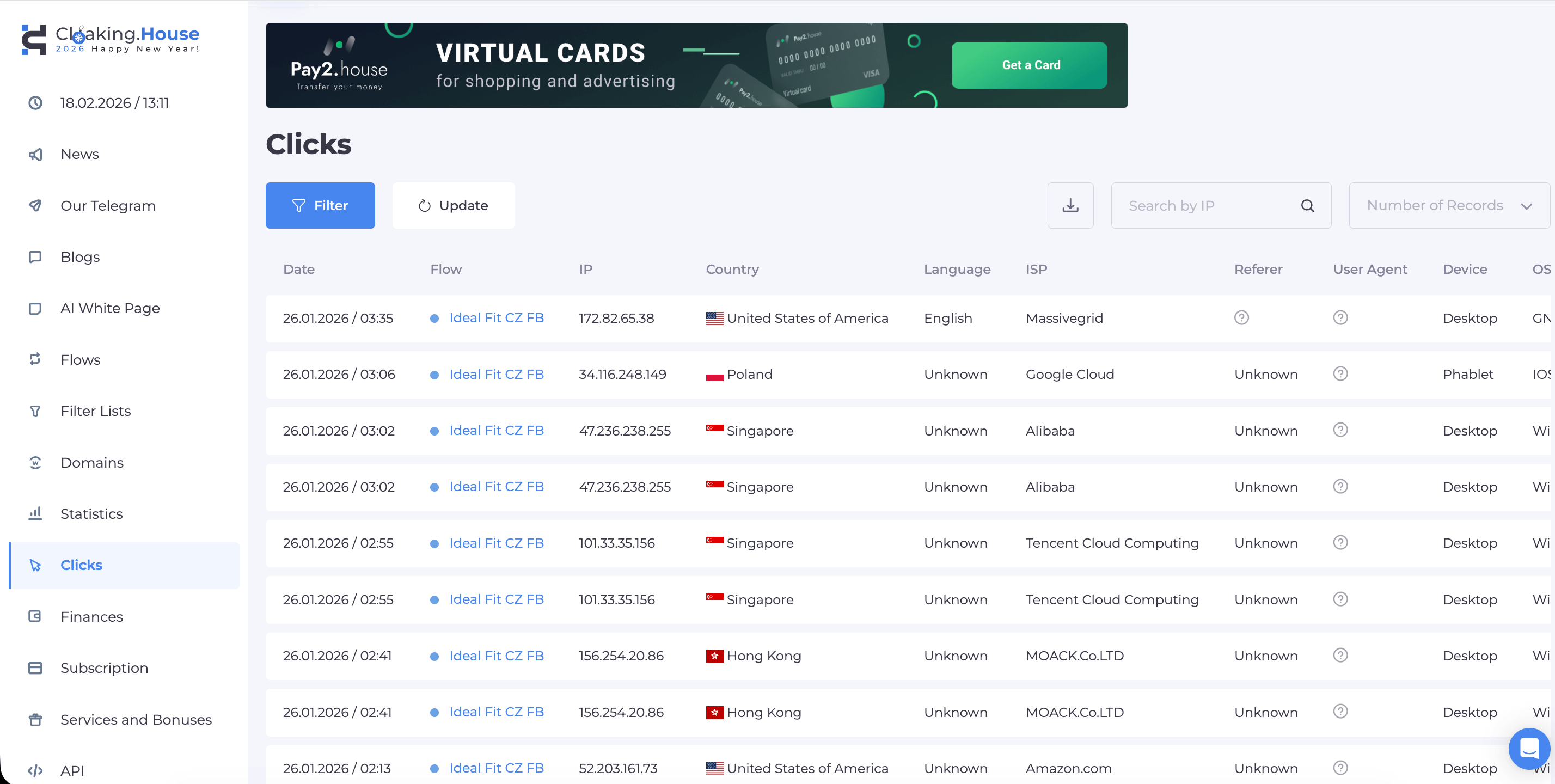
Active Pouring: Once the campaign receives "Active" status, real people start visiting the link. The system sees that this is a live user from the allowed GEO and automatically shows them the Offer Page with the product.
Conclusion and Bonus
Using professional cloaking is the foundation for a long account life. You don't waste time manually searching for white pages (they are made by AI) and don't risk losing your budget due to filtering errors.
Special offer for readers: Register at Cloaking.House and get 7 days of free access (Trial) to test the full functionality.
🎁 And with the promo code BVBV_BRO_30 you will receive a 30% discount on the purchase of any tariff.
Successful pouring and high ROI!




Be the first to share your opinion!
We value your feedback — share your thoughts.