


Cloaking is an advanced traffic distribution technology that allows showing different content to different groups of users clicking on the same link.
In 2026, the advertising networks (Facebook, Google, TikTok) have become extremely aggressive. Cloaking is your "shield" that operates on the following algorithm:
- Moderators and bots: The system recognises them by IP, browser fingerprints, and behaviour, sending them to the White Page (a safe page fully compliant with the platform's rules).
- Real users: The target audience interested in the product passes seamlessly to your Offer Page (the targeted landing page or store).
Who Needs This?
- Arbitrageurs: To launch offers that have difficulty passing direct moderation.
- Media buyers: To protect their bundles from "spies" (copying by competitors).
- Business owners: To filter out unqualified junk traffic and bots that waste their budget.
Starter Kit: What is Needed to Launch Advertising?
Launching an ad campaign in modern realities is like assembling a complex constructor. To keep the system stable, you will need a minimal set of tools:
- Account at Cloaking.House: The "brain" of your filtering system that decides who to allow on the offer.
- Anti-detect browser: A tool for working with multiple accounts that masks your "fingerprints" (hardware, OS, fonts) so that the ad network does not ban all accounts at once.
- Proxies (Mobile or Residential): Your "address" on the web. It is important to use high-quality proxies from the GEO where you are launching ads.
- Payment options (Virtual cards): Services like Pay2House, allowing you to issue trusted cards for paying advertising cabinets.
- Hosting and Domain: A place for your site and cloaking script. It is recommended to use foreign hosting for better speed (read more about choosing hosting in our blog).
Where to Find the White Page and Resources
Your White Page (White) is the "face" of your campaign for moderators and bots. It should be clean, load quickly, and correspond to your ad's topic.
To find ideas and resources, use the following tools:
- Generator Cloaking.House: The simplest way is to generate a white page directly in our panel.
- "Services and bonuses" section: Our interface contains vetted partners with discounts on proxies, accounts, and anti-detects.
- Spy services (e.g., Spy.House): Advertising libraries where you can peek at the "white" sites of top buyers.
- Builders: External platforms like Shopify, WordPress, or Tilda for manual assembly.
- Supplies shops: Stores for accounts and proxies, often integrated directly into anti-detect browsers.
Golden Rule: The white page must be logically related to the creative. If your ad is about sports, then the white page should be a blog about training.
How to Generate an AI White Page with Us?
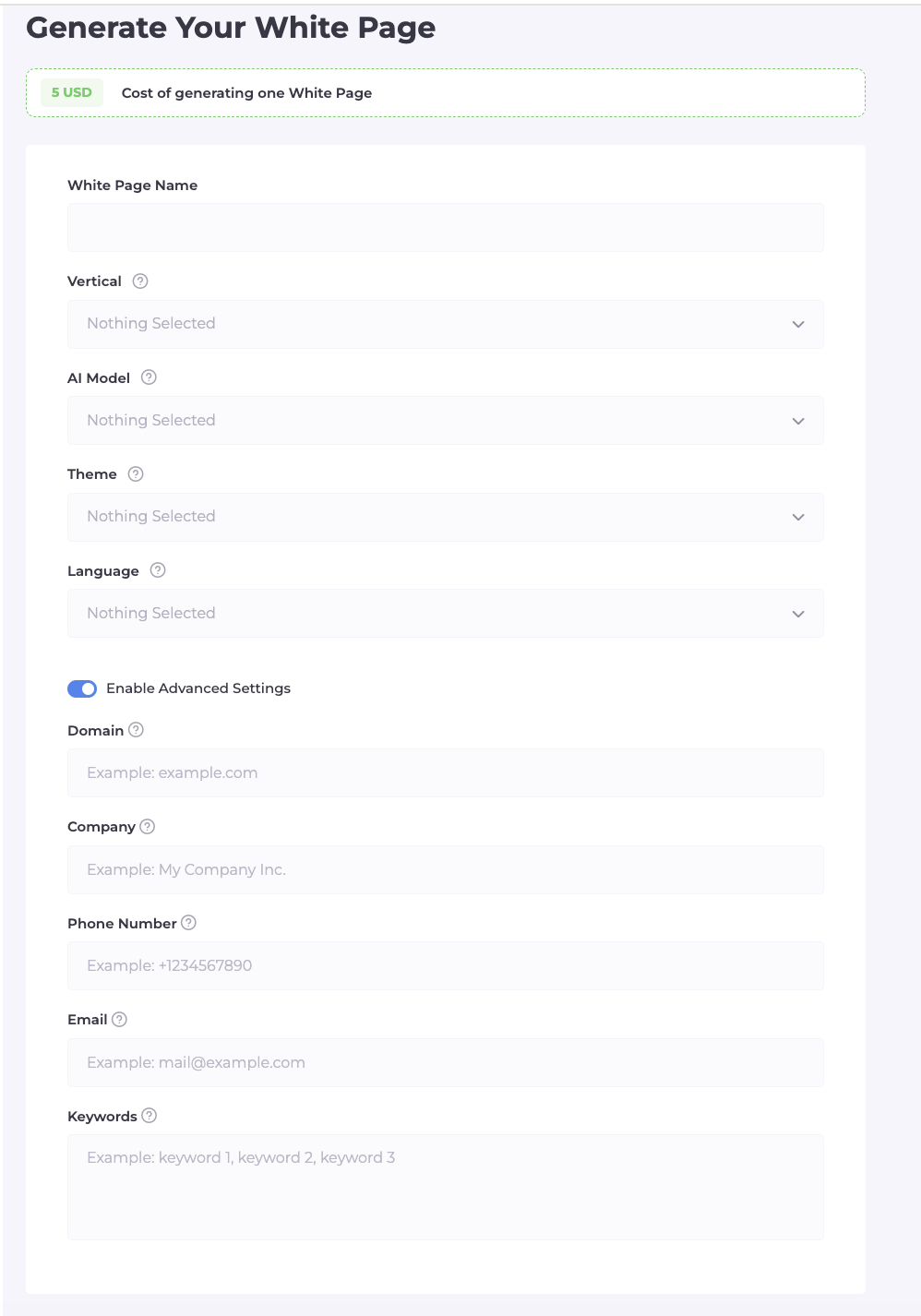
The AI White Page tab allows you to create a unique site managed by neural networks that looks as natural as possible for algorithms.
When creating a white page, you set the following parameters:
- Name and Vertical: Project name and direction (Nutra, Gambling, Technology).
- AI Model: Type of site (One Page; For Apps; For Ads).
- Theme and Language: Visual design and content language for your GEO.
- Additional settings: Domain, company name, phone number, and email to enhance trust.
- Keywords: Basic queries that the neural network will use to generate relevant text.
Instructions for Installing White Page on Hosting
Correct file placement is a technically important step that affects the moderation outcome.
Installation steps:
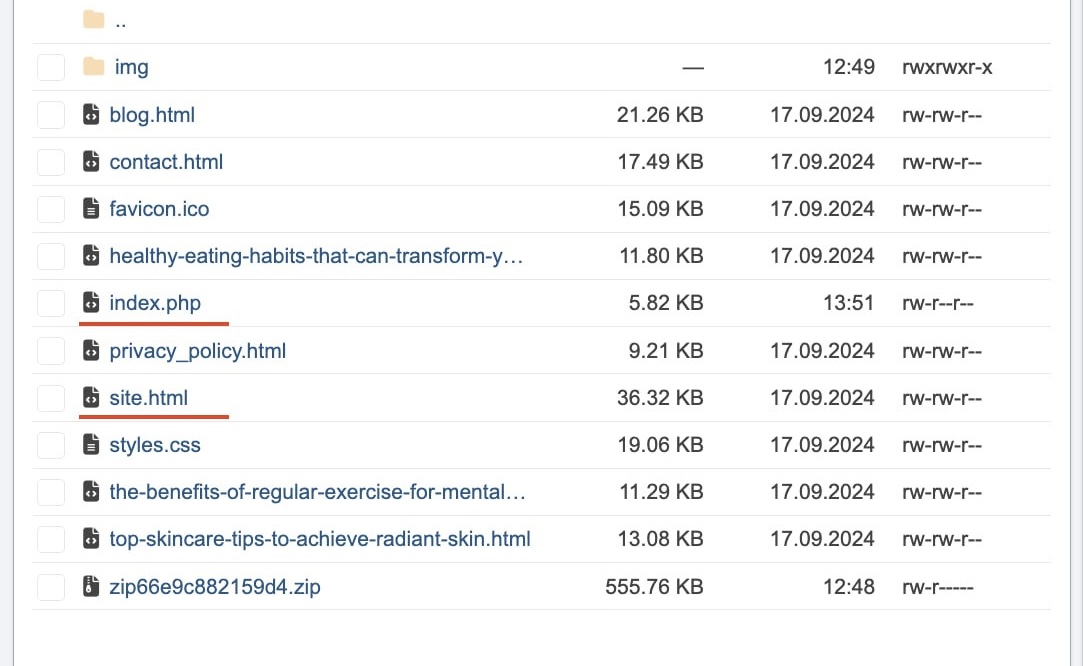
- Go to the hosting file manager (usually the public_html folder).
- Upload all files of your generated white page to this directory.
- Find the main executable file of the site (usually index.php or index.html).
- Rename this file to site.php (or site.html) — this name is critically important.
- Make sure other resources (images, styles) remain in the same folder.
- Keep the window open for uploading the main cloaking file later.
Creating Flows, Filtering, and White List
The logic setup occurs in the section "Flow" -> "Create Flow". The process is divided into three steps.
Step 1: Name and Path Selection (White & Offer)
- Enter a unique flow name.
- Set up the White Page: select the "Loading" method so that the URL in the browser does not change.
- Enter the path to the white page on your domain relative to the root (e.g., site.php).
- For third-party white pages, enter the full link with https://.
- Similarly, set up the path to the Offer Page (your offer).
Step 2: Fine-tuning Filters
This is a critical stage. Here we establish the "intelligent barrier".
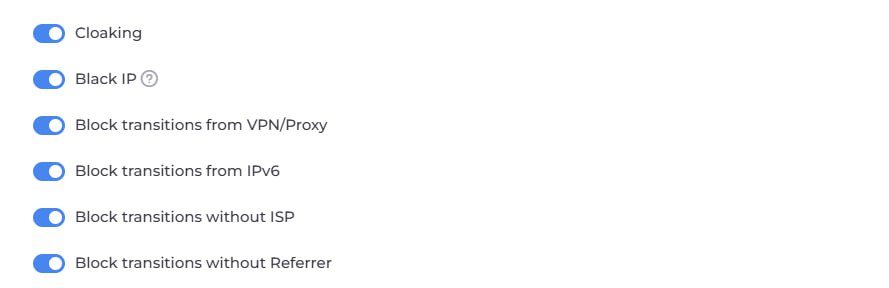
Basic filtering toggles:
- Cloaking and Black IP: Fundamental protection. Filters visits based on moderators and bot networks.
- Prohibit VPN/Proxy: A mandatory filter. Moderators in 99% of cases use IP masking. A regular buyer orders from home internet.
- Prohibit IPv6: Most server bots operate on this protocol. Disabling it adds an extra level of security.
- Prohibit without ISP: Disables visits from data centres (Amazon, Google Cloud). If there is no real provider — you’re facing a bot spy.
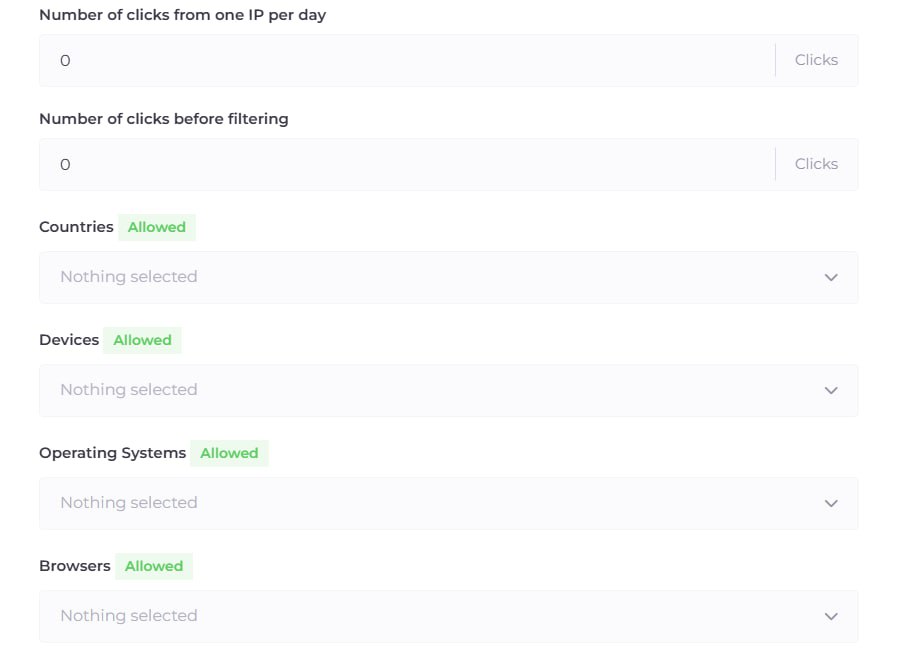
Segmenting the Target Audience:
- Just below in the flow settings, you will find filtering by Devices, OS, and Browsers.
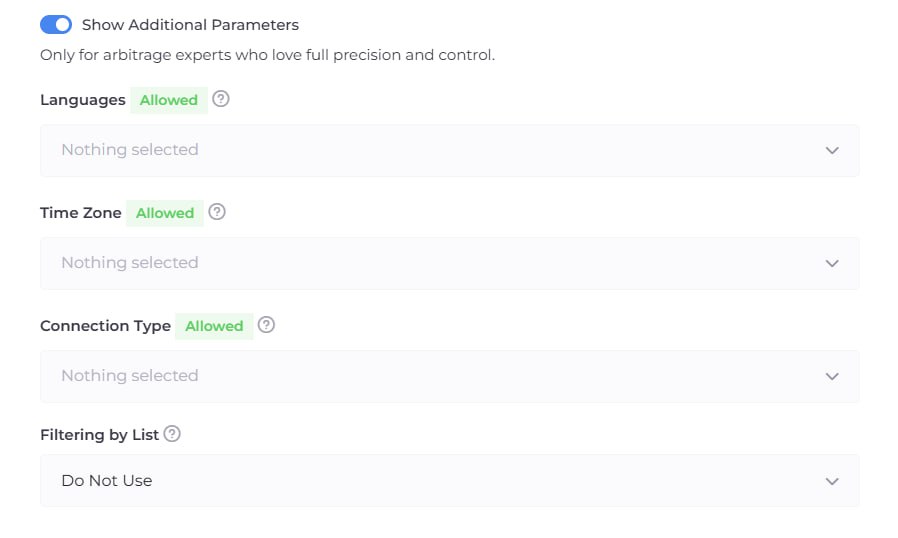
Additional Settings: If standard filters are not sufficient, enable the "Additional Settings" section. Here you can refine the flow to perfection:
- Languages and Time Zones: If you are targeting Italy and users come with an English browser, this is a reason to send such a user to the White Page.
- Connection Type: You can allow only mobile internet (Wi-Fi/4G), which is the most trusted for ad networks.
- Filter Lists (White/Black Lists): If you have your own bases of "bad" IPs or want to allow specific services, use the "Filter Lists" tab to create custom rules.
Step 3: Status and Access Check (White List)
- Select status: "Active" (filtering is working) or "Pause" (everyone goes to White).
- Find the input field for the IP address and insert your current IP there.
- This address will be added to the White List, allowing you to personally see the Offer Page and check its operation.
Analytics: How to Work with the "Clicks" Section?
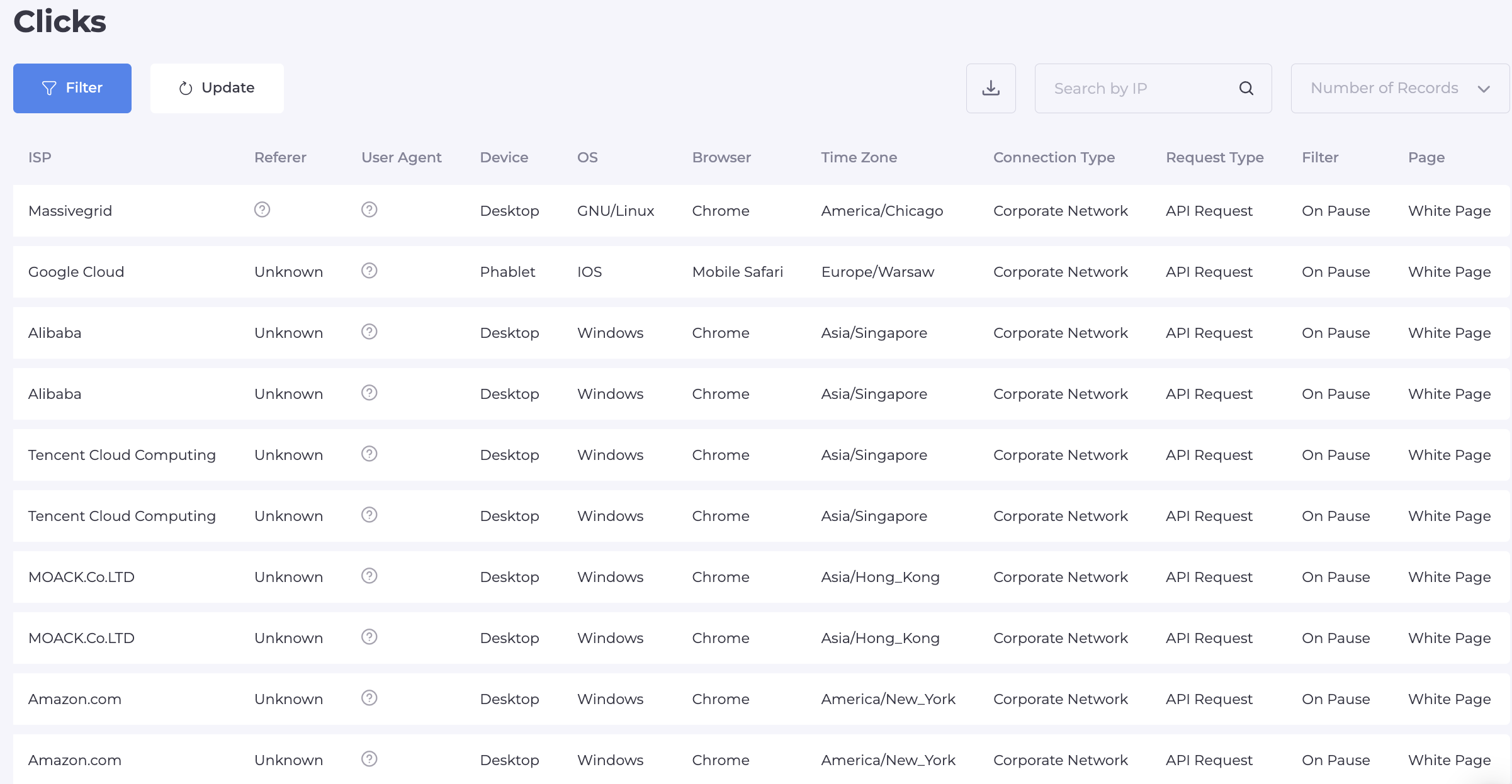
The "Clicks" section is your monitoring command centre with complete technical information on each visit.
In the clicks table, you will find:
- Flow: The flow name.
- IP and Country: Visitor's address and location.
- Language and Timezone: Language and time zone.
- ISP and Connection type: Provider and connection type.
- Referer: Source of the visit.
- UA, Device, OS, and Browser: Technical data of the device.
- Page: Where the user lands (White Page or Offer Page).
- Filter: Reason for the system's decision.
Values in the Filter column:
- client — successful passage to the offer.
- on pause — flow is paused (going to white).
- clicks ip per day — exceeded the click limit for one IP.
- clicks before filtering — technical interval before filtering begins.
- cloaking — visit identified as a bot by the system's algorithms.
- IPv6 / Referer / ISP / country — blocked by specific parameter.
- device / os / browser / language — does not match targeting.
- black ip / black list — hit in the blocking database.
- vpn/proxy — use of anonymisers.
- white list — passage through the white list.
Filtering Lists: Creation and Setup
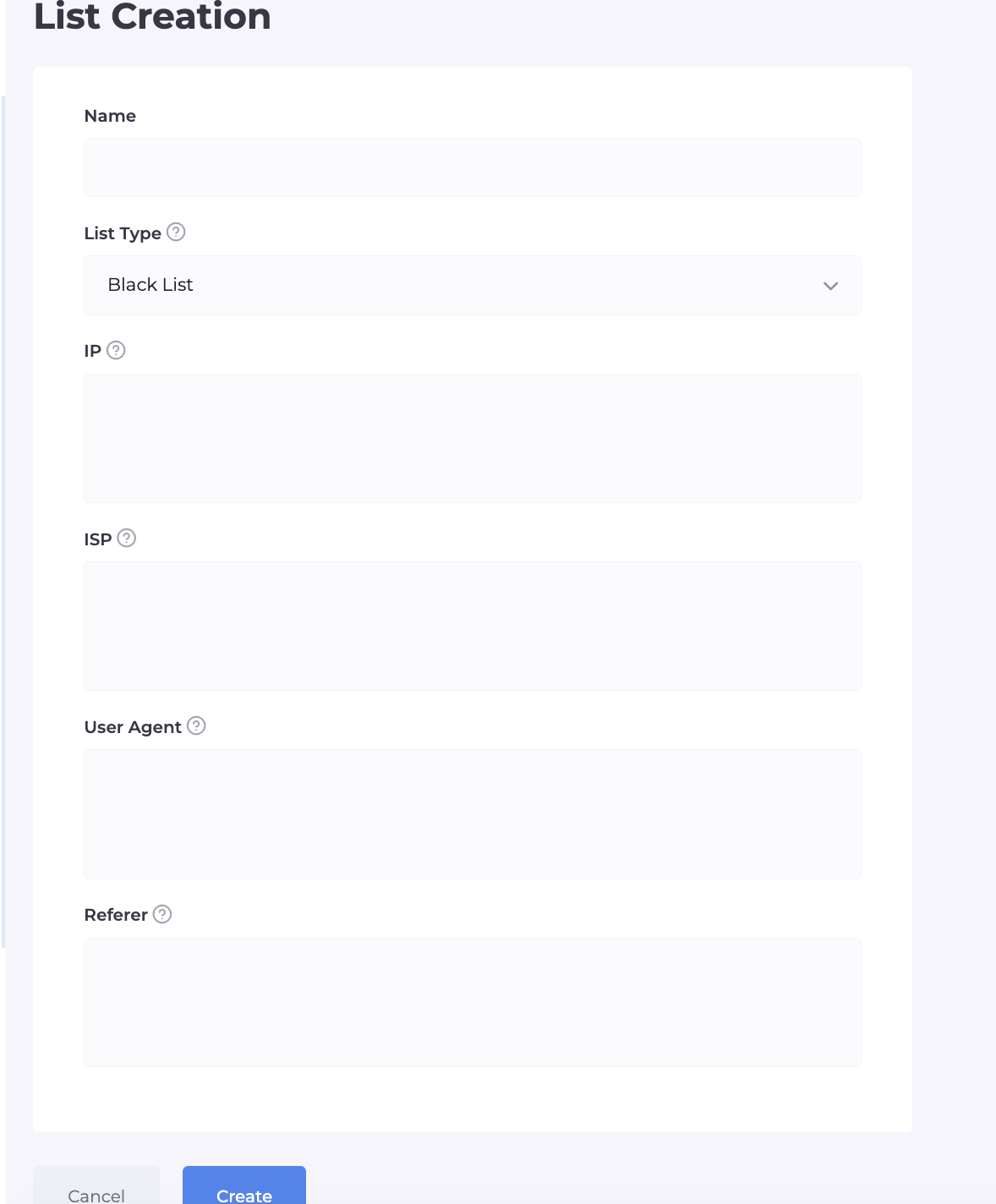
The section allows creating custom databases for flexible access management and blocking moderators' offices.
List Setup Parameters:
- Name: A name for identification.
- List Type: White List (always allow) or Black List (always block).
- IP: Specific addresses or subnets.
- ISP: List of providers.
- UA: Specific User-Agent strings.
- Referer: Block/allow by source.
Creatives and Payment Solutions: Where to Find Resources?
The uniqueness of the creative and trusted cards in 2026 directly affects the "survival" of accounts.
Where to find resources:
- Spy.House: Monitoring competitors and finding profitable approaches.
- Facebook ad library: Free resource for studying active ads.
- Generation through AI: Midjourney (static) and Runway (video) for content creation without history in networks' databases.
- Pay2House: Cards with a high trust level from platforms.
- Uniqueness: Always change metadata and filters on other creatives.
Launch Checklist: Facebook, Google, TikTok
Maintaining "digital hygiene" is key to the long life of your advertising account.
Safe launch rules:
- Warmed account: Presence of an activity history and natural engagement.
- Theme relevancy: The white page must match the meaning of the creative.
- Technical stack: High-quality anti-detect + clean GEO proxies.
- Clean domain: Domain not on blacklists.
- No rushing: No sharp mass actions in the first hours of work.
- Google specifics: The Loading method is mandatory.
- TikTok specifics: Focus on dynamic AI videos in a user-generated content style.
Cost of Cloaking.House and Trial Period
The system is accessible to both beginners and large media buying teams.
Our terms and bonuses:
- 7 days Trial: Every new user receives a week of free access to all system features for testing.
- Automatic 50% discount: When purchasing any subscription immediately for a year, the system automatically applies a discount of half the rate.
- Promo code for discounts: Enter code BVBV_BRO_30 at checkout and receive an additional 30% discount.
- Flexible pricing grid: Cost varies based on your needs — from basic packages for starting to corporate ones with unlimited flows.
- Instant activation: All features become available immediately after registration.

Conclusion: Your Profit Depends on Details
Arbitrage in 2026 is not a game of chance; it is precise calculation and the use of the right tools. Cloaking.House gives you the confidence that your advertising budget won't go "down the drain" due to immediate bans, and moderators will only see what you allow them to see.
Remember: technologies change, but the foundation remains the same — high-quality traffic filtration, unique content, and clean resources. We have given you all the tools; the rest is up to your creativity and desire to achieve high ROI.





Be the first to share your opinion!
We value your feedback — share your thoughts.