



Affiliate marketing has long ceased to be an experimental channel for small tests. Today, it is a full-fledged performance-based industry with a complex technical stack that combines trusted ad accounts, trackers, analytics systems, anti-fraud tools, and landing pages. As advertising budgets grow, media buyers and advertisers face a key operational question: how to control and filter what happens to a user in the gap between clicking an ad and completing a target action?
This is precisely the zone where traffic management and filtering systems, including cloaking, operate. Without them, ad budgets are inevitably diluted by bots, spy services, competitor scrapers, and non-target visits from irrelevant regions. In this article, together with the agencygdt.com team, we will explore the role traffic filtering plays in a modern affiliate marketer's stack, the technical signals a system uses to distinguish a real customer from a bot, and how to build a workflow based on Cloaking.House to make decisions using clean data.
The Economics of Affiliate Marketing in Numbers: Why the Cost of Mistakes Has Grown
The scale of the performance channel is clearly confirmed by industry research. According to the Performance Marketing Association Industry Study 2025 report, the market continues to grow at a double-digit pace, and the volume of traffic passing through it demands an increasingly strict technical setup:
| Market Metric | Value |
|---|---|
| US affiliate marketing spend in 2024 | $13.63 billion |
| Growth dynamics compared to 2021 | +49.8% |
| US e-commerce sales volume via the affiliate channel | $113 billion |
| Share of affiliate marketing in all US online sales | 9.4% |
These numbers matter for one reason: when billions of dollars flow through advertising campaigns, any tracking inaccuracy or traffic leakage directly hits profit margins.
A telling example is evaluating return on ad spend, or ROAS. In retail e-commerce, the market average reaches $11 in revenue for every $1 invested. However, this metric cannot be applied across all verticals. In niches with a long deal cycle - such as finance, subscription services, B2B, or complex mobile apps - real revenue is generated weeks after registration or the first lead.
If junk traffic - bot clicks, moderator visits, or competitor click fraud - gets into campaign analytics, statistics are distorted right at the start of the funnel. The media buyer sees an inflated click volume, an underestimated conversion rate, and either turns off campaigns that could actually generate profit or scales placements delivering low-quality audiences.
Why Technical Infrastructure Becomes More Complex as Budgets Grow
Large media buying teams and advertisers rarely rely on a single traffic source. A standard working setup combines search advertising in Google and Bing, targeting in Meta and TikTok, native and teaser networks, as well as In-App inventory. Each source brings an audience with its own behavioral patterns, devices, and share of automated traffic.
The resilience of such a setup depends on two infrastructure layers. The first layer is reliable ad accounts with a high level of trust, such as agency accounts from GDT Agency, which allow working without strict daily spend limits and reduce the risk of random campaign bans when scaling in Meta, Google, and TikTok. The second layer is technical filtering of incoming traffic, which protects both the account itself and the landing page from unwanted visits.
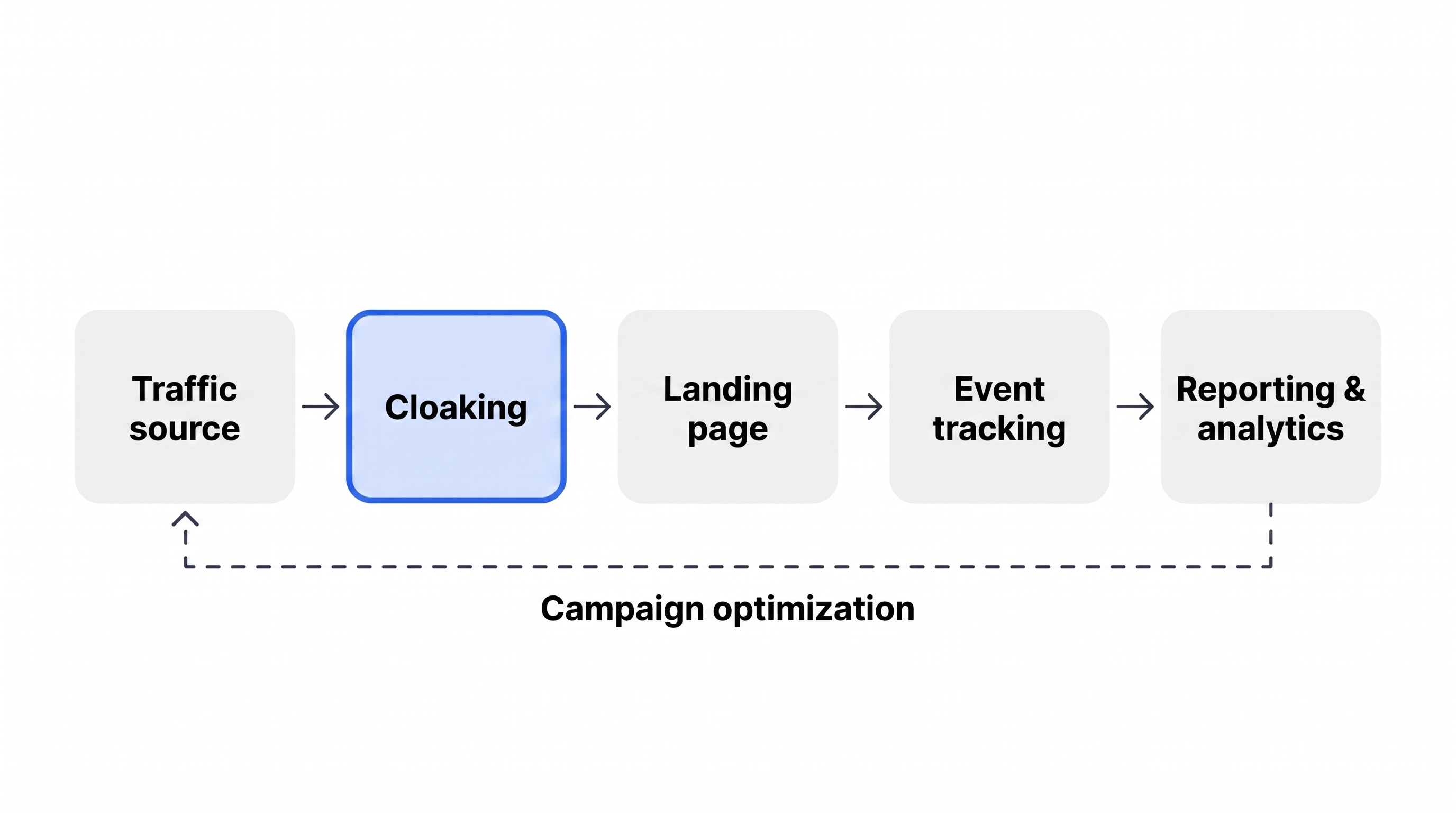
To manage a multi-channel mix without losing control, the infrastructure must perform five core tasks:
- Separate sources in end-to-end analytics. Understand which specific placement, campaign, or creative brought the user.
- Profile every incoming visit. Instantly determine the visitor's country, network type, operating system, browser, and ISP.
- Manage traffic routing. Show the target audience the main product on the Offer Page, while directing irrelevant or technical visits to a neutral, safe White Page.
- Record the entire chain of events. Track the path from the first click to a confirmed sale or deposit, rather than just surface-level metrics like CTR.
- Consolidate data into unified KPIs. Evaluate the effectiveness of different channels based on the cost of a qualified target action.
In this architecture, filtering tools act as an entry gateway that cleans the flow even before the user loads the target landing page and enters the tracker funnel.
How Cloaking Works and What Technical Signals It Analyzes
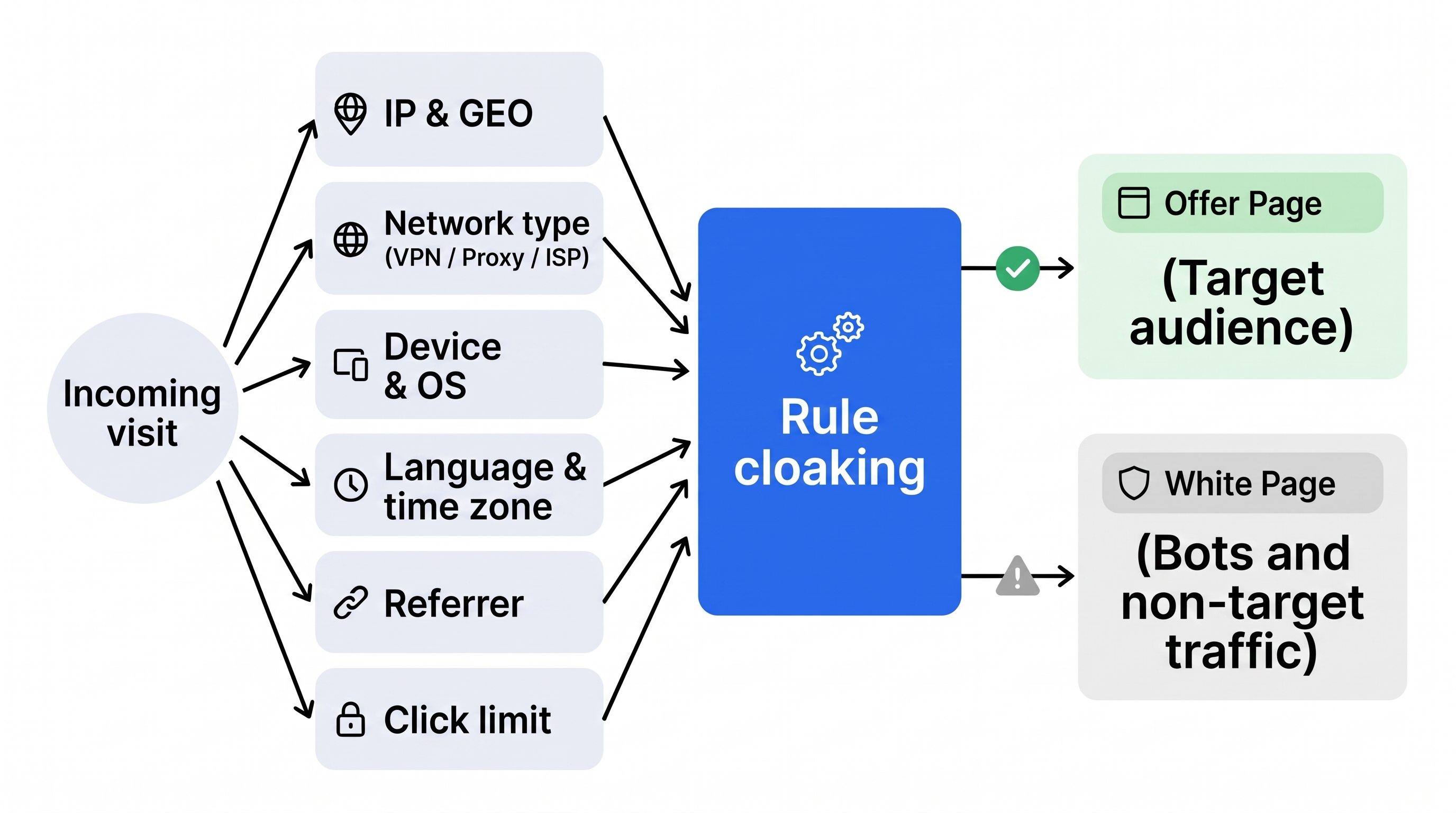
Cloaking is a technology for filtering and distributing incoming requests in which the system evaluates visitor parameters in real time and directs them to one of two pages: to the Offer Page for the target audience, or to the White Page for bots, ad network crawlers, spy services, and non-target segments.
The decision is made in fractions of a second based on a combination of technical signals transmitted by the visitor's browser and network connection:
| Technical Signal | What Exactly the System Determines | Practical Application in a Campaign |
|---|---|---|
| IP address and GEO | Connection country, region, and city | Cutting off non-target countries to which ad networks often dump remnant traffic |
| Connection type and ASN | Residential internet, mobile carrier, data center, VPN, or Proxy | Separating real people from server bots, crawlers, and scrapers |
| IPv6 protocol | Use of the sixth version of the Internet Protocol | Fine-tuned filtering for sources like Google Ads, where part of verification or mobile traffic goes through IPv6 |
| Device, OS, and browser | iOS, Android, Windows, or macOS platform and client version | Separating mobile and desktop traffic, blocking outdated headless browsers |
| Language and time zone | System and browser locale settings | Detecting mismatches - for example, when an IP belongs to Germany, while the system language and time zone belong to another region |
| Referrer | Source of transition to the target link | Verifying whether the click actually came from an ad, rather than via a direct link from a spy service |
| Click limit | Number of transitions from a single IP or subnet within a set time | Protecting the budget from click fraud and repeated verification visits |
An important principle: no single signal on its own provides an accurate picture. The outcome is determined specifically by the combination of parameters. For example, a visit from a mobile IP of the target country with a matching browser language represents the profile of a real buyer. The exact same geo-location, but from a data center IP and with an empty referrer, is highly likely an automated scanner or bot.
Four Practical Tasks Solved by Traffic Filtering
In practice, traffic management tools solve several daily problems for media buyers and affiliate teams at once:
1. Protecting Campaigns from Spy Services and Copying
As soon as a creative starts generating a stable volume of clicks, automated scrapers from spy platforms pick it up. Competitors see not only the banner itself, but the entire funnel - pre-landing page, landing page, and affiliate network. Filtering by data center IPs, referrers, and behavioral patterns hides the real Offer Page from intelligence bots, extending the lifespan of a profitable setup.
2. Cleaning Statistics from Junk Clicks
In native, teaser, and certain In-App networks, the share of automated traffic can reach 15-30%. If this entire flow reaches the main landing page, tracker analytics become distorted, and ad network optimization algorithms start training on incorrect data. Pre-filtering cuts off junk at the entry point.
3. Precise Control Over Geography and Device Types
Even with strict targeting settings in an ad account, platforms periodically send traffic from neighboring countries or incompatible devices - for instance, desktop clicks in a campaign strictly intended for mobile apps. Routing rules instantly redirect such traffic to a neutral page without ruining the conversion rate of the main offer.
4. Hidden Server-Side Processing Without Extra Redirects
Modern advertising platforms react negatively to long chains of visible redirects through intermediate domains. Properly configured server-side PHP integration processes the request before the page even begins loading in the browser. From the outside - in the address bar and developer tools - no trace of filter operation remains.
How to Build a Workflow Using Cloaking.House as an Example
To keep filtering from turning into a complex manual routine with every launch, it is convenient to organize the entire process through a specialized cloud tool. In Cloaking.House, work is structured around Flows, where two target pages and a set of distribution rules are defined for each campaign.
The step-by-step launch algorithm looks like this:
- Define the Flow logic. Establish the objective before setup: whether you need to block bots and VPNs, restrict traffic to a specific GEO and mobile devices, or split Flows by internet service providers.
- Prepare the Offer Page and White Page. The main landing page or affiliate link is connected for the target audience. For all other visits, a relevant, technically sound neutral page is required. Cloaking.House includes a built-in AI White Page Generator for this purpose - it creates a unique website tailored to the required vertical and language within a couple of minutes right in the interface, eliminating the need to code or search for templates manually.
- Configure flexible filters. Unlike systems with rigid preset packages, every parameter here is enabled and adjusted individually: IP reputation check, VPN and Proxy blocking, granular IPv6 handling, filtering by ISP, devices, OS, languages, referrer, and click limits per IP.
- Upload custom Black & White lists. If a team has its own databases of unwanted IP addresses or subnets, they can be uploaded to the Black list. Working IP addresses and tester IPs are added to the White list to check the main offer without hindrance.
- Choose a connection method. Two options are available: classic server-side PHP integration on your hosting, where the filtering code executes on the server and is invisible in the page source code, or a ready-made cloaked link inside the service, allowing you to launch without purchasing your own server and domain at all.
- Run tests before launching traffic. Check the link from your whitelisted IP - the Offer Page should open. Then visit the page via a proxy or mobile internet of the target GEO, as well as from other countries, to verify that the rules trigger properly.
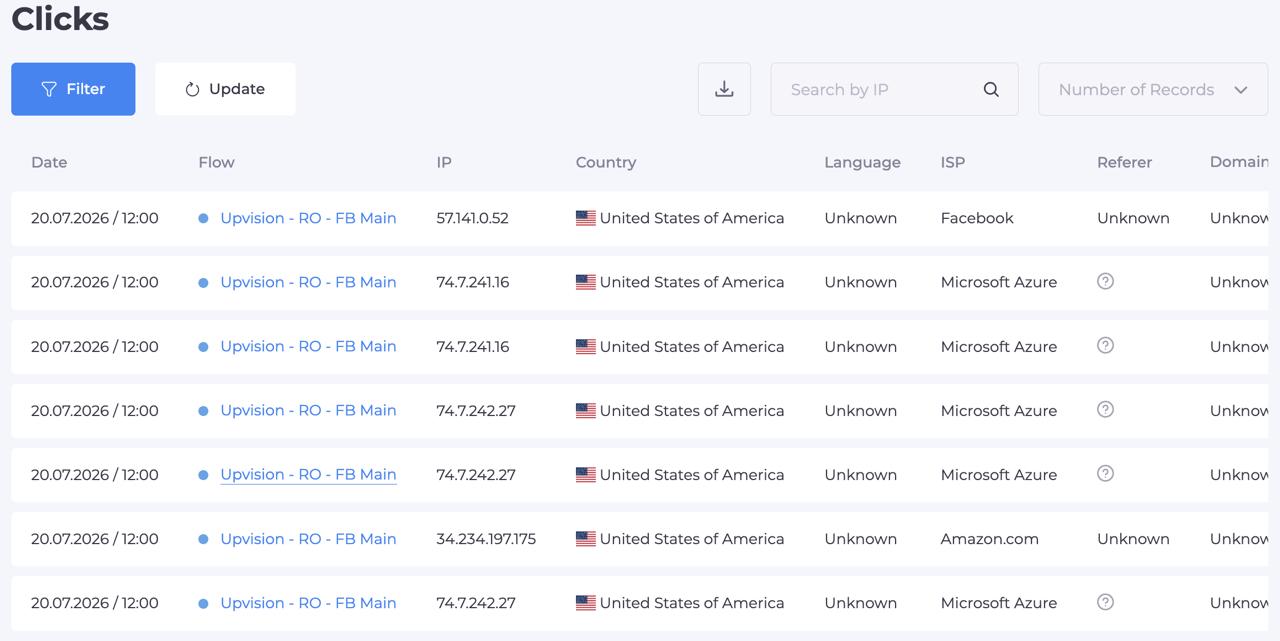
- Monitor the click log. After launching the campaign, regularly review visit statistics. The logs display the status of every click, the triggered filter, IP address, country, language, device, and referrer - making it easy to spot quickly if any rule turns out to be too strict.
Which Metrics to Track After Launch
Filtering effectiveness is measured not only by how many bots it blocked, but also by how cleanly target traffic passes through. In daily analytics, it is worth relying on five key indicators:
| Metric | What It Shows | What to Pay Attention To |
|---|---|---|
| Share of filtered visits | Percentage of traffic directed to the White Page | A sharp spike in this metric signals a surge of bots or an auction shift in the traffic source |
| Click discrepancy | Difference between clicks in the ad account and visits in the logs | A large gap indicates slow hosting or traffic loss during redirects |
| Conversion rate of cleaned traffic | Performance of users who reached the Offer Page | Reflects the true effectiveness of the setup without distortion from bot activity |
| False positives | Share of real target users mistakenly sent to the White Page | A sign of overly strict filters - for example, total blocking of IPv6 or entire mobile carriers |
| Cost per qualified lead | Final cost of acquiring a target customer | The primary benchmark when deciding to scale the budget |
Common Mistakes When Setting Up Filtering
Even a reliable tool can fail if configured blindly. Most often, media buyers encounter the following issues:
- Overly aggressive default blocking. Turning all filters up to maximum without accounting for source specifics leads to losing a portion of live traffic. For example, total blocking of the IPv6 protocol in some mobile networks cuts off real smartphone users.
- Changing multiple rules simultaneously. If you change five filtering parameters and rebuild blacklists all at once, it will be impossible to tell which specific adjustment caused a change in conversion rates. Change one rule at a time and record the result.
- Ignoring the click log. Without regularly reviewing logs, it is easy to miss a situation where a new IP pool of a major mobile carrier is mistakenly classified as non-target.
- Evaluating a campaign solely by cheap clicks. High CTR and low cost per click mean nothing if traffic does not reach target events inside the funnel.
- Low-quality or empty White Page. An overly primitive page lacking navigation, contact details, and basic legal sections raises red flags for automated ad network crawlers.
Pre-Launch Checklist for an Advertising Campaign
Before submitting an ad for moderation and allocating the main budget, go through a short checklist:
- A specific filtering goal is defined - bot protection, geo-routing, or click fraud prevention.
- A unique White Page matching the language and theme of the ad is prepared.
- Granular filters for GEO, devices, OS, VPN and Proxy, IPv6, and click limits are configured for the specifics of the given source.
- Up-to-date Black lists are verified and uploaded, and test IPs are added to the White list.
- An appropriate integration method is selected - a server-side PHP script with no trace in the code or a ready-made cloaked link.
- A test run through the link has been conducted from an IP in the target country and across different device types.
- Regular click log monitoring and end-to-end conversion tracking are configured.
Frequently Asked Questions
How does cloaking differ from standard geo-targeting in an ad account?
Geo-targeting within a traffic source relies solely on the ad network's own basic location databases and does not protect against bots, VPNs, proxies, scrapers, or remnant traffic from other countries. Filtering systems analyze a combination of dozens of technical signals - IP, ASN, referrer, browser headers, and click frequency - and manage routing at the server level.
Is it mandatory to buy your own hosting and configure a server to work with filtering?
No. Although server-side PHP integration on your own hosting remains the standard for large campaigns, in Cloaking.House you can create a Flow and immediately get a ready-made cloaked link inside the service - allowing you to run tests without deploying your own server infrastructure.
How can I quickly verify that filters are not cutting off the target audience?
After configuring the rules, add your IP to the whitelist to verify the main offer, and then test the link via mobile internet or residential proxies in the target GEO. Immediately afterward, open the click log and make sure your test visits received the correct distribution status.
Why is it important to separate filtered traffic from total traffic when working with analytics?
Because bots and automated crawlers do not make target purchases. If they are counted in the overall funnel, conversion metrics are artificially lowered, making it difficult to accurately calculate ROAS and make informed decisions about scaling campaigns.
Growing volumes in affiliate marketing have transformed technical infrastructure from an auxiliary tool into a primary competitive factor. Combining trusted ad accounts, accurate analytics, and pre-filtering of incoming traffic preserves campaign unit economics even at high budgets.
You can test flexible traffic filtering, custom black and white lists, server-side PHP integration, and the built-in AI White Page generator on live campaigns in Cloaking.House - after registration, 7 days of free access to all features without restrictions are provided.






Be the first to share your opinion!
We value your feedback — share your thoughts.