



Taboola - one of the largest sources of native traffic: widgets with recommended content are embedded on thousands of publisher sites around the world, and it is through these widgets that affiliates get massive, but very heterogeneous traffic. Heterogeneity - the key word: the same Flow on Taboola receives clicks from hundreds of different publishers, and each has its own referrer, its own audience, and its own level of traffic "cleanliness".
Because of this, filtering for Taboola is structured a little differently than for classic push or pop networks: more attention goes to the referrer and repeated clicks, and less - to a single source of IP databases. In this guide, we will break down the entire process of setting up a Flow for traffic from Taboola through Cloaking.House - from building a White Page to analyzing clicks after the launch.
Tools required for work
For a basic setup you will need:
- Cloaking.House - a cloud service for traffic filtering and routing.
- White Page - a page seen by Taboola moderators and unwanted visitors. It is built manually or via the AI White Page Generator in Cloaking.House.
- Offer Page - a landing page or link to an offer.
- Domain - to host the White Page.
- Hosting - a server for the White Page and PHP integration of Cloaking.House.
- Taboola ad account - the source of incoming traffic.
Features of working specifically with Taboola
Before creating a Flow, it is worth considering a few points specific to native advertising:
- Referrer diversity. Traffic from Taboola comes from tens and hundreds of different publisher domains, not from a single platform - so the referrer filter should be set up according to the Taboola domain pattern (sync, trc, taboola), and not by a single specific address.
- White Page content is more important than aggressive creative. Taboola separately checks the landing page for compliance with the "recommended content" format - a too obvious advertising approach on the White Page increases the risk of a manual review.
- Clicks from a single widget can repeat. Users click on recommendations more often than on banners - the click limit from one IP should be set with a margin so as not to cut off real interested users.
- Do not mix GEO and widget formats at the start. Individual desktop and mobile placements are better tested separately - traffic behavior and conversion differ noticeably.
Building a White Page for Taboola
Before setting up a Flow, you need to prepare a White Page - manually or via the AI White Page Generator in Cloaking.House.
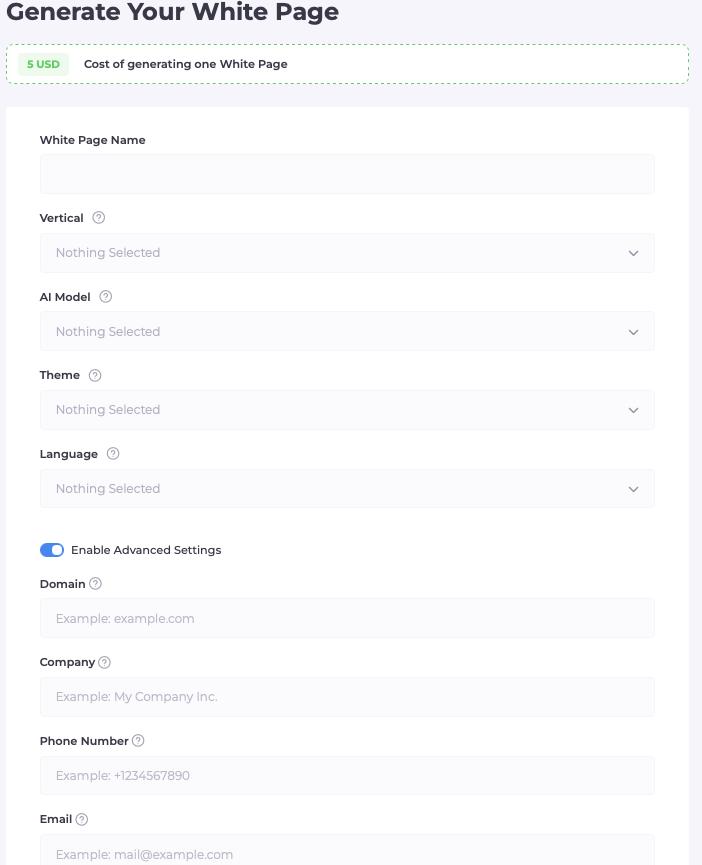
During generation, the following are specified:
- Vertical - campaign theme;
- Language - for the target GEO;
- Theme - visual design;
- Model - page format.
For Taboola, it is especially important that the page looks like natural content, and not like a direct advertising landing page - a structure closer to an article or review works better than a page with a "Buy" button on the first screen. After generation, download the archive and place it on your hosting.
File preparation
The main file needs to be renamed:
index.html → site.html
After that, check the page directly in the browser: https://your-domain.com/site.html
If the page opens correctly - proceed to creating a Flow.
Creating a Flow in Cloaking.House
Open your Cloaking.House personal account and create a new Flow.
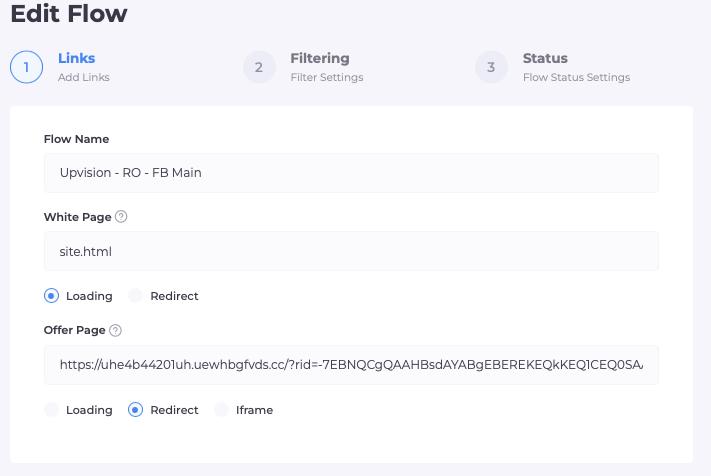
Step 1: White Page and Offer Page
Two main pages are specified in the Flow:
- White Page - the prepared site.html file, display method - Loading (without changing the address in the browser).
- Offer Page - a link to the landing page; if the offer is located on an external resource, Redirect is used.
Step 2: Setting up filters
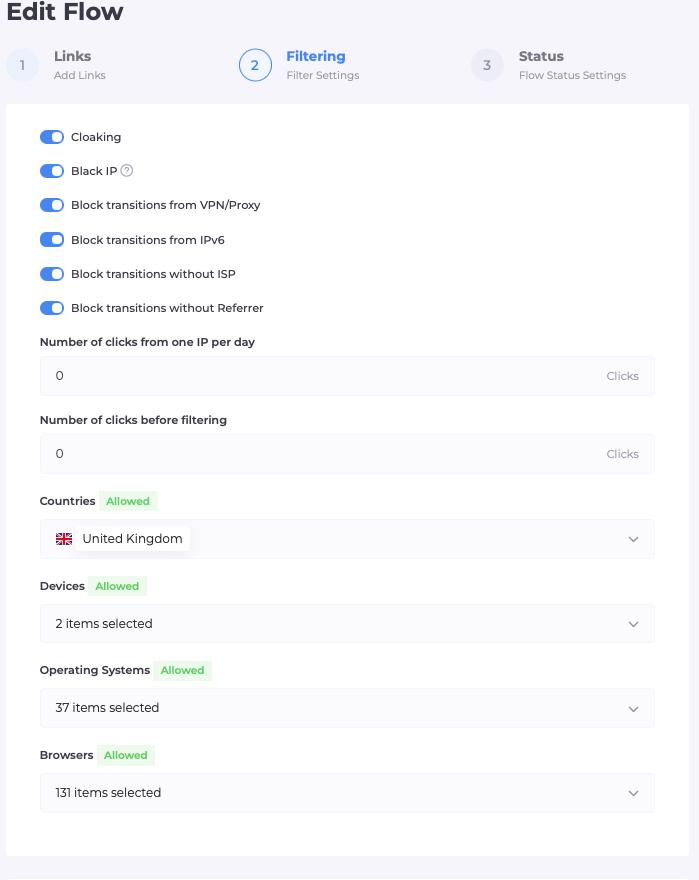
After adding the pages, we move on to traffic filtering. For a setup with Taboola, you should pay special attention to the following parameters:
- Referrer - a key filter specifically for native traffic: it is set up according to the pattern of Taboola domains through which clicks from widgets pass, and not by a single specific publisher site.
- GEO - the country or region of the user for which the campaign is set up.
- Device - Mobile, Desktop, or Tablet; for Taboola, it often makes sense to run desktop and mobile through separate Flows.
- OS - Android, iOS, Windows, macOS.
- Browser - the user's browser as an additional routing condition.
- VPN / Proxy - accounting for the use of a VPN or proxy when processing a click.
- IPv6 - a separate setting for connections via IPv6.
- ISP - filtering by the user's internet service provider.
- Click Limits - click limit from one IP; on Taboola, it should be set slightly higher than for push traffic so as not to lose real users clicking on several recommendations in a row.
Step 3: Integrating Cloaking.House on hosting
After setting up the Flow, connect it to the domain. In Cloaking.House, it is recommended to use PHP integration - it works on the server before the page is served to the browser, so the fact of filtering is not visible either in the source code or in the developer console.
Download the integration file from the Flow and place it in the root directory of the desired domain. The structure looks something like this:
public_html/
├── index.php   - Cloaking.House integration
├── site.html   - White Page
└── ...         - other files and page resources
After uploading, open the domain in the browser and make sure the site works without errors.
Activation and testing
Before launching ad traffic, check the created Flow. Make sure that:
- the domain opens;
- the White Page loads correctly;
- the Offer is accessible when your IP is added to the whitelist;
- the PHP integration works;
- the specified filters are applied as expected.
You can find your own IP in the Clicks section and add it to the whitelist to test the routing before the campaign starts.
Launching traffic from Taboola
After technical testing, you can launch the campaign. At the start, it is convenient to work with a limited segment - one GEO and one device type (for example, only mobile traffic in one country). This accelerates the collection of statistics and helps to understand the real behavior of traffic specifically from native widgets before expanding the campaign to other placements. Do not change several parameters at once - otherwise, it will be difficult to understand what exactly affected the result.
Analyzing clicks in Cloaking.House
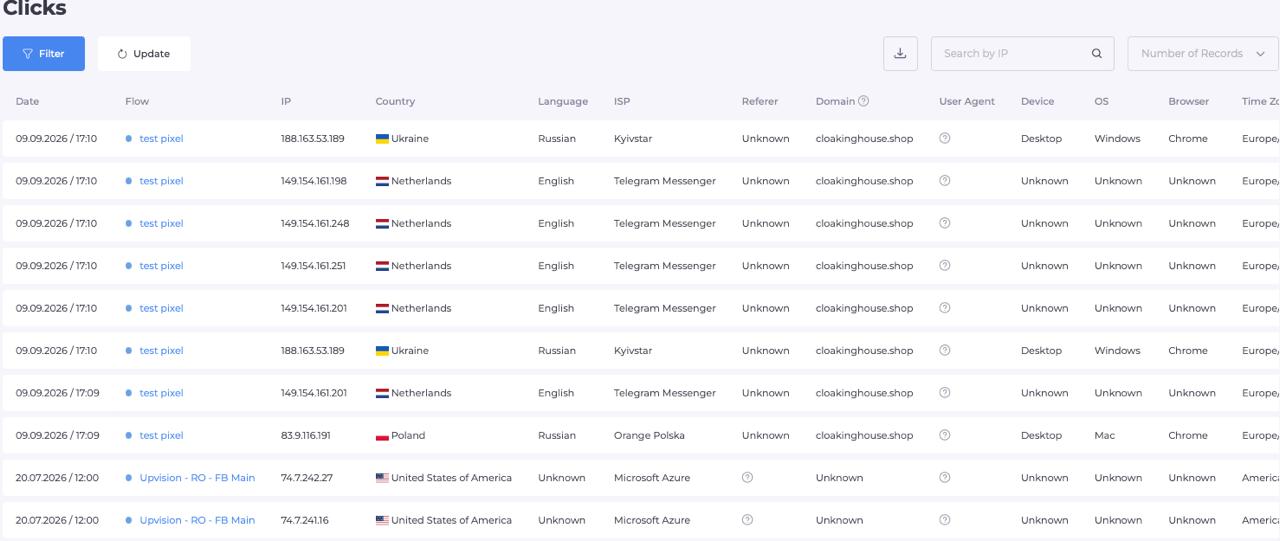
After launch, go to the Clicks section. Here you can see the main parameters of incoming clicks:
- Result (White Page / Offer);
- Triggered Filter;
- IP;
- GEO;
- Referrer;
- User Agent;
- Device, OS, Browser.
For Taboola, it is especially useful to look specifically at the spread of values in the Referrer - if domains that do not look like the Taboola widget pattern regularly pop up in the statistics, this is a reason to check whether extraneous traffic is leaking through the Flow.
Final recommendations
For the stable operation of the Taboola + Cloaking.House setup, you should adhere to a simple sequence: prepare a White Page that looks like natural content, upload it to the hosting, create a Flow, configure filters with an emphasis on the referrer and click limit, install PHP integration, and test the entire chain before launching ads.
The optimal process looks like this: White Page preparation → Flow setup → filtering → integration → testing → click analysis → optimization. This approach allows you to centrally manage traffic routing from dozens of Taboola publishers simultaneously and gradually adapt Flows for specific GEOs, devices, and placements.





Be the first to share your opinion!
We value your feedback — share your thoughts.