


Telegram Ads in 2026 has finally secured its position as one of the most effective and simultaneously strictly moderated traffic sources. The platform offers direct access to the messenger's multimillion audience, but the rules regarding landing pages and ad creatives have become even stricter. When working with affiliate or non-standard ad traffic (iGaming, crypto, nutra, dating, or aggressive info-business funnels), it is critically important to consider the characteristics of clicks, the correctness of landing pages, and the operation of complex user routing.
In this comprehensive guide, we will break down in detail how to properly prepare the technical bundle of Telegram Ads + Cloaking.House. You will learn how to create a trusted White Page capable of passing any manual moderation, how to set up the Flow filter system to cut off Telegram bots, how to connect server integration, and safely scale the ad campaign after a successful launch.
Why cloaking is needed and how traffic protection works
Cloaking - is a traffic distribution technology in which different categories of users see different content under the same link.
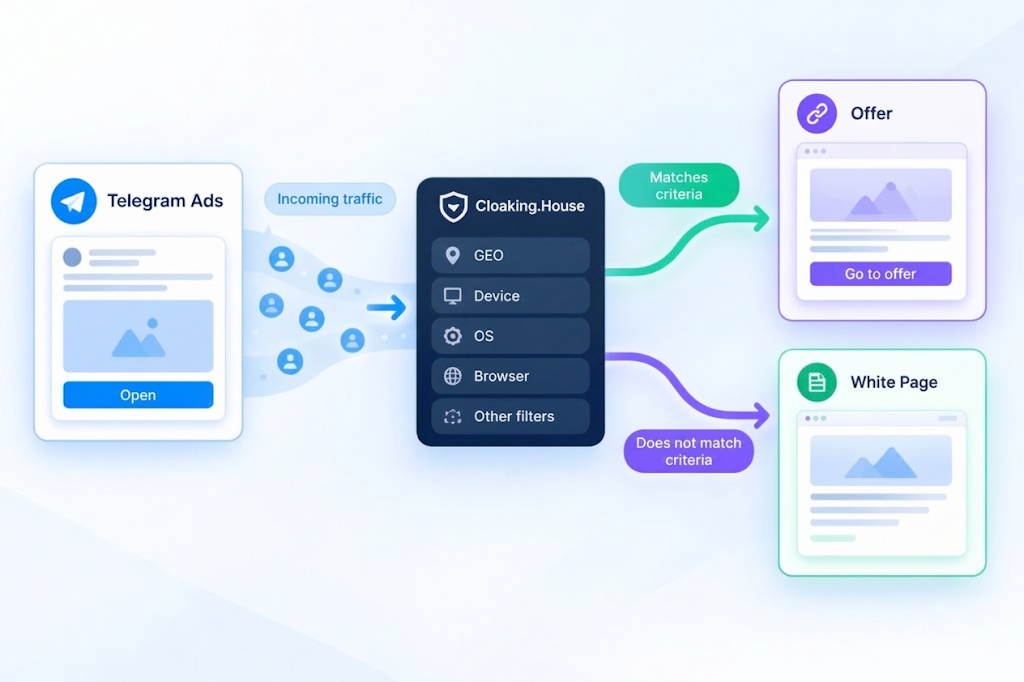
In the reality of Telegram Ads, moderation consists of two stages: automatic bots that scan the link when an ad is submitted, and live moderators who can check campaigns selectively or upon complaints. The task of the routing service - is to determine exactly who is clicking on the link.If the system sees the IP address of a Telegram data center, an analytics bot, or a spy service, it shows the White Page (a white, fully compliant page). If a real target user clicks from a mobile phone - they are instantly redirected to the Offer Page (your real landing page or pre-lander).
Tools required for work
To create a stable and durable bundle, you will need a solid technical foundation. Do not skimp on basic tools, as the percentage of successful moderation passes depends on them.
Cloaking.House - a professional cloud service for filtering and routing traffic. The platform uses updated IP address databases, machine learning algorithms to detect bots, and offers flexible filtering settings.
White Page - a specially prepared landing page that perfectly matches your ad creative and does not violate a single point of the Telegram Ads rules.
Offer Page (Black Page) - your true landing page or resource where real users are directed to make a conversion.
Trusted domain and dedicated hosting - for hosting site files and connecting server integration. In 2026, it is recommended to use domains in the .com, .net, .io zones with a history, necessarily connecting a reliable SSL certificate to them.
Telegram Ads ad account - an agency or direct account (depending on your budget and jurisdiction) for setting up, topping up the balance (in TON or fiat), and launching the campaign.
Preparing a flawless White Page
Before creating a flow, it is necessary to prepare a White Page. This is your shield against bans. The page can be developed independently (ordered from a developer) or you can use the built-in AI White Page Generator in the Cloaking.House interface.A modern White Page for Telegram Ads must look like a real site or a high-quality blog. Moderators easily recognize one-page "stubs".Key requirements for a White Page:
Thematic consistency: If you promise "investment tips" in the creative, the White Page must be a full-fledged financial blog, not a car repair page.
Legal transparency: It is mandatory to have working links to Privacy Policy, Terms of Service, Contact Us. Add a physical address and a cookie consent form.
Responsiveness and speed: The page must display correctly on mobile devices (over 90% of Telegram traffic) and load faster than 1.5 seconds according to Google PageSpeed metrics.
No broken links: All menu buttons and internal links must work.
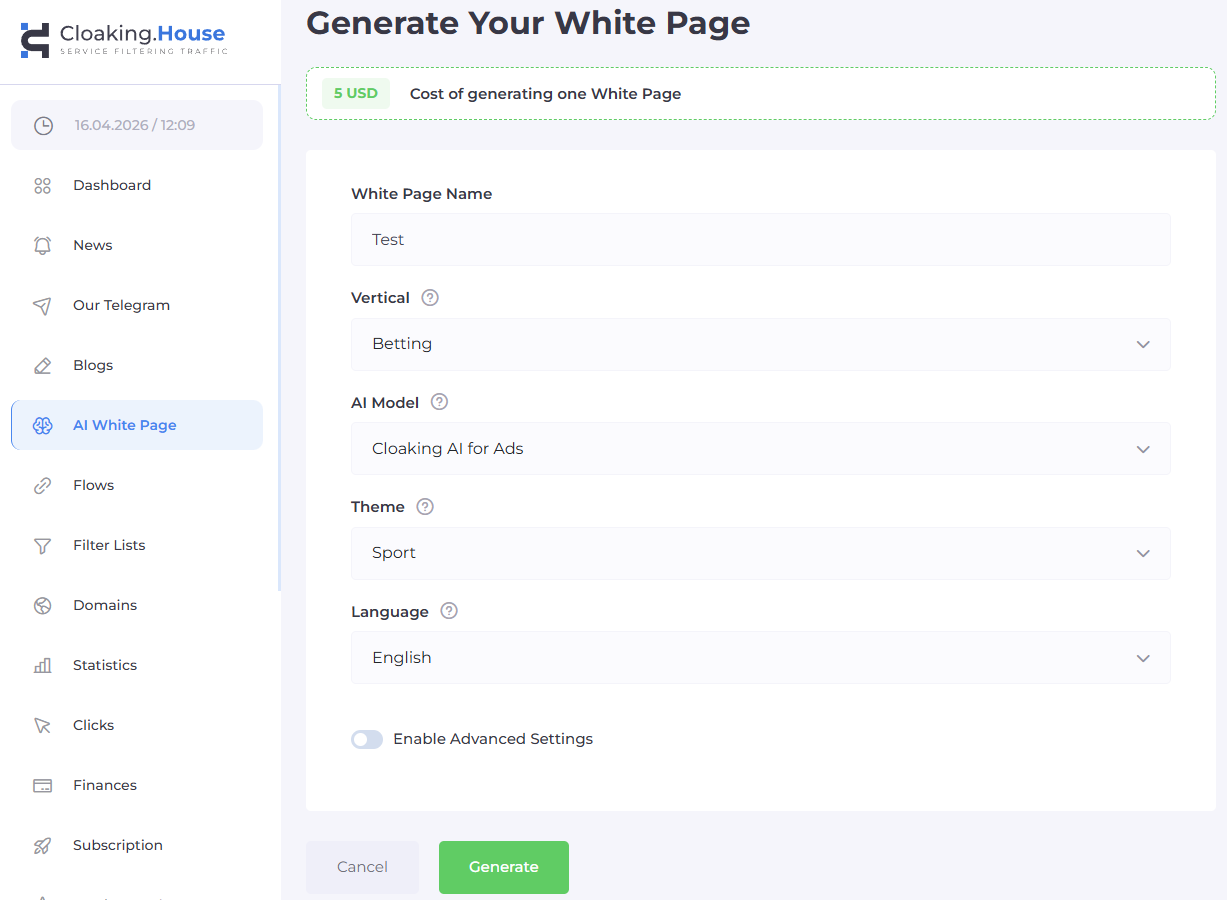
During automatic generation, specify the topic, the language corresponding to your ad's geo-targeting, and the desired structure. After generation, download the archive and host the files on your hosting. The main file must be renamed: index.html -> site.html
After uploading, check the page directly via the browser: [https://your-domain.com/site.html] Make sure the SSL certificate is active (the padlock in the address bar) and the page does not contain suspicious scripts that could trigger antivirus systems.
Creating and setting up a Flow in Cloaking.House
After flawlessly preparing the white page, open the Cloaking.House control panel and create a new flow (Flow). Here you set the logic by which the system will distribute clicks.
Step 1. Adding pages and loading methods
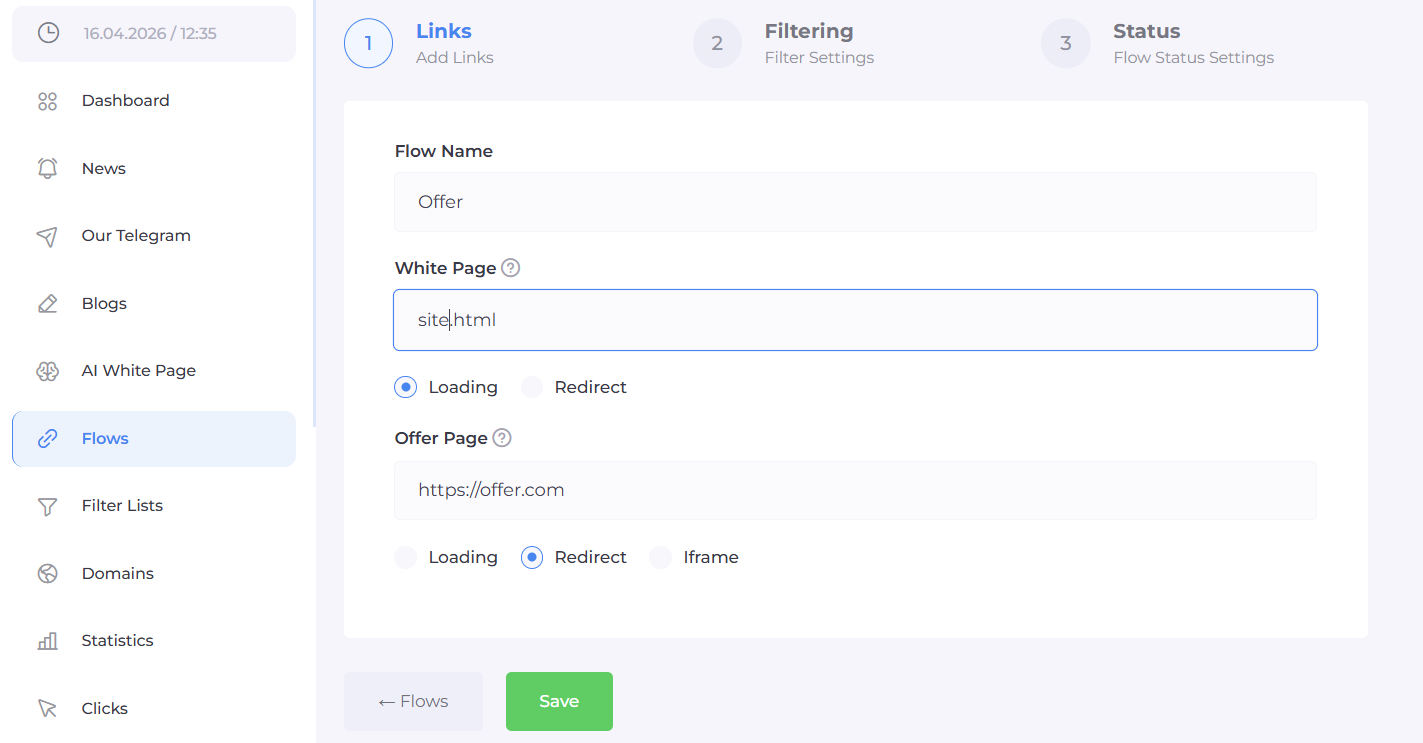
In the basic flow settings, you need to link your resources:
White Page - specify the path to the renamed file of the prepared page (site.html) hosted on your domain. It is recommended to use the Loading method. In this case, the content of the white page opens directly via your link without redirects, which is as safe as possible for moderation.
Offer Page - paste your affiliate link, path to the landing page, or URL of an external resource. For the target page, the Redirect method is most often used, or iframe-loading if the offer allows iframe display.
Step 2. Advanced filter setup
The service provides a huge array of parameters for segmenting incoming traffic. Proper filter setup - is 80% of campaign success. Depending on the aggressiveness of the offer, set the following parameters:
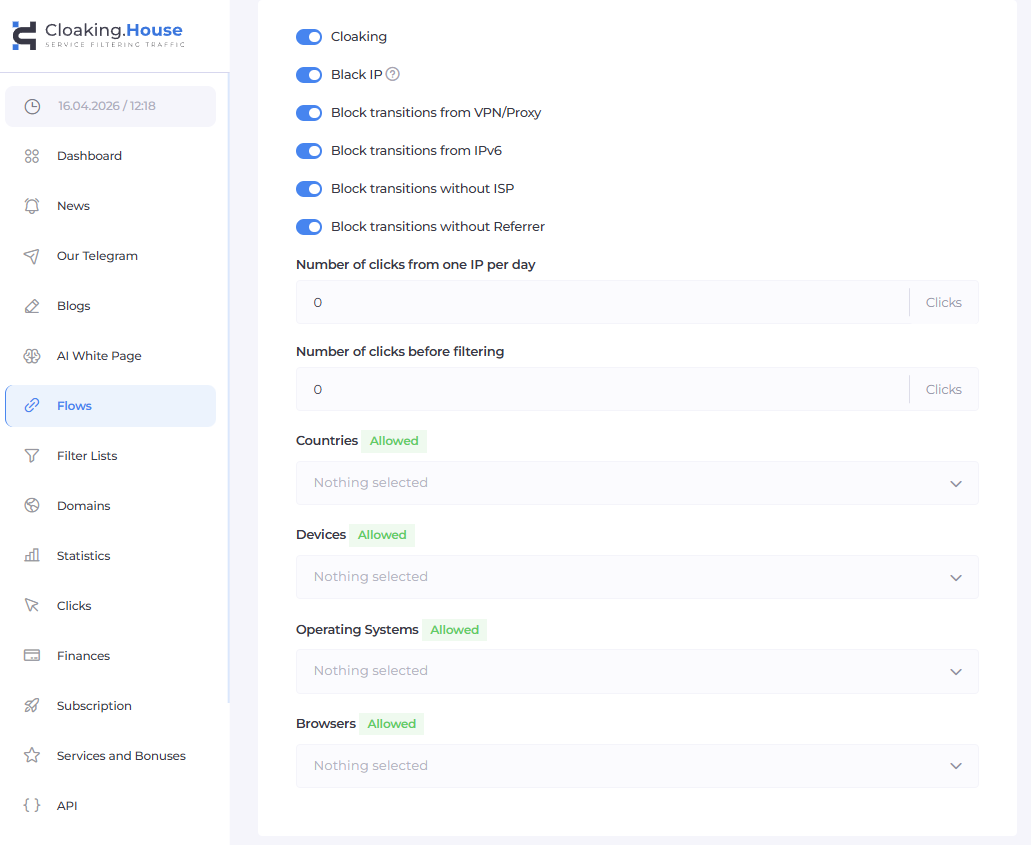
GEO (Geography) - strictly limit the countries. If you are driving traffic to Spain, block any clicks from other countries, as moderators are often located in other locations.
Device (Devices) - allow only mobile devices (Smartphones) or tablets if the ad is running only in the Telegram mobile app. Send clicks from desktop (Windows/macOS) to the White Page, as bots and moderators often check links from a PC.
OS and Browser - block rare or outdated browsers, as well as server-type operating systems (Linux) from which automated scripts operate.
VPN / Proxy - be sure to enable strict blocking. Most spy services and manual moderators use proxy servers to spoof their location.
IPv6 and ISP - cut off traffic from corporate networks and data centers (Data Center IP, Hosting/Cloud IP). Live users access from home ISP networks (Residential) or mobile operators (Cellular).
Referrer - check the click source.
Click Limits - set a limit on the number of clicks from a single IP address. If someone refreshes the page 5 times in a row from one IP - this is an anomaly, send them to the White Page.
Choose parameters with surgical precision. Before launching, strictly test the settings: log in with a VPN enabled and make sure you see the white page, then log in from clean mobile internet of the target GEO and check the redirect to the offer.
Step 3. Connecting the integration
After setting up all logical nodes of the Flow, you need to link the service to your domain. The most reliable method in 2026 - is PHP integration. It works on the server side (backend), hiding the traces of cloaking from any code analyzers in the browser.
Download the integration file (index.php) from your Cloaking.House personal account.
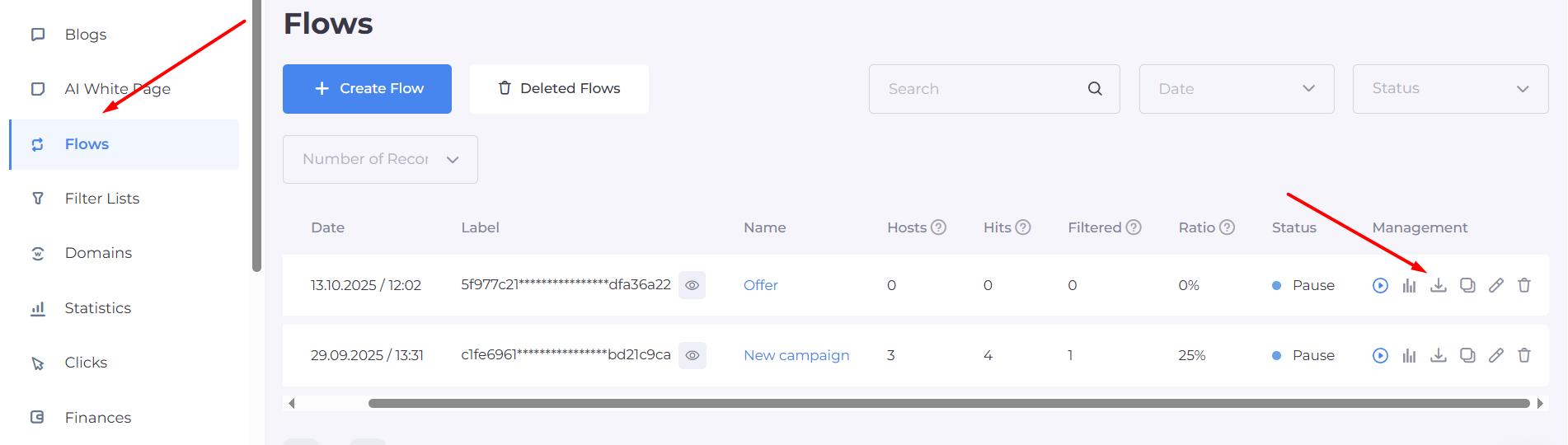
Connect to your hosting via FTP or the control panel's file manager.
Place the index.php file in the root directory of the site (usually the public_html or www folder).
Check that there are no other index.html or index.php files in this folder that could override the script.
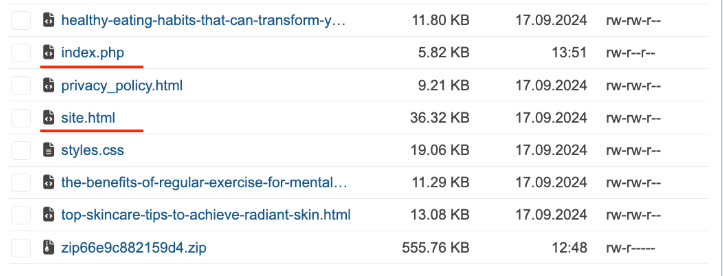
The structure of the root folder should look like this:
index.php - the main integration handler script of Cloaking.House;
site.html - your White Page;
resource folders (css, js, images) for the white page.
After connecting the integration, run a final test of the entire bundle from start to finish, simulating both the behavior of a moderator and the behavior of a target lead.
Launching an ad campaign in Telegram Ads
When the Flow is fully configured and the integration is repeatedly tested, move on to the most crucial stage - creating and launching a campaign in the Telegram Ads dashboard.In the ad account, click "Create a new ad". Prepare the ad text, select the necessary targeting parameters (by specific channels, interests, or custom audiences), and add your main link (the configured domain with index.php), which will be used for clicks.
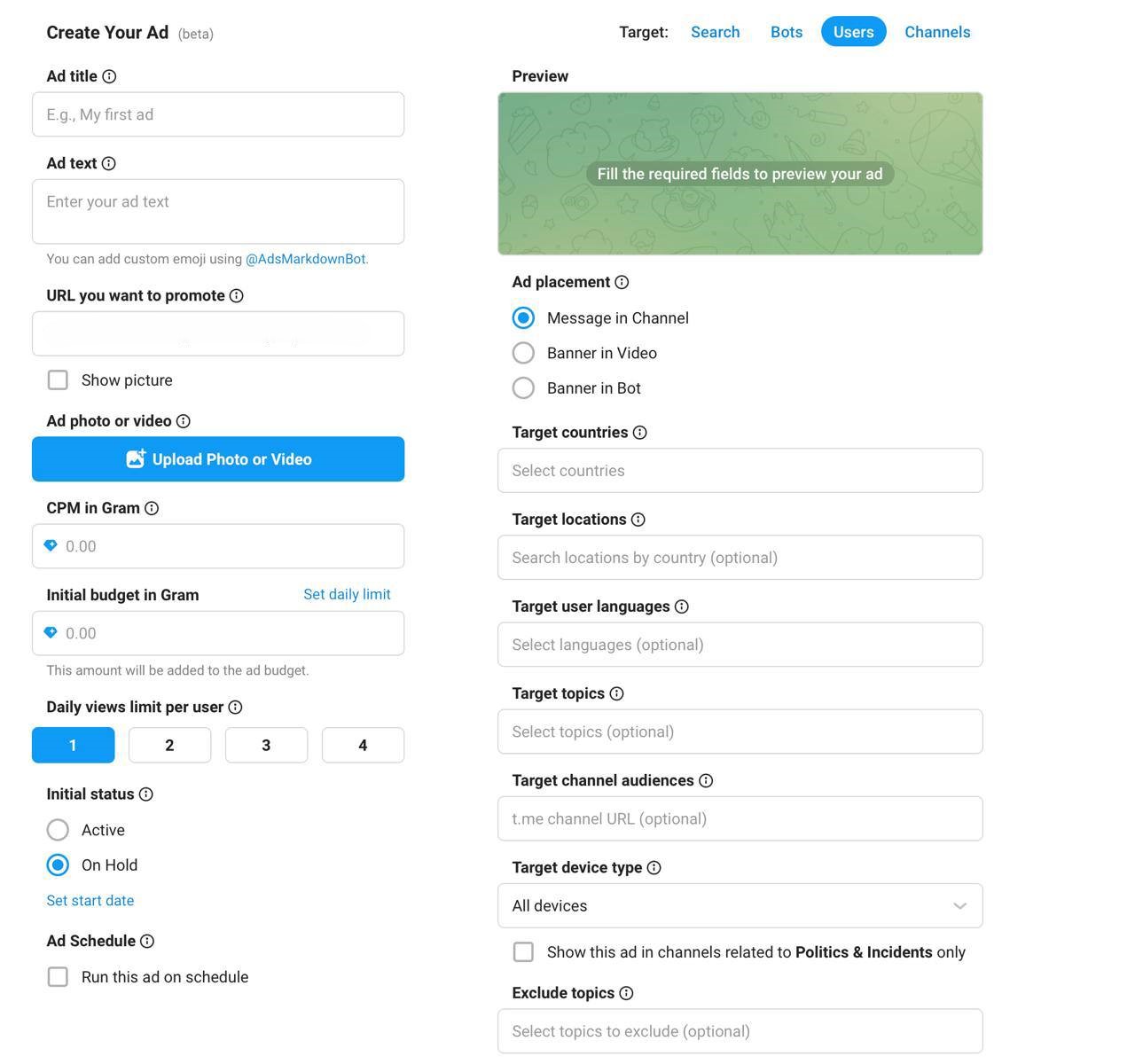
Important nuances when launching:
The ad text should organically echo the content of your White Page. If the moderator does not see a logical connection between the promo text and the site, the campaign will be rejected with the mark "Irrelevant content".
Never use aggressive calls to action (Clickbait) in the ad text itself if your offer belongs to the gray zone. Save aggressive marketing for the Offer Page.
Immediately after sending the campaign for moderation, your site will be attacked by Telegram's technical crawlers. The configured Cloaking.House filter system must flawlessly send them to site.html.

After the campaign receives the "Active" status, check the availability of the ad, impressions, and the correctness of clicking on the ad link from different devices. Using a third-party routing service does not cancel basic compliance with the ad platform's rules in creative texts - only the final landing page is masked.
In-depth check and click analysis
Campaign setup does not end after the "Start" button. As soon as the first impressions and clicks start coming in, open the Clicks section in Cloaking.House. This is your main analytical tool for monitoring traffic quality and detecting protection "breaches".
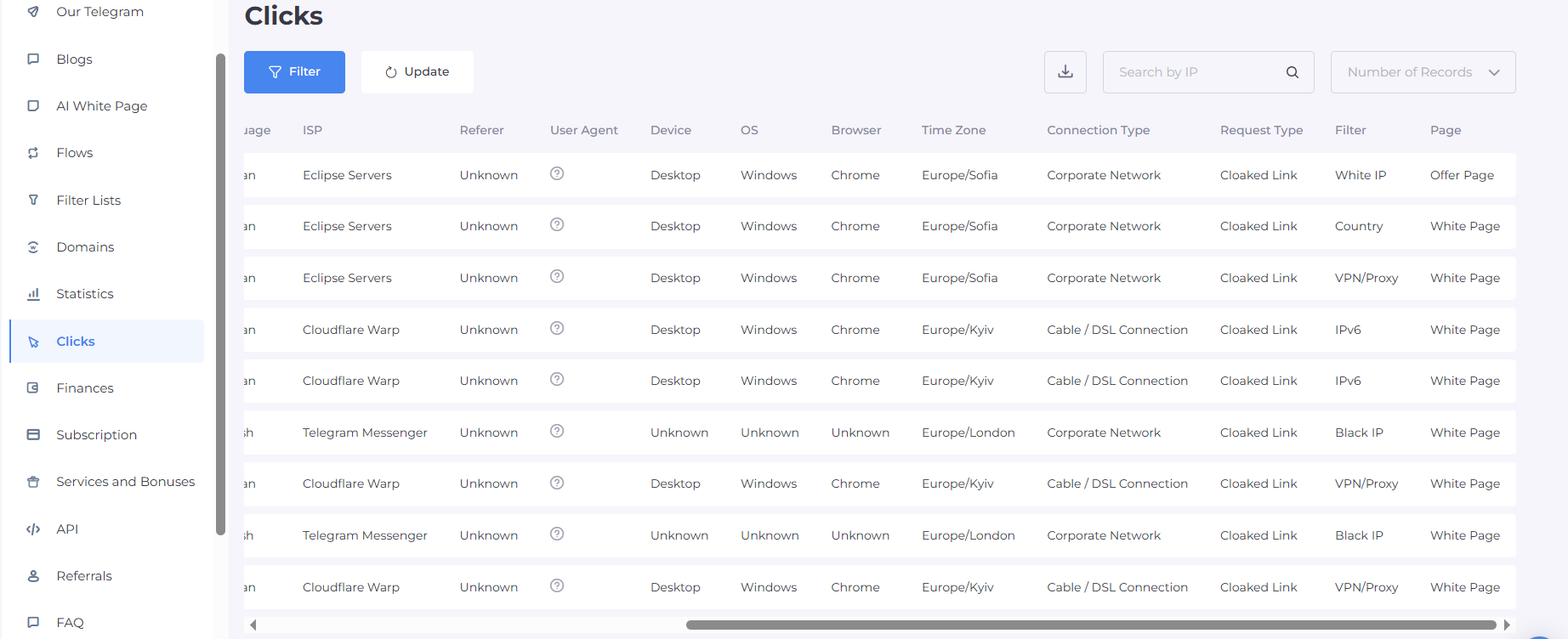
The click log provides comprehensive real-time information. Depending on the available data, it is necessary to regularly analyze:
Click processing result: where the click was directed (to the White Page or Offer Page).
Filter (Triggered filter): for exactly what reason the user did not pass to the offer (for example, a VPN filter was triggered or GEO mismatch).
IP, ISP, and GEO: analyze the providers. If you see massive clicks from Amazon AWS, DigitalOcean providers, or Telegram's own servers - these are moderator bots.
User Agent, device, operating system, and browser: track anomalies (for example, massive clicks from outdated versions of Chrome).
Scaling and final recommendations
For successful and long-term work with Telegram Ads in a bundle with Cloaking.House, adhere to a strict algorithm: preparing trust pages - creating a flow - setting up filters - integration - testing - launching a test campaign - analyzing clicks - scaling.Tips before scaling budgets:
Do not edit the link or ad text if a campaign has passed moderation and brings leads. Any change sends the campaign for re-moderation, which may turn out to be deeper.
Distribute risks: use the scheme "One Telegram account - one domain - one Flow". Do not link dozens of different ad campaigns to a single domain. In the event of a domain ban, you will instantly lose all launched bundles.
This systematic approach helps to centrally manage all traffic routing, reliably hide bundles from competitors and spy services, control every click, and stably generate profit, working even with the most difficult niches under the strict moderation conditions of 2026.






Be the first to share your opinion!
We value your feedback — share your thoughts.