


In modern media buying, running traffic successfully has long ceased to be a matter of just a good creative or a lucky offer choice. In recent years, the anti-fraud algorithms of Meta, Google Ads, and TikTok have reached the level of complex neural network analysis. Moderation evaluates the advertising process not in isolation, but as part of an end-to-end chain of digital events: from the media buyer's first click in the anti-detect browser to the user's final transition to the landing page.
If even one suspicious link appears in this chain, the campaign is doomed. Affiliates often face a paradox: traffic filtering is set up flawlessly, bots and moderators are reliably blocked, but accounts fly into Risk Payment or Policy Checkpoint even before the first impression. The reason almost always lies at the "entrance" - in the low quality of network consumables.
To ensure a campaign setup lives long and scales without cascading blocks, the coordinated work of two interconnected layers of protection is required: a reliable traffic distribution and filtering system Cloaking.House and a pool of trusted residential proxies from SX.ORG.
 In this article, we will analyze in detail the concept of dual-circuit security in affiliate marketing, find out why cheap proxies kill campaigns even at the farming stage, and show how to properly configure and test the infrastructure before launching traffic.
The Dual-Circuit Security Model in Media Buying
In professional teams, security is divided into two independent but closely related circuits:
- Input circuit (buyer's workspace): managing profiles in an anti-detect browser, account warming, linking payment methods, and publishing campaigns in the ad account. Here, the platform's security algorithm analyzes the hardware, canvas fingerprints, matching network parameters, and the reputation of your IP address.
- Output circuit (landing page): processing incoming clicks on the advertising link. At this stage, the filtering service separates moderators, ad network bots, and spy services from paying leads, directing the former to a neutral White Page, and the target audience - to the Offer Page.
If the input circuit is compromised by a dirty IP address, the platform's algorithm puts the account under an in-depth manual review. In this case, even the most advanced link protection will be subjected to an increased load. And conversely: to correctly check the operation of the output circuit before launching, the buyer needs tools to emulate a real user's visit.
Why Data Center Proxies Are No Longer Suitable for Launching Ads
The desire to save on network consumables is the most common reason for drained budgets. Server proxies (Data Center) rented from hosting providers like OVH, DigitalOcean, or Hetzner are instantly recognized by anti-fraud systems.
- Autonomous systems (ASN) under suspicion. Ad platform security systems cross-reference IP ownership with public registries in real time. If the connection to the Ads Manager comes from a data center IP, the platform knows in advance: it is not a live user from a laptop, but traffic from a server rack.
- Cascading subnet bans. Server proxies are often used by bots, auto-reg software, and parsers. It takes just a few unscrupulous "neighbors" on the subnet to trigger security filters, causing the entire grid of addresses to be blacklisted in spam databases (Spamhaus, Barracuda, MaxMind).
- Mismatch of the passive OS fingerprint (p0f). Packets passing through data centers often reveal a mismatch of MTU and TCP Window parameters with the device you are emulating in the browser.
For a stable ad launch, you need proxies whose addresses belong to real home Internet service providers (Residential) or mobile operators (Mobile 4G/5G).
SX.ORG Infrastructure: Clean Pools for Affiliate Marketing Tasks
The SX.ORG platform was created taking into account the requirements of teams working under aggressive anti-fraud conditions. Instead of spammed server grids, the service provides access to millions of real residential and mobile IP addresses around the world, covering Tier-1, Tier-2 markets, and developing regions.
The main advantage of residential addresses from SX.ORG - a natural Trust Score. Traffic is routed through the equipment of home internet providers (Comcast, Vodafone, AT&T, Deutsche Telekom). To Meta or Google security modules, activity in the account looks like the actions of an ordinary user working from home or a cafe.
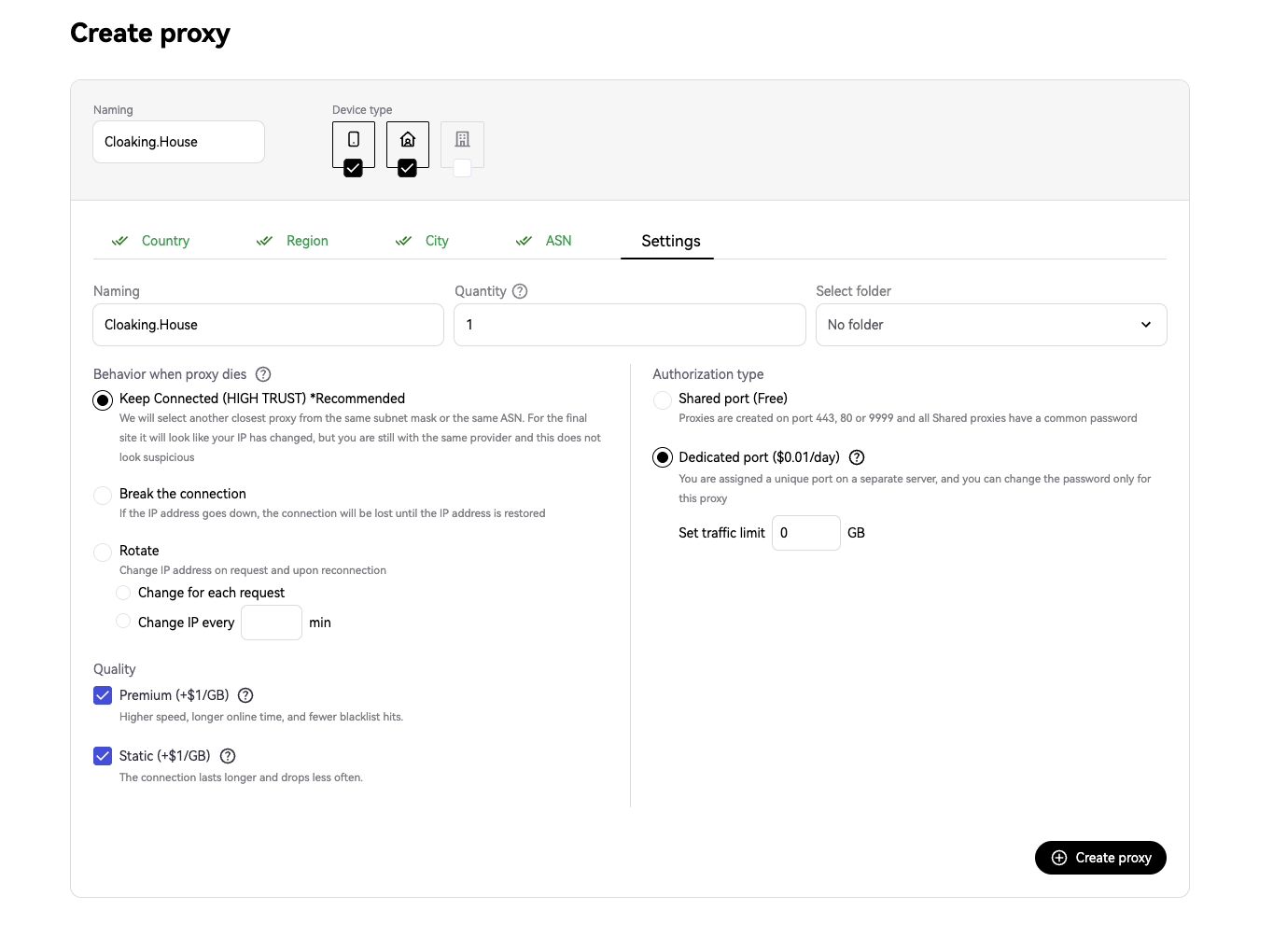 Setting parameters in SX.ORG: choosing a device pool and keeping the session in Keep Connected mode
Architectural Features of the SX.ORG Panel:
- Support for the native SOCKS5 protocol. Unlike standard HTTP proxying, the SOCKS5 protocol operates at the OSI model's data link layer. It transmits traffic without adding identifying headers and natively supports network protocols used by WebRTC, which eliminates accidental leaks of the real IP.
- Session time control (Sticky Session). For farming and ad management, it is critically important that the IP does not change chaotically every two minutes. In the SX.ORG panel, you can fix the IP address for the entire period of the working session, preventing security triggers due to a sudden change of geolocation.
- Rotation mode for background tasks. If, before launching, you need to scrape creatives, analyze competitors in the ad library, or check search results, a single switch changes the port to a dynamic address rotation mode on every request.
Fingerprint Geometry Synchronization: Linking Proxy and Anti-Detect
One of the main mistakes when preparing a profile is internal data inconsistency. Anti-fraud systems evaluate the harmony of all parameters in combination.
If your proxy points to Berlin, the browser's system language is set to Russian, the timezone is set to London, and the billing is linked to a US bank - the probability of a block tends toward 100%.
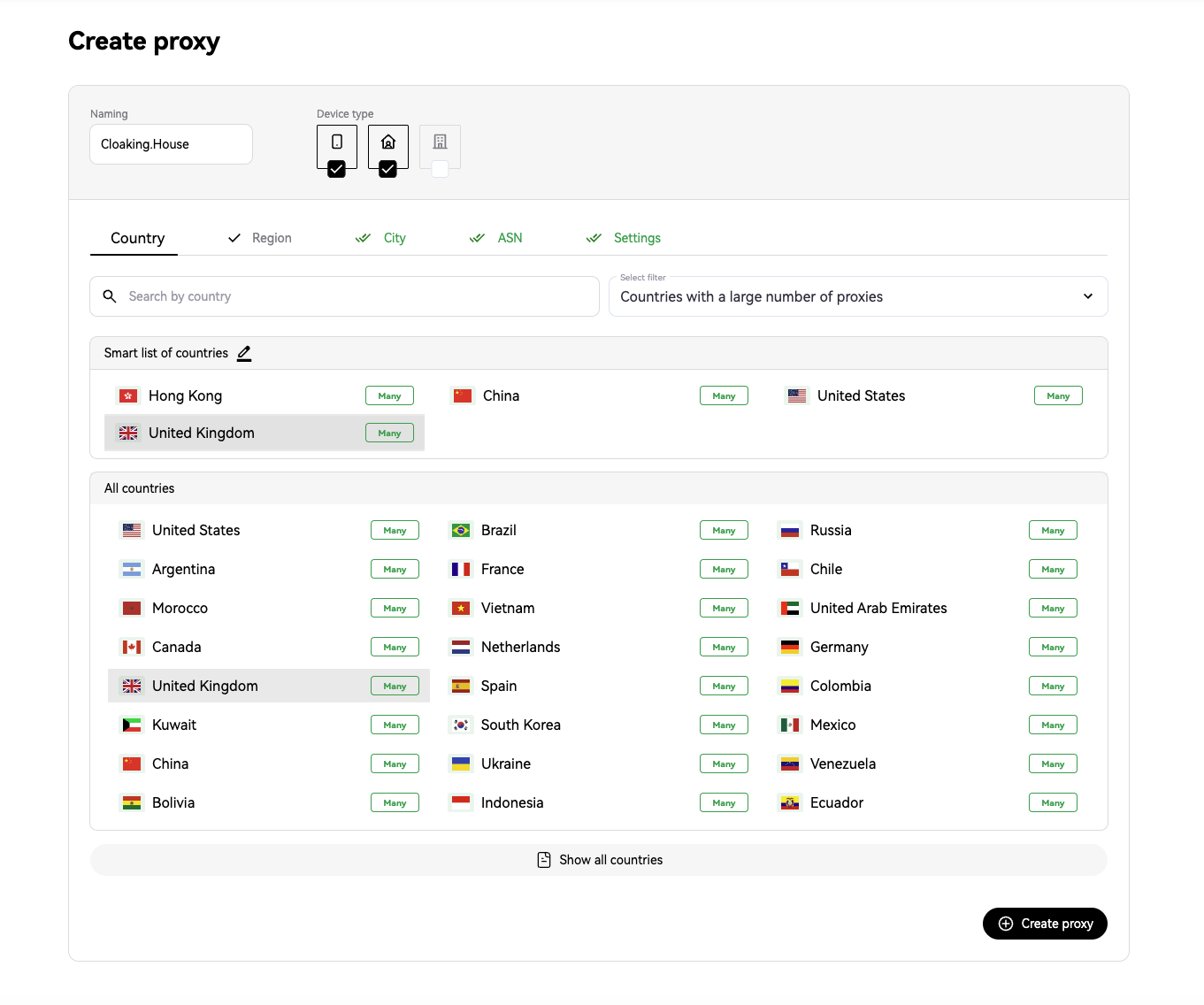 Fine geolocation selection in the SX.ORG panel: filtering the pool by target country, specific city, and communication provider.
When setting up a profile in conjunction with SX.ORG, follow this algorithm:
- Exact geo-matching: in the proxy generator, choose exactly the country and city for which the payment instruments are prepared and the account is warmed up.
- Automatic timezone synchronization: most modern anti-detect browsers can set the timezone based on the incoming IP address. Make sure this feature is active.
- Correct WebRTC: set the WebRTC spoofing mode based on the proxy's public IP. Completely disabling WebRTC in the settings often looks suspicious, since 99% of real users have this technology enabled.
Comparison Table: Roles of Tools in the Campaign Lifecycle
| Launch Stage | Buyer's Main Task | SX.ORG's Area of Responsibility | Cloaking.House's Area of Responsibility |
| Farming and warming | Profile creation, cookie gathering, social media activity | Ensures a high IP Trust Score, eliminates fraud risk | - |
| Billing linking | Adding a bank card, first payment | Keeps a stable Sticky session without changing geolocation | - |
| Campaign setup | Creating a secure flow and access criteria | Acts as the standard of a clean IP for working with the account | Filters bots, spy services, and ad network moderators |
| Moderation | Passing manual and automated checks | Ensures a secure session when submitting an ad | Shows reviewing bots exclusively the White Page |
| Ad delivery and lead gen | Bid management, optimization, and scaling | Allows you to safely make edits in the Ads Manager | Protects a converting campaign setup from competitors and repeated bans |
5 Critical Mistakes That Lead to Lost Budgets
1. Using free public proxies. Public lists have been compromised for years. Logging in from such an address in any ad account will lead to instant profile deactivation without the right to appeal.
2. Changing location during a single working session. If you started an account warming session from Berlin, and 10 minutes later the gateway changed your address to Munich or another region, the anti-fraud will regard this as session hijacking and request SMS confirmation or a password reset. Always lock the address lifetime in the SX.ORG panel.
3. Templated and empty White Pages. Even with perfect bot filtering, a moderator will eventually visit the white page manually. If the site consists of three sentences and does not contain a privacy policy, the ad will be rejected for the low quality of the landing page.
4. Neglecting click analytics. Always compare the traffic consumption data in the proxy panel with the click statistics in the tracker and filter. This helps to identify parasite traffic and optimize budgets in time.
Setup Readiness Checklist Before Pressing the "Publish" Button
Before launching ads for delivery, go through the checklist of control points:
- The profile in the anti-detect browser is configured using a residential or mobile SOCKS5 proxy from SX.ORG;
- The session type is set to address retention mode, the timezone and browser language are aligned with the IP geolocation;
- The flow in Cloaking.House is configured: protection against bots, VPNs, and suspicious data centers is active;
- Geotargeting in the filtering rules strictly matches the geotargeting of the launched ad campaign;
- A test click was performed verified that the system correctly cuts off a non-target visit to the White Page;
- The White Page contains contact information, a user agreement, and a personal data processing policy.
Conclusion
In modern conditions, effective media buying is built not on looking for "secret buttons," but on implementing a stable, fault-tolerant infrastructure.
Using the professional traffic filtering system Cloaking.House guarantees the safety of your landing pages and protects your funnels from reviewers and competitors. At the same time, connecting reliable residential proxies from SX.ORG resolves all trust issues on the side of the ad accounts and allows you to flawlessly calibrate the funnel before scaling.
By combining clean network consumables and smart click routing, you reduce the impact of random bans to a minimum and turn running traffic into a predictable business process.






Be the first to share your opinion!
We value your feedback — share your thoughts.