


In the world of traffic arbitrage and affiliate marketing, not all products pass the strict moderation of ad networks easily. Offers from verticals like nutra, gambling, dating, or crypto often face harsh restrictions or outright bans from Facebook Ads, Google Ads, or TikTok.To launch ads and deliver an offer to the target audience, media buyers use a traffic distribution technology known as cloaking. The essence of this method is to show different content to different categories of visitors clicking on the same link.
Anatomy of Cloaking: White Page and Offer Page
The foundation of any cloaking setup is built on dividing landing pages into two categories. For the system to work, you need to prepare two completely different websites:
White Page: This is a page created exclusively for the eyes of moderators and automated bots of the ad network. It must be completely "fluffy," legal, and fully compliant with all platform rules. If you are advertising a weight loss product (which the network bans), your White Page might be a harmless blog about healthy eating or fitness. The main task of the white page is to convince the algorithm that the ad leads to a safe and useful resource.
Offer Page: This is your real landing page (landing page or pre-landing) with aggressive marketing triggers, promises, and the offer itself. This page is seen only by real target users.
To successfully pass moderation and launch an ad campaign, it is critically important to show the algorithms and human reviewers exclusively the White Page.
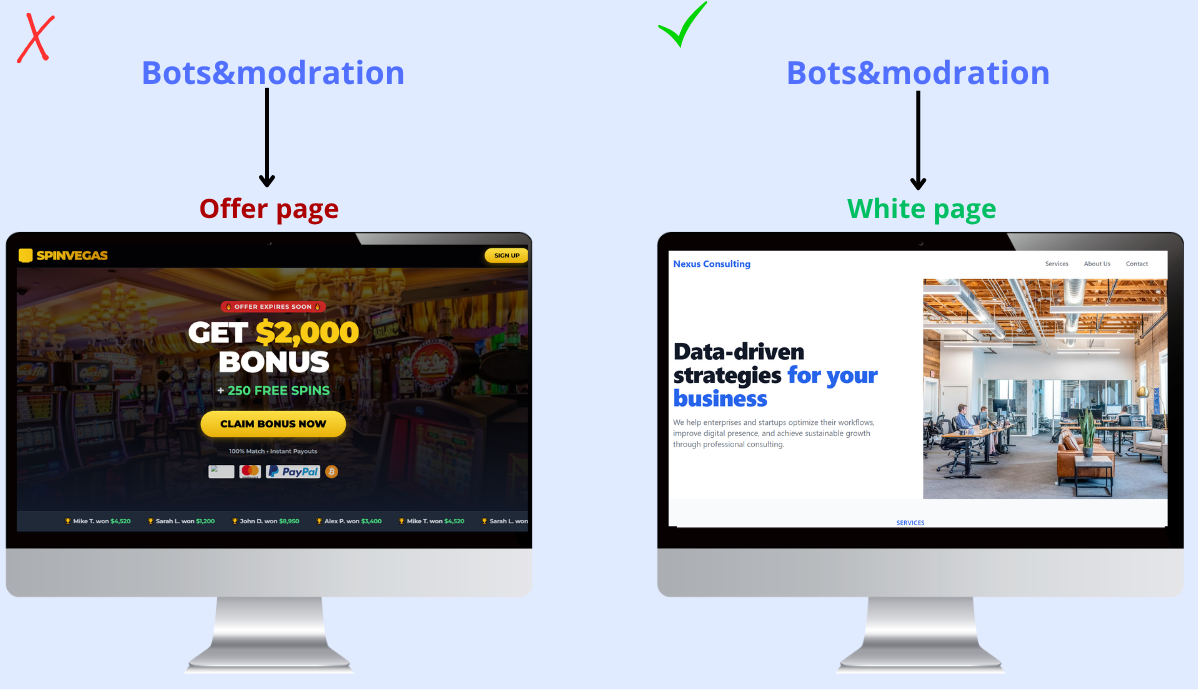
If the filtering system fails and a moderator reaches the real offer (Black Page), the advertising account will receive an immediate and inevitable ban. The entire point of cloaking is the reliable separation of these flows.
How Does Cloaking Know What to Show and to Whom?
The secret of cloaking lies in the software that stands between the advertisement and the final website. When an ad is clicked, the system analyzes the incoming visitor profile in a fraction of a second based on multiple parameters:
IP Addresses and Databases: Cloaking contains massive, constantly updated databases of IP addresses belonging to Google data centers, Facebook servers, moderation hubs, and anti-fraud systems. If a click comes from such an IP, the visitor is sent to the White Page.
User-Agent: This is an identifier that the browser or device passes to the server. Ad network bots often have specific User-Agents or hide them. The system filters out suspicious or empty values.
GEO and ISPs: If your ad is set for mobile internet users in Spain, but a click comes from a desktop computer connected to a US corporate provider, it’s a clear signal of a check. Such a click goes to the "white" page.
Behavioral Factors and Referrer: Bots often click links without a referrer (information about where the user came from) or behave atypically.
If a visitor passes all filters and is recognized by the system as a "live person from the target region," cloaking instantly redirects them to the Offer Page with the real offer. In all other cases (bot, moderator, competitor spy service), the White Page opens.This is why a reliable and modern cloaking service—such as Cloaking.House—is critically important for successful moderation and stable performance. Ad network algorithms are constantly getting smarter, and self-written scripts or old IP databases can no longer keep up.
Step-by-Step Cloaking Setup in Cloaking.House
To ensure the technical setup doesn't become a "headache," the Cloaking.House service has simplified the interface as much as possible while maintaining the powerful functionality of a professional cloaking service. The entire process from creating your first page to generating profit fits into several logical steps manageable even for an arbitrage beginner. Let's break down the process from page generation to launching a flow in the Cloaking.House service.
1. Creating a White Page
You don't necessarily have to create a "white page" manually. Inside Cloaking.House, there is an AI White Page tool. You choose a harmless topic, and the neural network assembles a ready-made site in a couple of minutes that moderators will like.
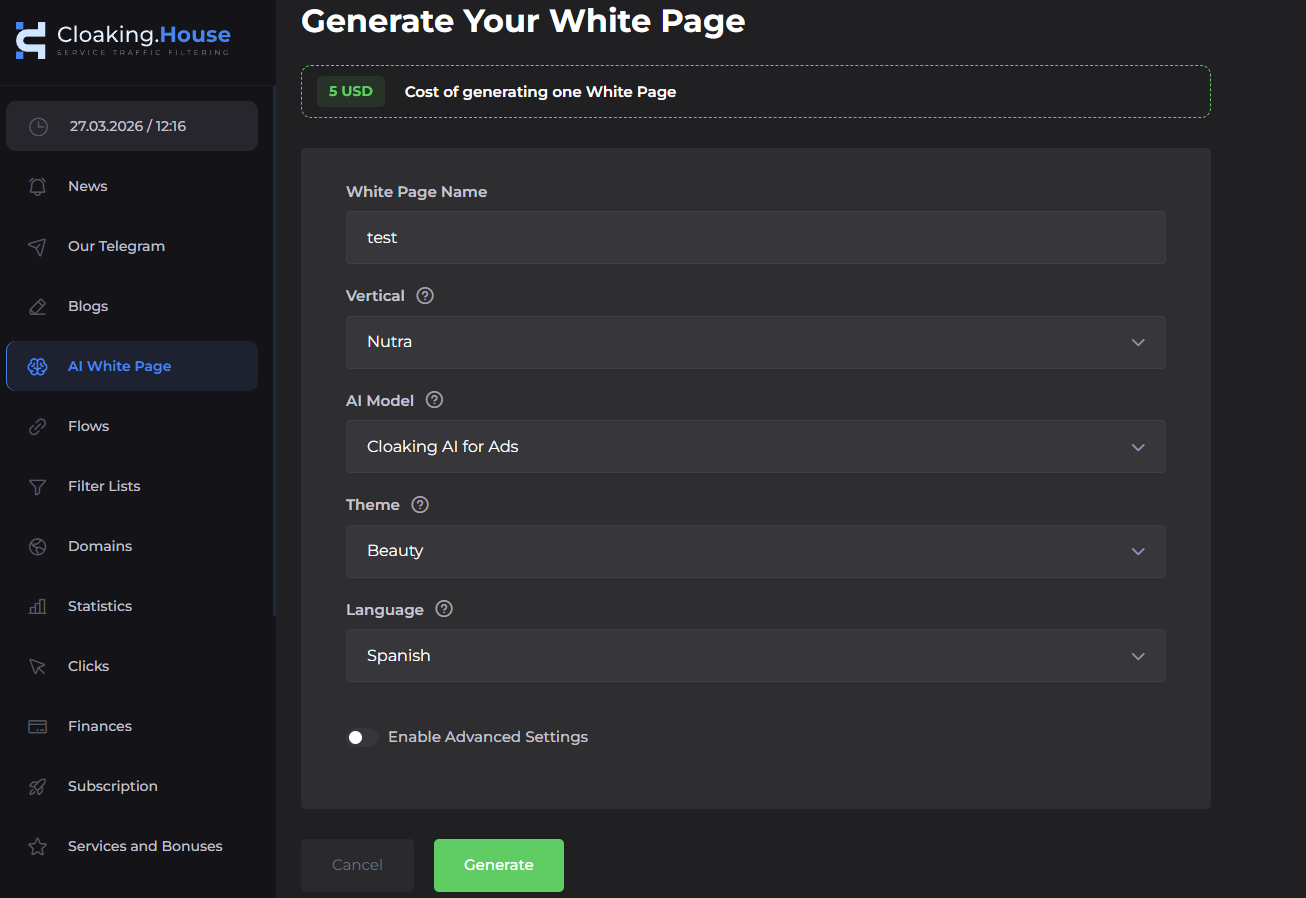
After generation, download the archive with the generated White Page and unpack it into the root folder of your domain on the hosting.
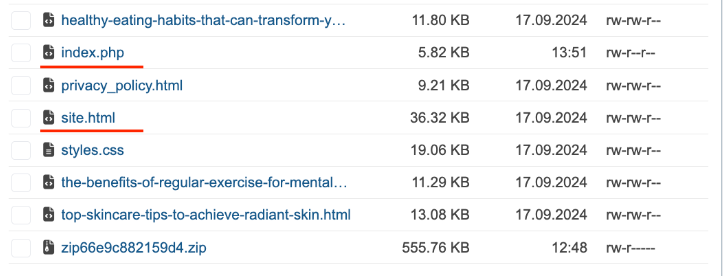
Important: Find the main file of the white page (index.html or index.php) and rename it to site.html (or site.php, respectively). This must be done to free up the index.php name for the cloaking system's own file.
2. Creating a Flow
Go to your Cloaking.House personal account and create a new flow.
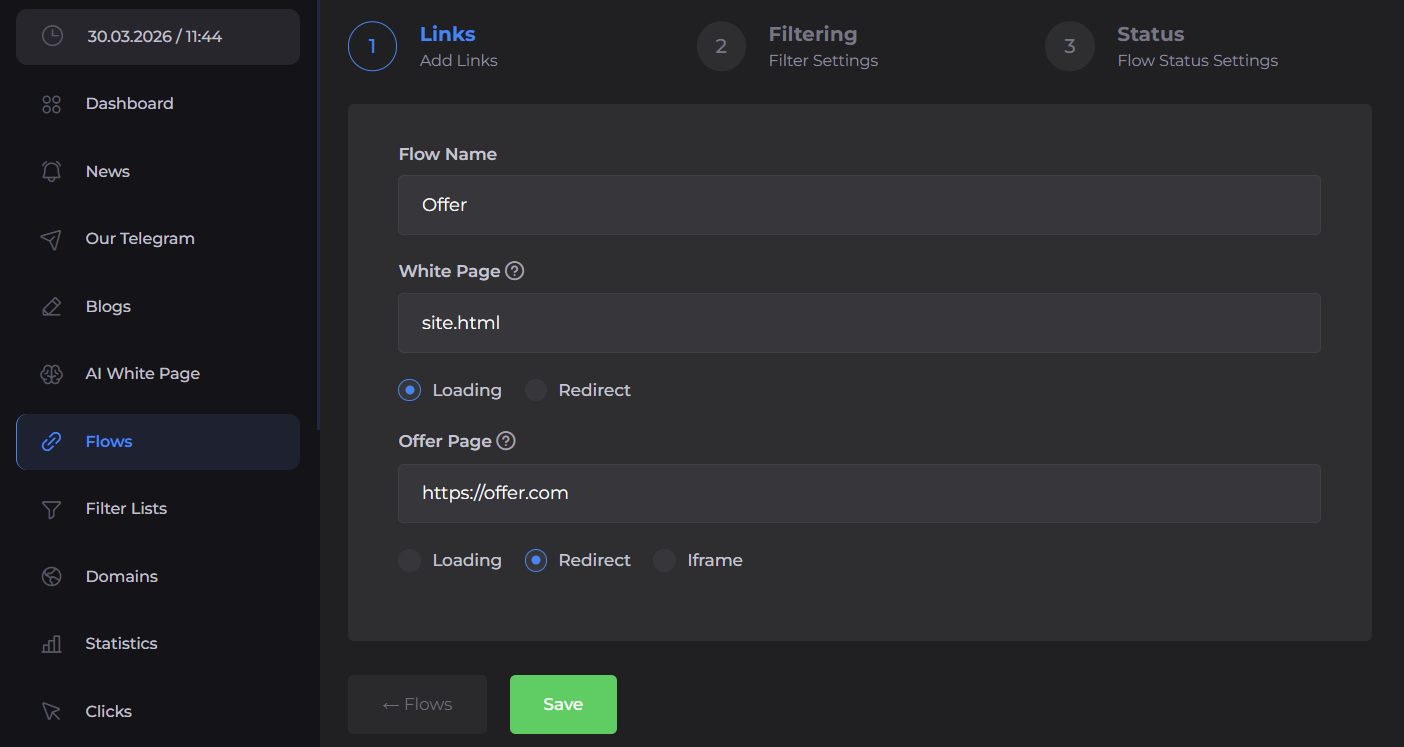
- White Page Setup: In the White Page settings field, enter the name of your renamed file (e.g., site.html). For the display method, select "Loading". This is important: the moderator should see the content directly on your domain without any suspicious redirects.
- Offer Setup (Black Page): In the offer field, paste your affiliate link (the direct link to the Offer Page). Set the display method here to "Redirect" so that the real user is instantly transferred to the desired selling landing page.
3. Filter Configuration
This is the core of your protection. In this section of the flow settings, we set the parameters for strict filtering.
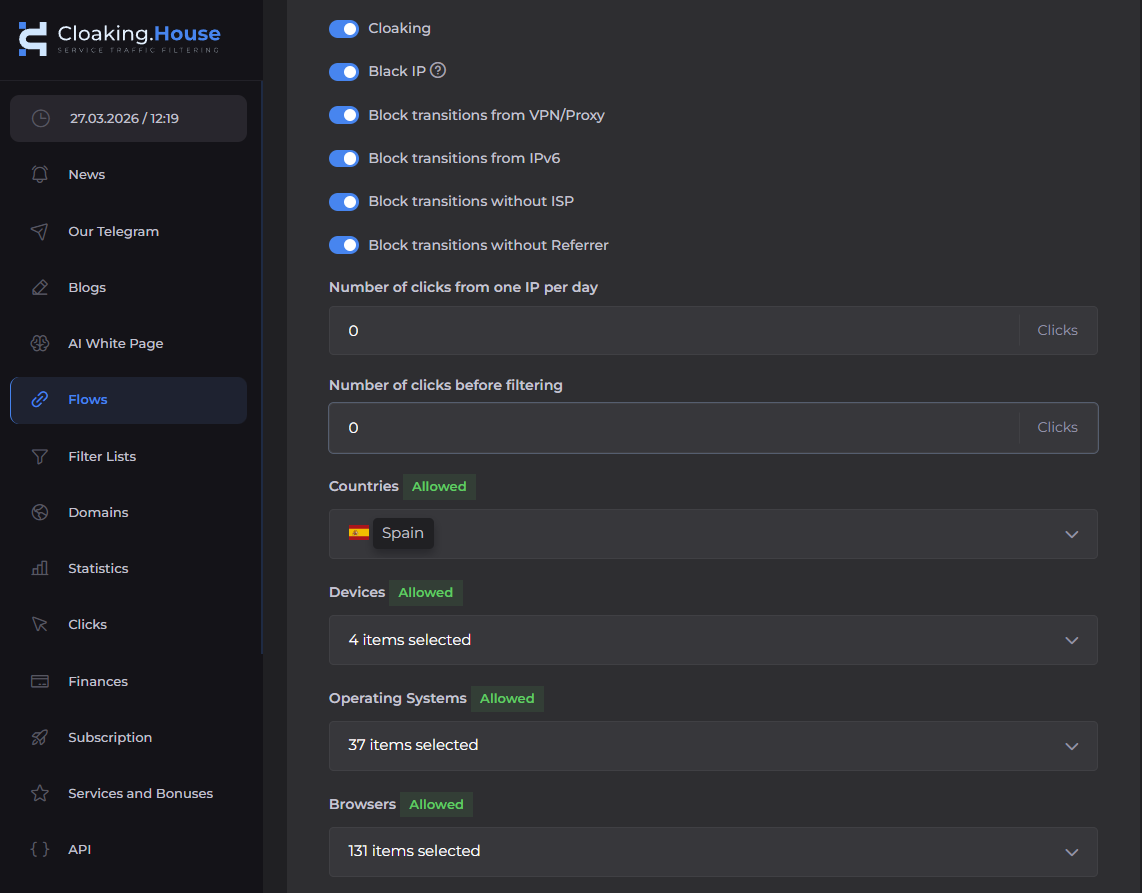
Each toggle here is responsible for blocking a specific behavior pattern typical of bots and moderators:
GEO (Countries): Allows only users from the target region of the ad, sending all other clicks to the White Page.
Device Types: Cuts off non-target platforms (for example, blocks desktop if your ad is running only on smartphones).
VPN/Proxy Ban: Blocks moderators and spy services trying to spoof their real location.
IPv6 Filtering: Filters out technical traffic from servers and bot farms, as regular people mostly use the IPv4 standard.
Block transitions without Referrer: Rejects clicks without a source history (where the user came from)—this is a classic marker of a bot or a manual check by a moderator.
Block without ISP: Does not allow access to the offer if the provider is not detected. In most cases, a real visitor's provider can always be determined by their IP address.
4. Saving Flow Settings
Once you have filled in the links and set the filters, click the save button. In the next stage, switch the flow status to "Active." From this moment, Cloaking.House is ready to work and will begin filtering incoming clicks according to your rules.
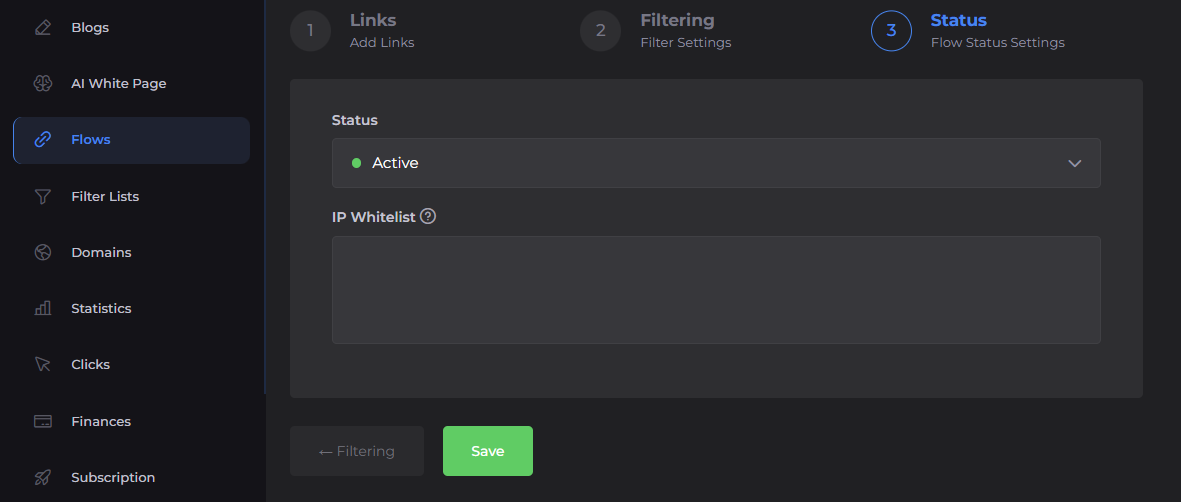
Useful Tip: In the same settings tab, there is a White List IP field. If you add your current IP address there, the system will ignore all filters for you personally. This is the best way to check how your offer is displayed without disabling protection for everyone else.
5. Script Integration
Save the flow settings. After this, the installation of the finished index.php file will be available to you.
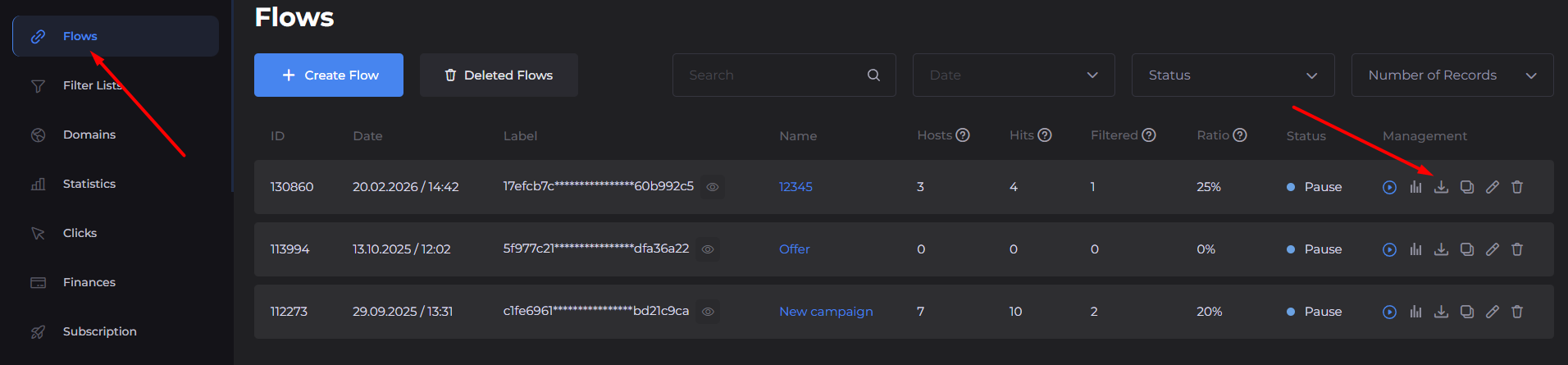
Download it and upload it to the root folder of your domain on your hosting (the same place where your site.html is already located).
6. Statistics and Analytics
As soon as the ads are launched, data will begin to collect in the Cloaking.House panel in real time.
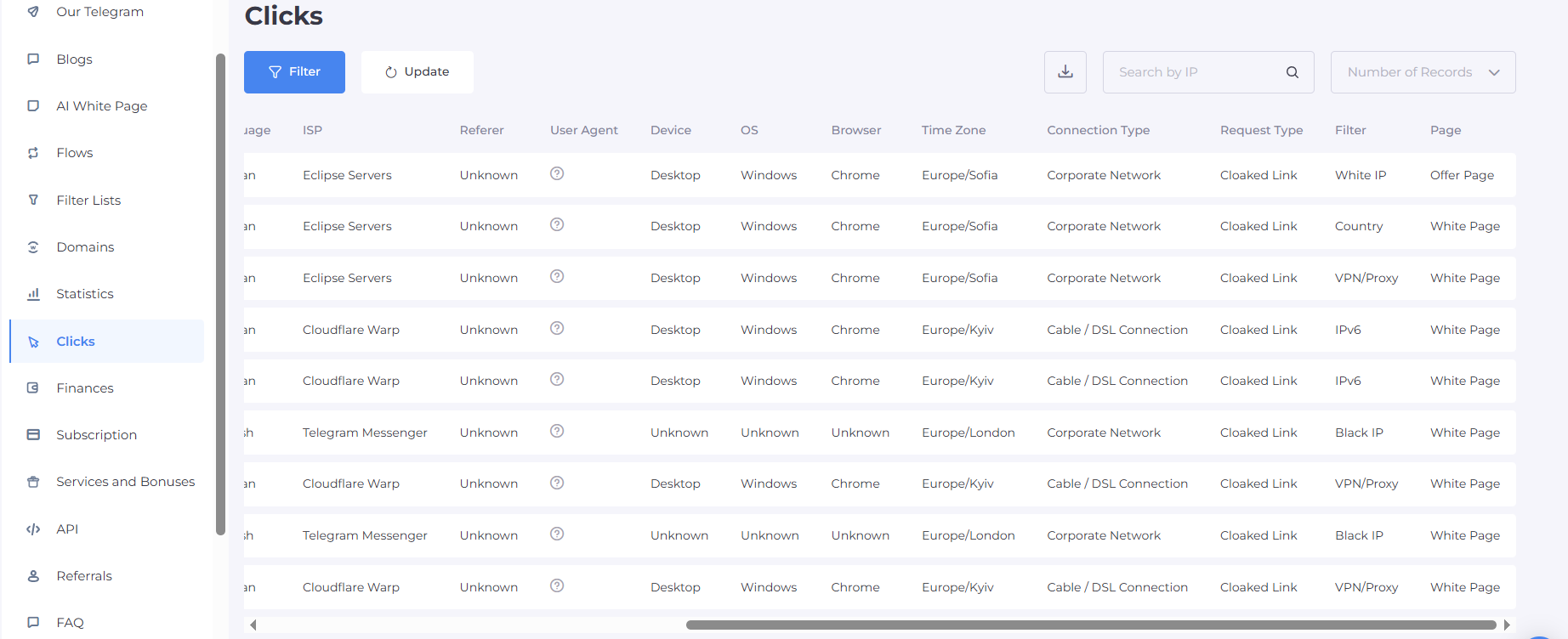
You will see more than just general numbers, but a detailed log of every click:
Traffic Direction: A clear label showing where the visitor was sent—to the White Page (filtering) or to the Offer (target transition).
Filtering Reason: If a click went to the white page, the system will show exactly which filter was triggered (e.g., "Black IP", "VPN/Proxy"). This allows you to flexibly fine-tune the flow and change filters at any time.
Full Click Dossier: For every transition, the IP address, country, device type, OS, browser, and full User-Agent are displayed.
What Else is Needed for a Successful Launch Besides Cloaking
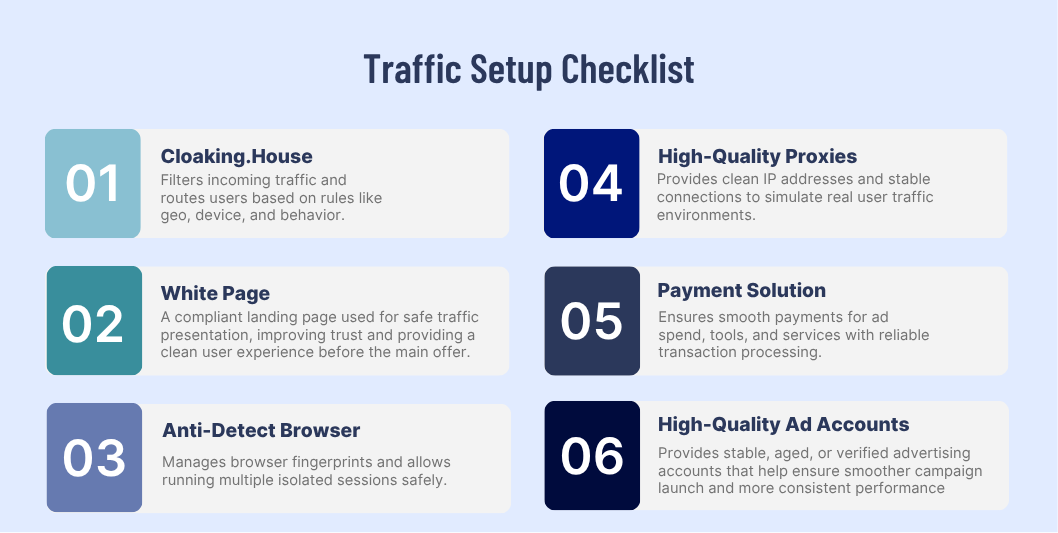
It is important to understand that even the most advanced cloaking, such as Cloaking.House, does not guarantee success if the other elements of your technical chain are weak. For ad network moderation, a combination of factors is vital, so you will need a full set of tools:
Anti-detect Browser: They spoof your browser fingerprints, allowing you to manage hundreds of accounts from one computer so the system sees no connection between them.
Quality Proxies: Use only mobile or residential proxies. Proxies must match the GEO of your accounts.
Trustworthy Accounts: Farmed accounts with history, "kings" (auto-regs with high limits), or agency accounts. Without warmed-up accounts, any link, even with perfect cloaking, can get banned at the start.
Payment Solutions: Virtual cards from foreign banks that have a good BIN (Bank Identification Number). Ad networks are very picky about which card is used to pay for ads.
Quality White Pages: For each flow, it's better to use fresh white pages on trusted domains in popular zones (.com, .net, .org) and reliable hosting with fast response speeds.
Summary
Ultimately, success in bypassing ad network moderation comes down to one critical task: the flawless demonstration of "white" content to those who come to inspect, while maintaining direct access to the offer for real customers. Using Cloaking.House in conjunction with a high-quality anti-detect and trusted accounts turns the process of passing filters from a lottery into a precisely calibrated technical procedure. Correctly configured filters and the use of trusted White Pages allow you to minimize the risk of bans and significantly extend the life of your advertising campaigns.





Be the first to share your opinion!
We value your feedback — share your thoughts.