


Ads on Bing are launched less frequently than on Google, and many consider this an advantage: less competition, a calmer auction. But Microsoft Advertising has the same issue as the rest: your ad is reviewed not only by a human, but also by a bot, and it inspects your landing page. If the offer is one of those that cannot pass directly, you need a split: one page for the reviewer, another for the real user.
Below is the complete launch roadmap: first, we create a White Page, configure the flow, and integrate it into the site; then, we set up the ads in the Microsoft Advertising dashboard. We do it in this order because the link from the ad must lead to an already prepared and verified domain.
How It Works: Three Links
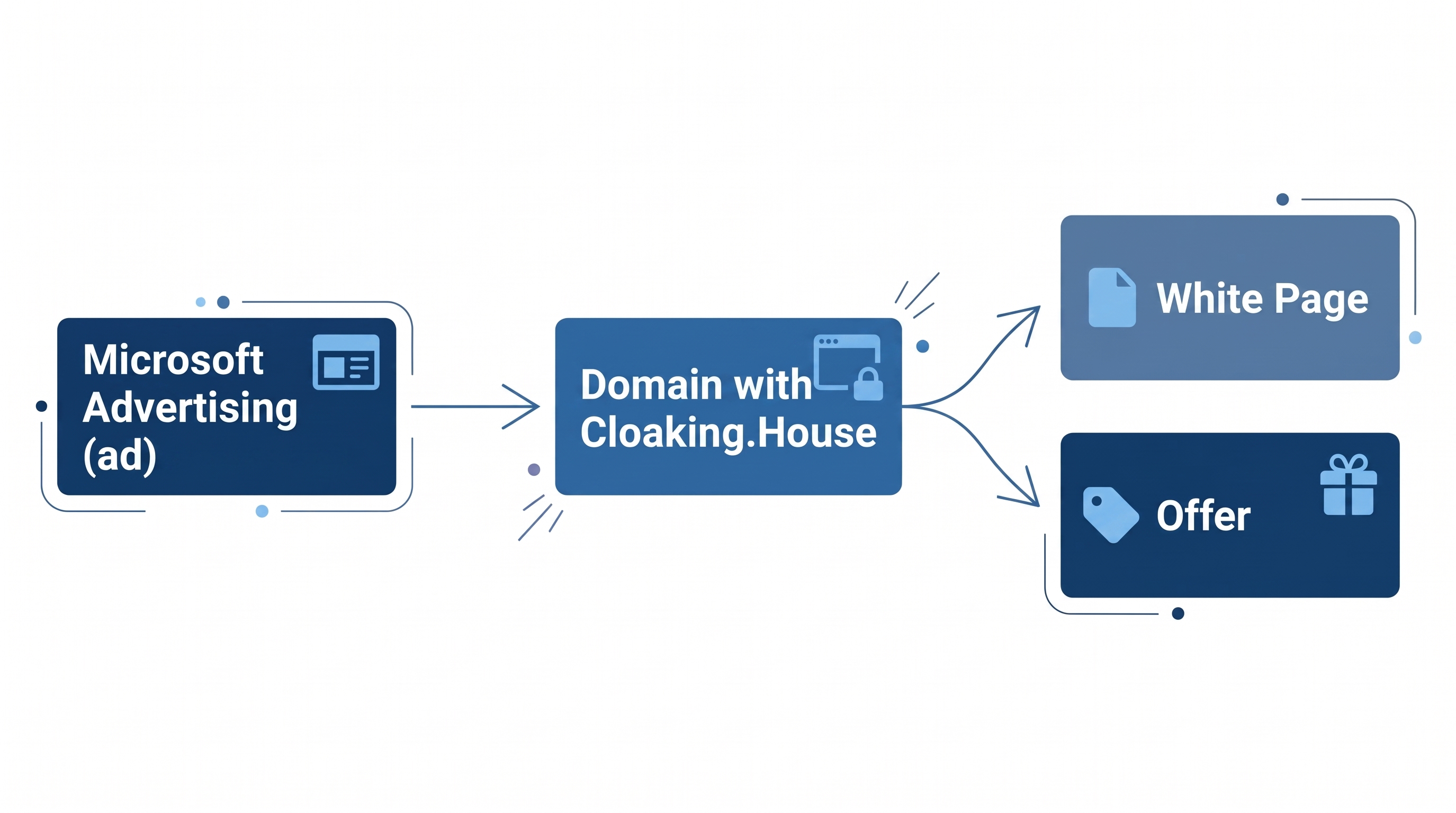
To avoid getting confused in the settings, keep a simple chain in mind:
- Ad in Microsoft Advertising. Here you set targeting, budget, ad copy, and Final URL.
- Domain with Cloaking.House integration. The Final URL leads here. There is only one domain, and the address does not change.
- The Fork. The service examines each click and directs the visitor either to the White Page or to the offer.
From this follows the main rule: first prepare the domain and the flow, and only then insert the link into the ad. Otherwise, the reviewer will land on an unconfigured page.
Part 1. Preparing the Page for the Reviewer
The White Page in this scheme is not just a placeholder: it is exactly what the bot and, possibly, a human reviewer will read. What is required of it:
- The topic matches the ad and the keywords.
- It has real content, rather than a single screen with a button: descriptions, sections, contacts.
- It includes standard pages: privacy policy, terms of service.
- It is unique to this campaign and not copied from someone else's website.
- It opens properly on mobile devices.
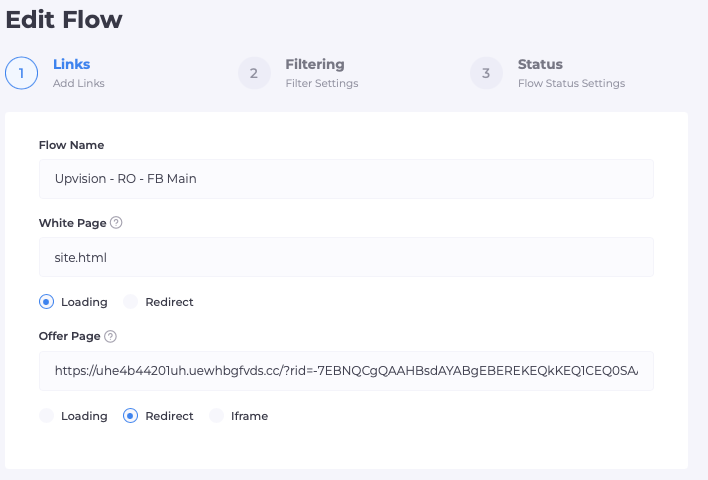
The easiest way is to generate it in Cloaking.House: the AI White Page generator is available on any plan. You select the vertical, language, topic, and model, and receive an archive. For applications, there is a dedicated For Apps model.
After uploading to your hosting, rename the main index.html file to site.html and verify that the page opens via a direct link.
Part 2. Flow and Filters in Cloaking.House
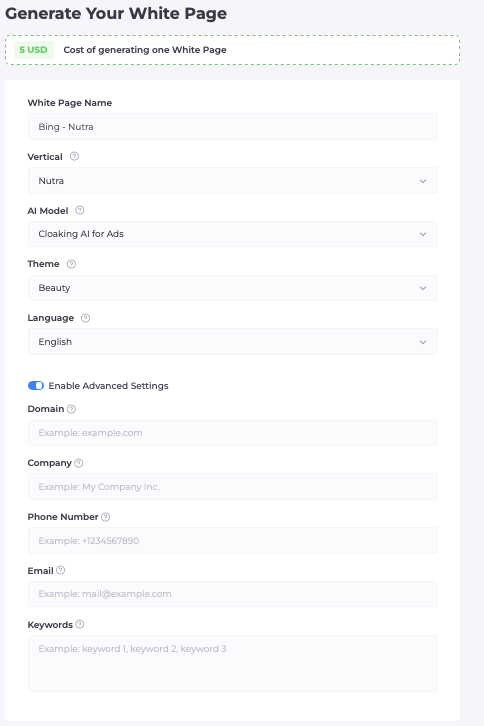
Create a new flow in the Cloaking.House dashboard and fill in the following:
- White Page: site.html, Loading method. The address in the browser remains the same. This is crucial because Microsoft's policy requires the ad link to lead to a single stable page, rather than different pages with every click.
- Offer Page: the link to the offer. Open an external affiliate link via Redirect, and a page hosted on your server via the same loading method.
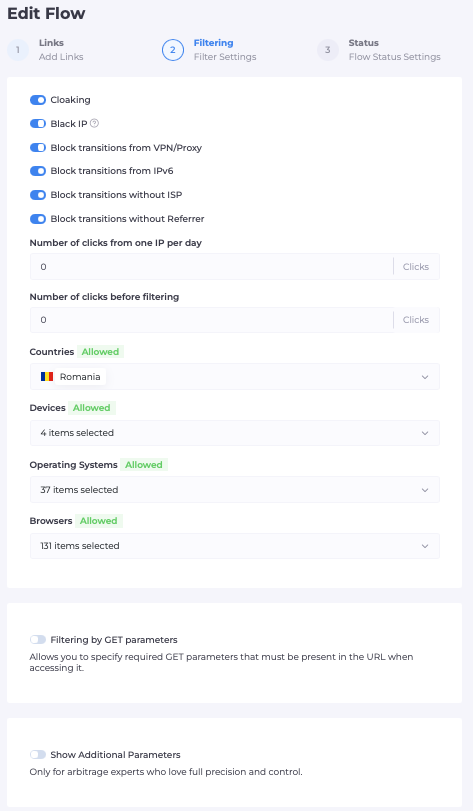
Filters for Bing: What and Why
| Filter | What It Does | Recommendation for Bing |
|---|---|---|
| GEO | Allows only the required countries | Match the GEO from your campaign |
| Device / OS / Browser | Restricts devices and systems | Keep what you selected in the ad account targeting |
| Language | Checks browser language | Must match the campaign language |
| VPN / Proxy | Cuts off clicks using VPN/Proxy | Enable |
| ISP | Filters by internet service provider | Helps remove atypical sources |
| Referrer | Filters by traffic source | Helps remove direct visits to the site, which moderation and bots often do |
| IPv6 | Separate rule for IPv6 | Do not block blindly; first check the log to see where real people come from |
| Click Limits | Limits clicks from a single IP | Set with a margin |
| Custom Blacklists and Whitelists | Your rules on top of the general database | Add notable IPs from the log |
General principle: the more accurately the filters mirror the targeting in your ad account, the fewer real people are lost. If the campaign specifies, for instance, a single country and mobile devices, the flow should have the exact same settings.
Part 3. Connecting the Domain
We recommend PHP integration: the check is performed on the server before the page is served, so there are no traces of filtering in the source code.
- Download the index.php integration file from the flow.
- Upload it to the root directory of the domain next to site.html.
- Open the domain and make sure the site works without errors.
If hosting is not required, use a ready-made cloaked link: park or purchase a domain within the service, and the link is ready. For initial tests, this is the fastest way.
Part 4. Campaign Setup in Microsoft Advertising
If you do not have an account yet, create one on the Microsoft Advertising website. Upon your first login, the system will offer to import campaigns from Google Ads. If you want to start from scratch, choose to create a new campaign. Imported ads still undergo a separate review by Microsoft, so they must be reviewed before launching.
Next, everything is done in the Campaigns section:
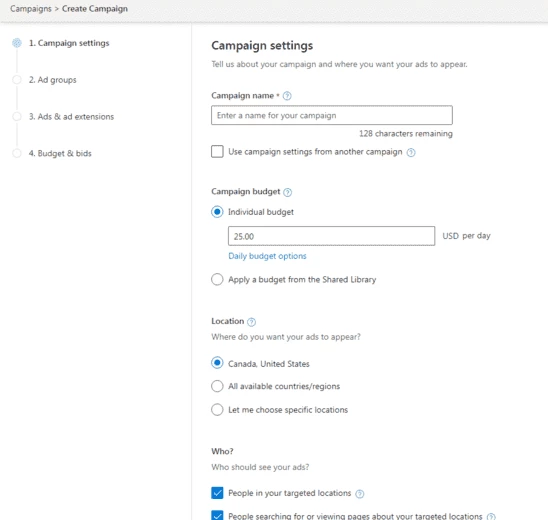
1. Create a campaign. Click Create campaign and select an objective. For traffic to a landing page, an objective focused on website visits or conversions is suitable. Select Search ads as the campaign type: ads will appear in Bing search as well as across Microsoft network partners.
2. Name the campaign so that you and your team understand it. For example: Offer_Geo_Device_Bing. The name must not contain any markup or scripts.
3. Set up targeting. Specify countries or regions, language, and devices. It is worth mirroring these exact settings in the cloaking filters: this way, you will not receive traffic that you would filter out yourself.
4. Set a daily budget. Start with a small amount. The goal of the first few days is to see whether the campaign setup gets approved and works, not to scale.
5. Choose a bidding strategy. At the start, manual bidding or maximizing clicks is the easiest choice. Automated strategies for conversions require configured conversion tracking: without it, the system will automatically switch the strategy to clicks.
6. Create an ad group and add keywords. Select thematic keywords tailored to a single offer. To control impressions, use exact and phrase match; leave broad match for later.
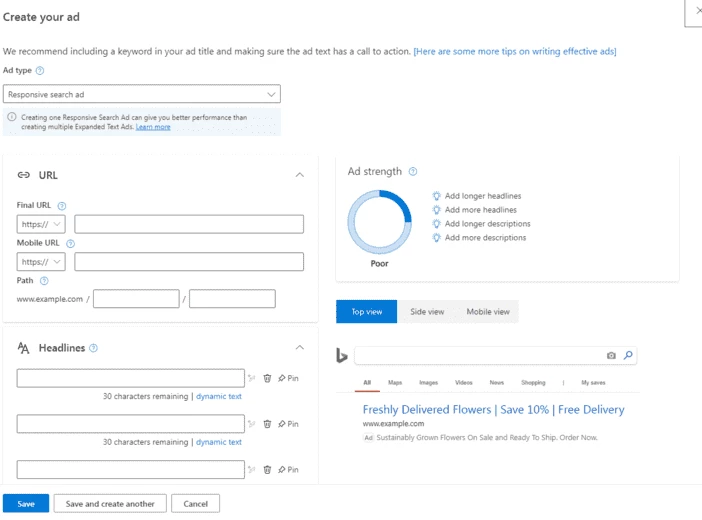
7. Create a responsive search ad (Responsive search ad). Specify:
- Final URL - the link to your domain with cloaking (it is best to already have it ready at this stage);
- several headlines (up to 15, 30 characters each);
- several descriptions (up to 4, 90 characters each).
The copy must honestly match what the reviewer will see on the White Page. An ad about one thing and a page about another is the primary reason for rejection.
8. Submit for review. After this, the ad will go to moderation, and that is precisely when the ad crawler will visit your domain.
Part 5. Verification Before Hitting "Submit"
Test the chain in two modes:
- As a user. Add your IP to the whitelist and open the link: the offer page should open.
- As a reviewer. Remove your IP from the whitelist and open the link via VPN or from another GEO: the White Page should open.
If both modes work, insert the Final URL into the ad and submit it for moderation.
Part 6. After the Launch: Reading the Logs
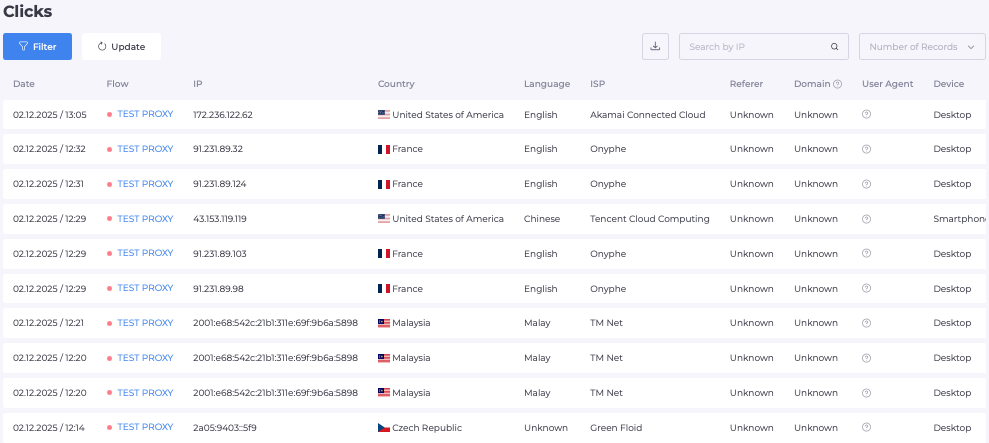
In the clicks section of Cloaking.House, you can see where each click was routed, which filter triggered, where the person came from, and what device was used.
What to look for in the first days:
- Real users landing on the White Page. The reason lies in the row of the triggered filter; relax that specific filter.
- Repeated visits from the same addresses. You can block them with a blacklist or a click limit.
- Unexpected referrers. They will reveal where your ads are actually being displayed.
- Clearly service user-agents. Microsoft ad bots appear in the logs under their names, such as adidxbot or bingadsbot. This is a reference point, but spoofing a user-agent is easy, so do not rely on it alone.
Change only one setting at a time to understand what exactly had an impact. And remember: if you change the page or URLs, the ad may be reviewed again.
Frequently Asked Questions
Why does Bing check the page if the ad is already approved? Verification does not end at launch: if the page or campaign changes, the ad may be re-checked.
Do I need to create a separate flow for each campaign? Yes, a separate flow, domain, and White Page for each campaign setup are easier to monitor and safer for your other campaigns.
What should I do if real users see the White Page? Open the click log, find the triggered filter, and relax it. Most often, it is referrer, IPv6, ISP, or click limit.
Can I test the service before paying? Yes, Cloaking.House offers 7 days of free access with no feature restrictions.
Launch Checklist
- A Search campaign is created in the dashboard with targeting, budget, and bidding strategy
- Keywords and ad copy match the White Page content
- The White Page is built, uploaded, and site.html opens properly
- The flow is created, and filters mirror the campaign targeting
- PHP integration is uploaded or a cloaked link is selected
- Both modes are tested: offer with the whitelist, White Page without it
- Final URL is inserted into the ad only after verification
- Small starting budget and a single GEO
- Click log is checked after the first visits
Summary
Launching on Bing with cloaking is best managed as a three-step sequence: campaign in Microsoft Advertising, domain with filters, and testing in two modes. The link goes into the ad only when everything else is already working. After launch, all that is left is to monitor the logs and adjust one setting at a time. There are no guarantees of results here, but following the proper order of steps and staying attentive at the start helps significantly.




Be the first to share your opinion!
We value your feedback — share your thoughts.