


There is one persistent myth due to which affiliate marketers lose accounts, burn deposits and entire setups. It sounds simple: "I opened incognito mode, which means I cannot be tracked." In reality, a private window protects you from exactly one person - from a partner or mom who will later sit at the same laptop. To the anti-fraud system of Facebook, Google, or any affiliate network, you are just as recognizable in incognito mode as in a regular window.
To understand why, you need to look deeper than marketing formulations and understand how websites actually distinguish users from each other. This principle is the foundation of browser fingerprint management: cookies alone have long been insufficient for websites.
How websites actually recognize you
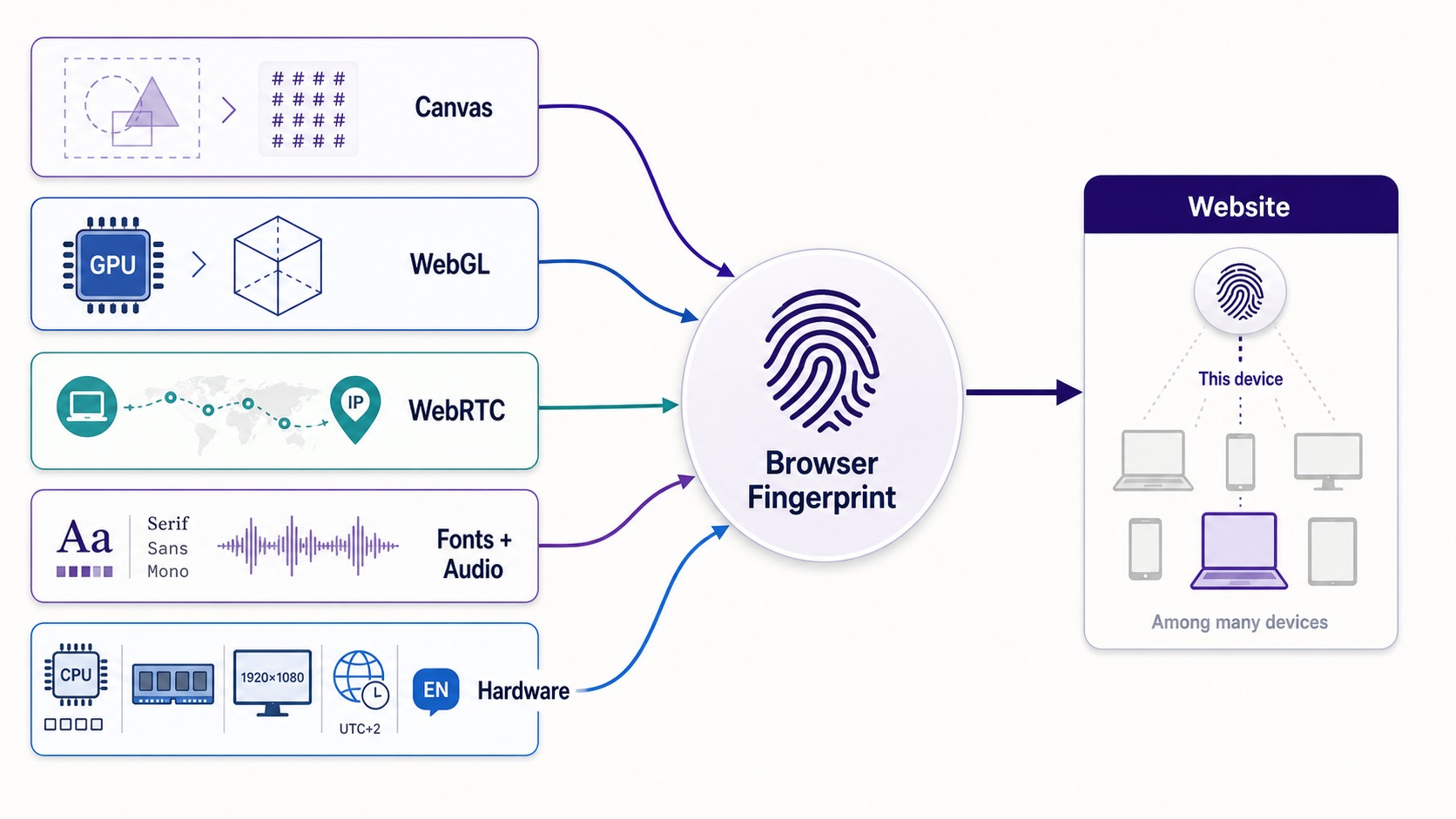
Imagine that every browser has a voice. Not one that can be heard, but a technical one: a set of parameters read by the site in the first milliseconds after the page loads. Individually, each parameter means nothing, but together they form an almost unique signature. This is a fingerprint - a digital footprint of the browser.
Here is what it consists of:
- Canvas. The site asks the browser to draw an invisible image on a hidden canvas and gets its hash. Due to differences in fonts, drivers, and anti-aliasing, the rendering result on each machine differs slightly.
- WebGL. The principle is the same, but for 3D graphics: the site requests data about the GPU, renderer, and driver version, and then records how the video card processes the test scene.
- WebRTC. A technology for browser calls that can reveal your real IP even when using a proxy, since it works outside the regular HTTP stack.
- Fonts and Audio. The list of installed fonts and how the audio stack processes a test signal also provide unique values.
- Hardware profile. The number of CPU cores, RAM size, screen resolution, platform, time zone, and language.
Let's consider a real case. Two Facebook Ads Manager profiles are open in regular Chrome windows on the same laptop. They have different email addresses and passwords, but the exact same Canvas hash, font set, and GPU in the WebGL report. This is enough for the anti-fraud system to flag both accounts as belonging to the same operator, even without a single shared cookie.
Collectively, these parameters form a fingerprint that makes you stand out among millions of users. Cookies are secondary here. Even if you delete all of them, the anti-fraud system will recognize the same device by Canvas, WebGL, and other signals. That is exactly why the "cleared cookies and logged in again" approach does not work against serious systems.
Anatomy of incognito mode: what it deletes and what it reveals
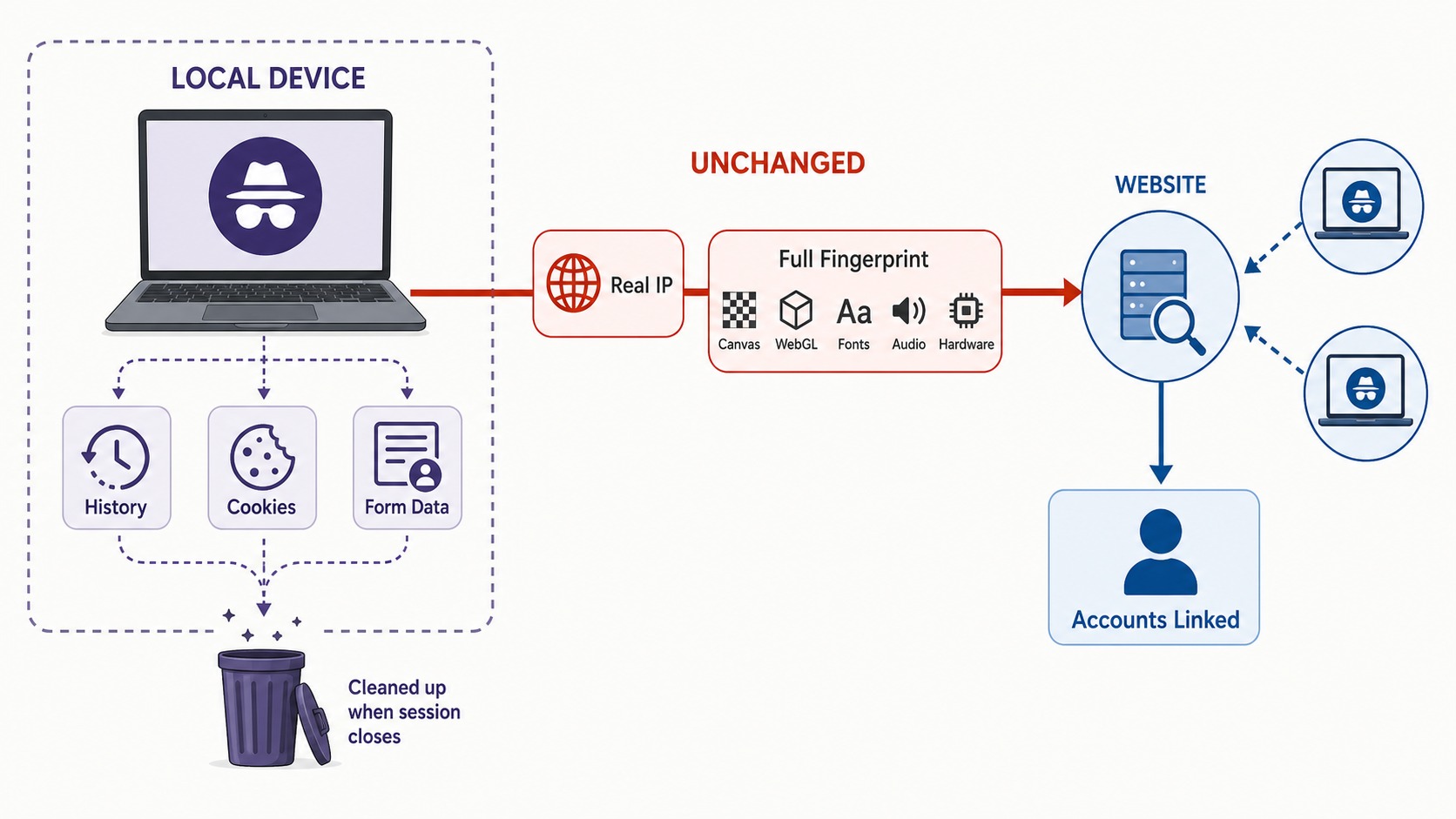
Private mode - is a local clearing feature, and nothing more. When you close the window, the browser forgets this session on your device. The mode was created so that browsing history would not remain on a shared computer, not to change how a site sees you.
What incognito mode actually does:
- does not save history, form data, and new cookies after closing the window;
- launches without the main profile's cookies, so on most sites you end up being logged out;
- isolates the session from the main profile as long as the window is open.
And that is all. The key word is - locally. Private mode changes what your computer remembers, and has almost no effect on what the outside world sees.
But here is what data incognito mode reveals, even though you do not notice it:
- your real IP. The site sees it exactly the same as in a regular window;
- full fingerprint. Canvas, WebGL, fonts, audio, and hardware profile remain unchanged. A private window has the exact same fingerprint as the main one;
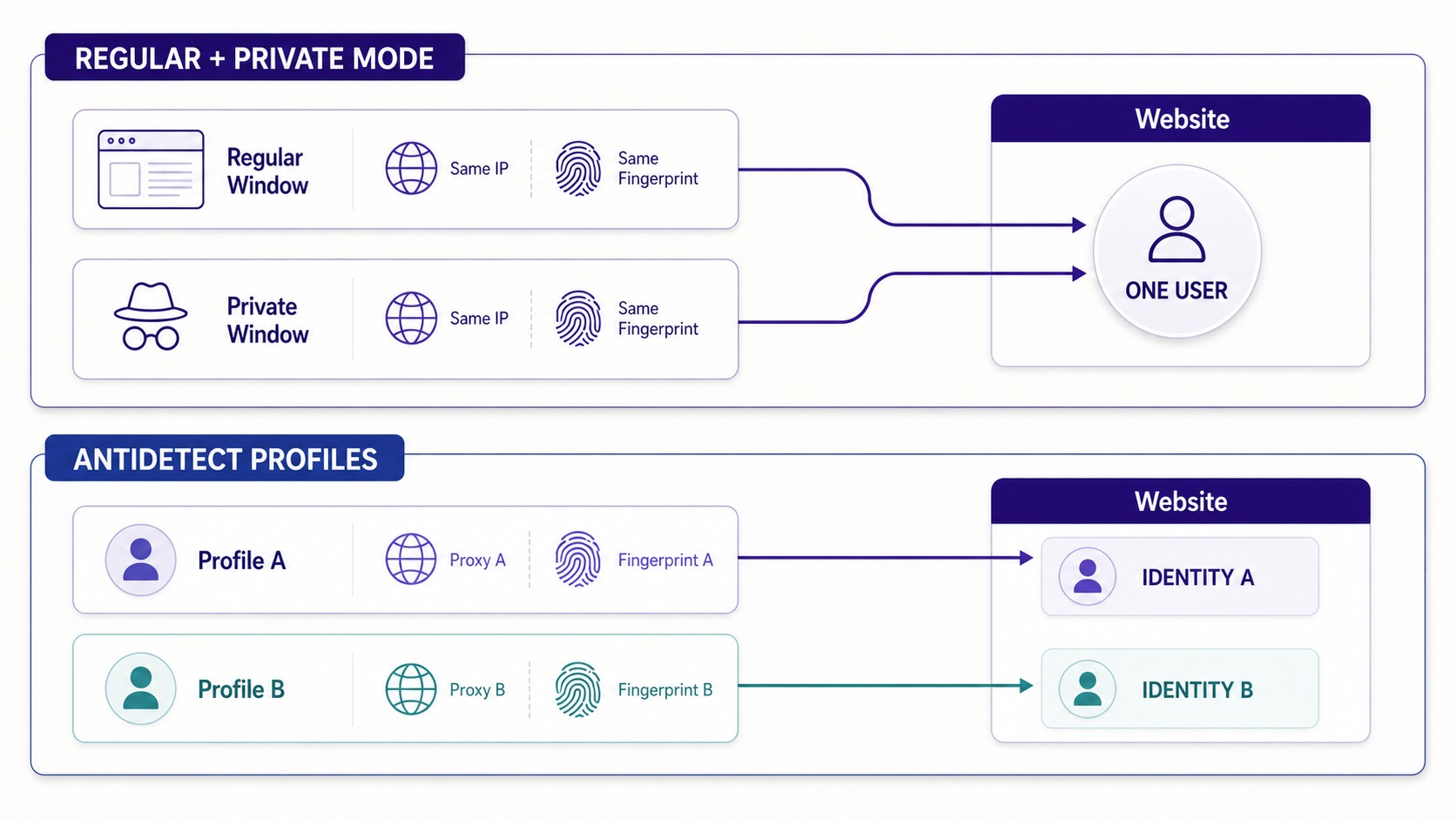
- connection between accounts. If you open two accounts in two private windows on the same machine, they will have the same fingerprint and IP. It is obvious to the platform that they are managed by one person.
Therefore, two incognito windows will not save you in multi-accounting. You erased the local memory, but kept the same digital voice. The anti-fraud system hears it identically in both windows.
Anatomy of antidetect: fingerprint substitution at the system level
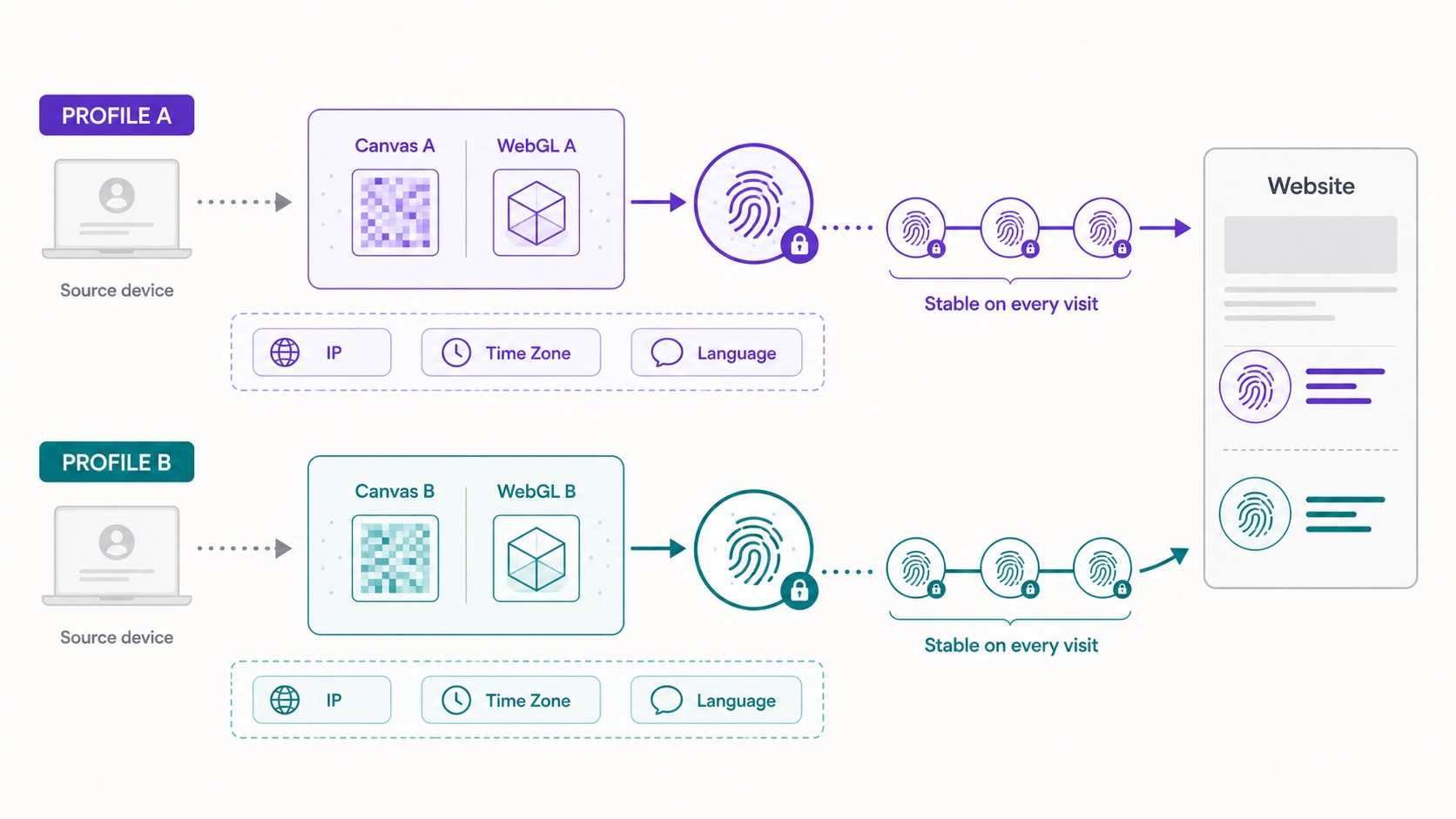
An antidetect browser works from the other side of the connection. It does not clear the local history, but manages the very digital voice that your browser presents to every site. Its task - is not to forget the session, but to maintain several separate, internally consistent digital identities that never intersect.
Instead of simply hiding parameters - which in itself is suspicious, because an "empty" fingerprint is already a red flag - a good antidetect browser replaces them with plausible values. For this, controlled distortion is used, which the industry calls noise.
- Canvas and WebGL noise. The browser adds microscopic deviations to the rendering result, which are stable within the profile. The hash differs from the hash of your real machine, but remains constant: with every visit, the site sees the same "device".
- Audio and Rects noise. The same principle is applied to the audio footprint and the geometry of elements on the page. This closes two more vectors by which sessions could be linked.
- Hardware profile. For each profile, you can set the number of CPU cores and RAM size. On real machines, the hardwareConcurrency value is almost always even due to hyper-threading, and navigator.deviceMemory in Chromium has a strict limit of 8 GB, even if 32 or 64 GB is physically installed. A profile reporting 16 GB of device memory immediately gives away a spoof: a real Chromium does not respond like that.
The main principle - is consistency, not concealment. One profile must look like one real person with one stable device. Therefore, consistency between different levels is no less important than the substitution itself: if the proxy points to Berlin, but the profile's time zone is New York and the browser language is Russian, the anti-fraud system will notice the logical inconsistency faster than the offer loads.
An example of an unsuccessful launch: a proxy in Malaysia, time zone Europe/Warsaw, browser language pt-BR. Each parameter individually looks normal, but together they reveal the substitution in the first seconds of the session.
Incognito and antidetect: a technical comparison
| Parameter | Private mode | Antidetect browser |
|---|---|---|
| What it changes | Local device memory | What the site sees |
| IP address | Your real IP | Dedicated proxy for each profile |
| Canvas / WebGL | No changes, fully accessible | Controlled noise for each profile |
| Audio / Rects | No changes | Separate noise for each profile |
| WebRTC | Can reveal real IP | Controlled or disabled |
| Hardware profile | One for the whole machine | Customizable (CPU, RAM) |
| Number of digital identities | One temporary window | Many persistent profiles |
| Cookie isolation | Until window is closed | Persistent, separate for each profile |
| Purpose | Privacy on a shared computer | Multi-accounting, affiliate marketing, QA |
Incognito mode answers the question: "Will my computer remember this?" Antidetect answers another question: "Will sites see these accounts as separate, real users?" These are two different tasks, and one solution does not replace the other.
Proxy: the network half of a digital identity
Fingerprint substitution - is only half the battle. The second half - is the network route. Even with perfect profile isolation, the anti-fraud system will easily link them by address if they all access the network through a single IP.
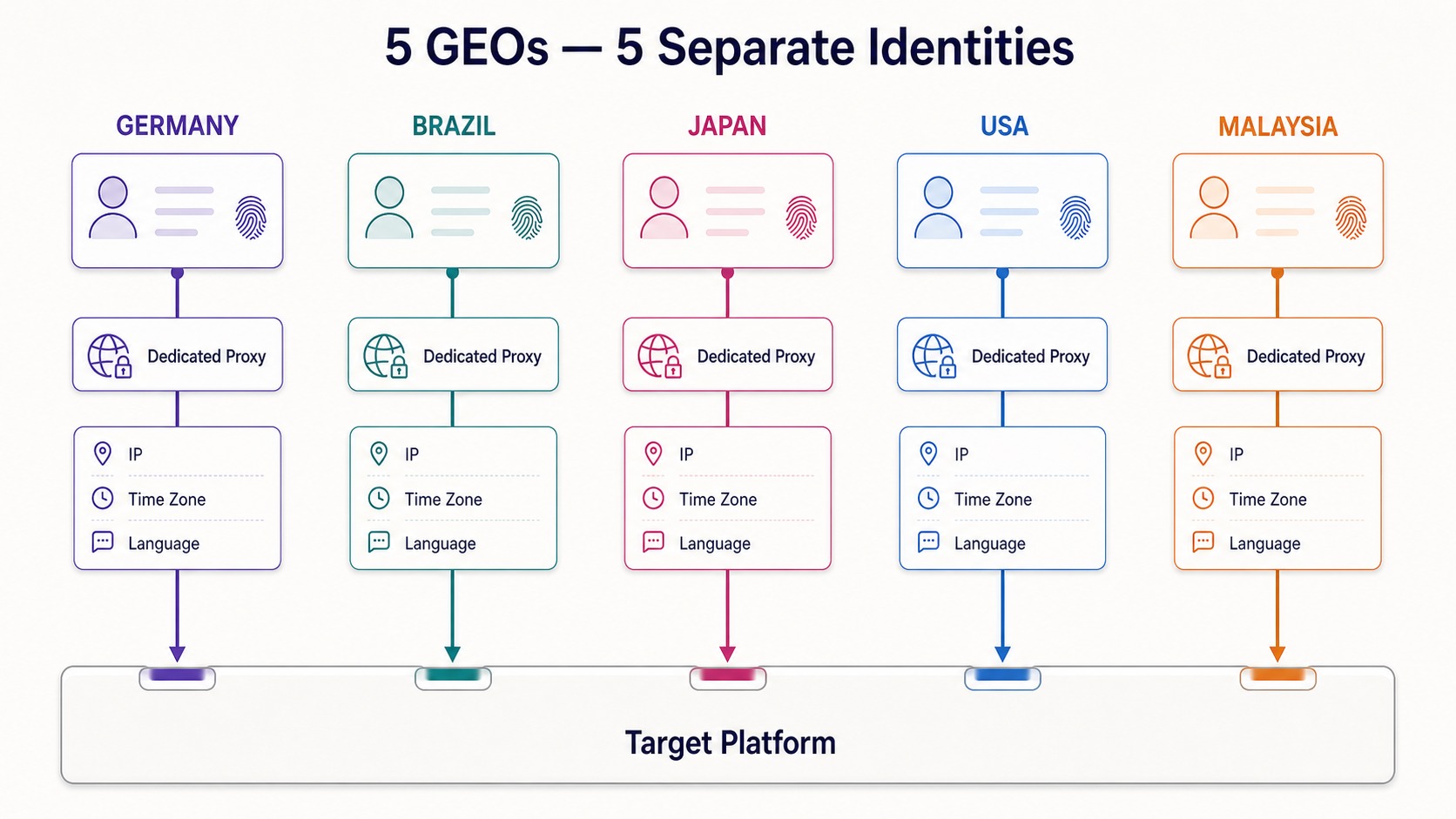
Therefore, each profile needs a separate proxy, and its geography must match the rest of the fingerprint parameters. Here, too, there are technical details on which the fate of the entire setup depends:
- HTTP and HTTPS are well suited for a standard TCP connection;
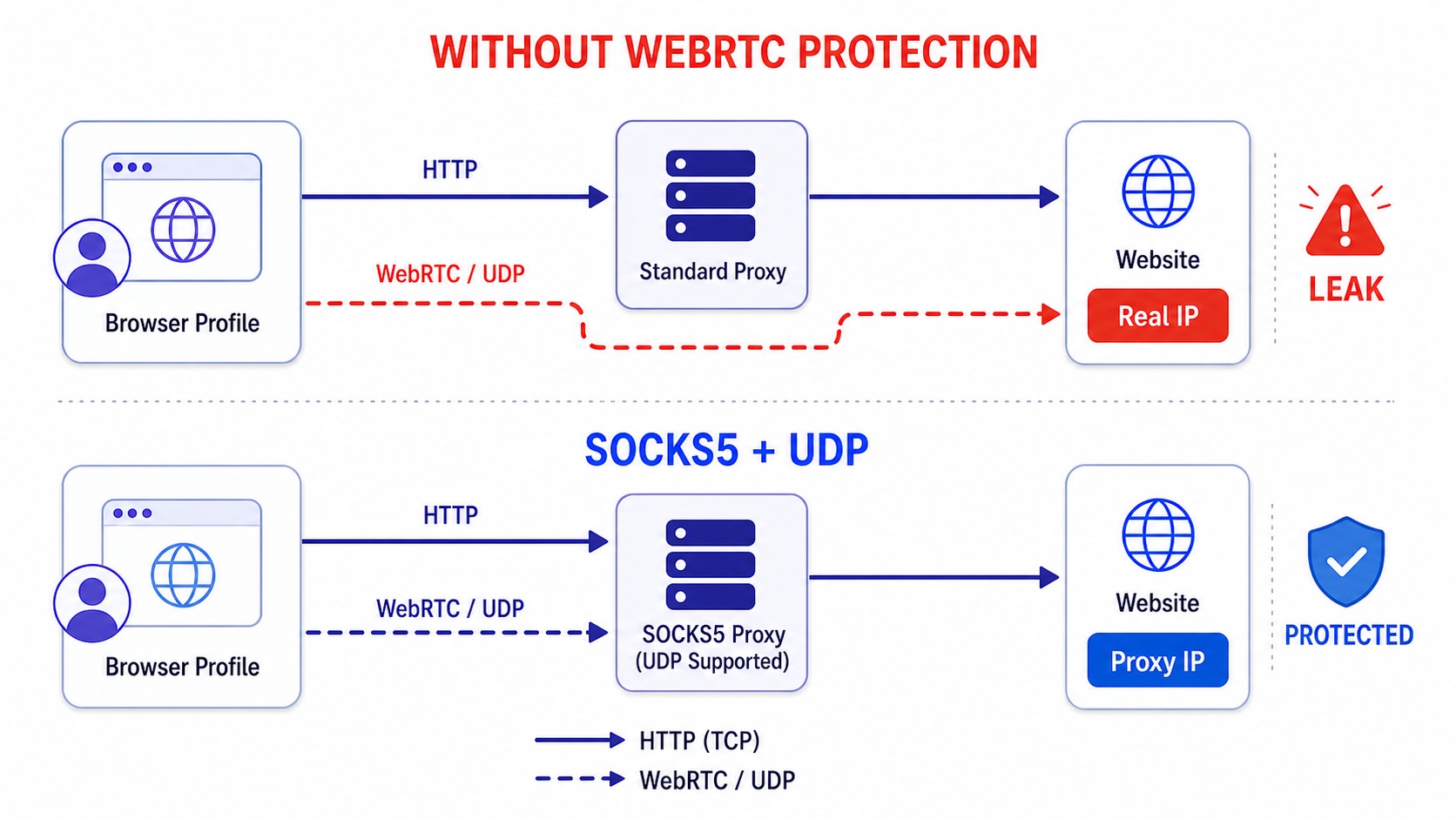
- SOCKS5 is necessary where UDP is important, in particular for the correct operation of WebRTC. A high-quality SOCKS5 proxy with real UDP support allows WebRTC to work naturally, rather than remaining disabled;
- WebRTC leak. If the proxy does not handle WebRTC, the browser may transmit your real IP via RTCPeerConnection. Therefore, WebRTC is either routed through a proxy or forcibly disabled so that the real address is never revealed.
A profile that belongs to one country by time zone and language, but connects from an IP of another, looks contradictory. For an affiliate marketer, this means a manual check, a request for documents, or a shadow ban even before getting the first lead.
What this class of tools looks like in practice
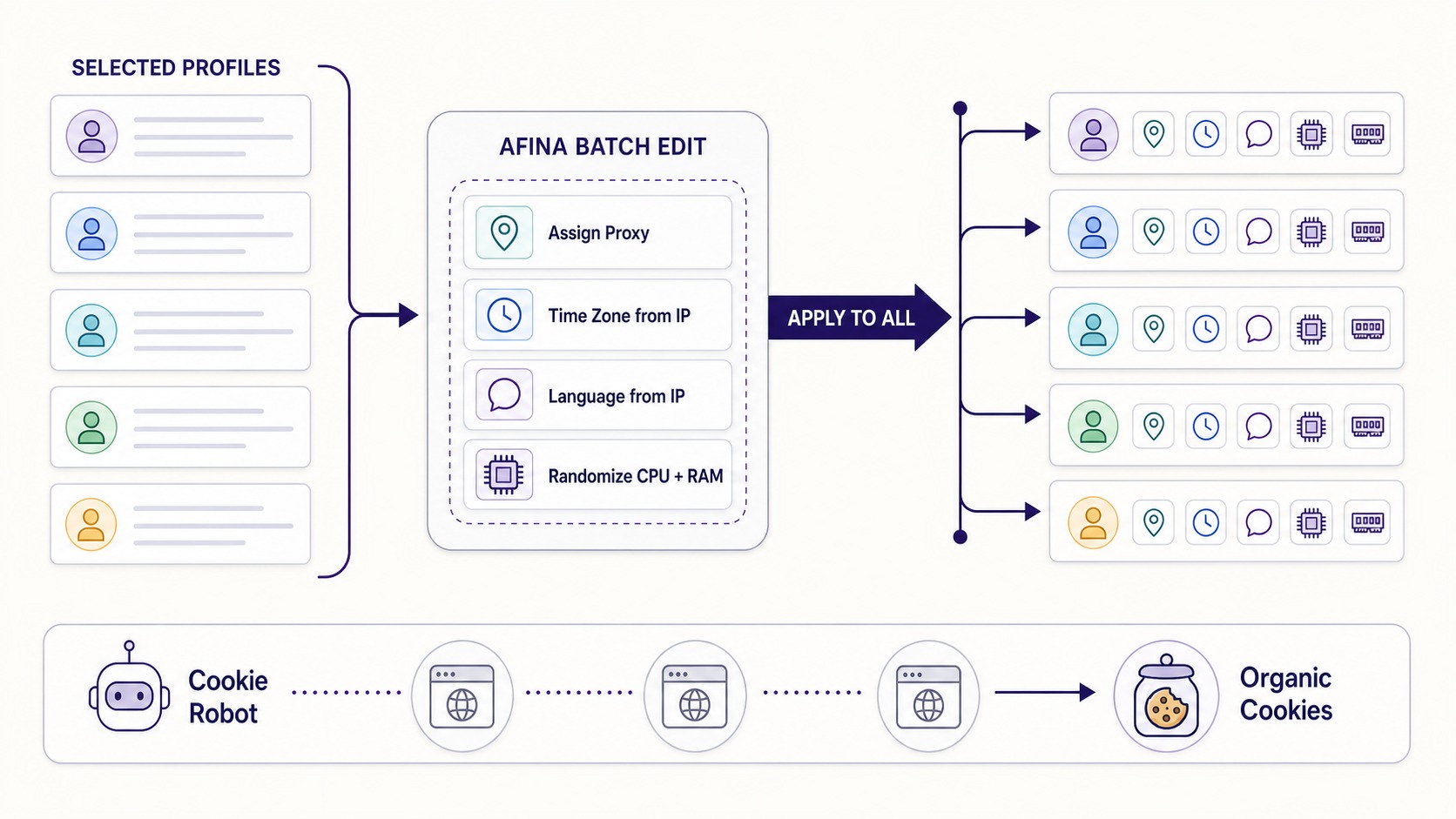
When you manage not three, but three hundred accounts, manual setup of each profile ceases to be an option: one day of routine work stretches into a whole week. That is why there is a separate software category - antidetect browsers, such as Afina, Multilogin, GoLogin or Dolphin{anty}. They differ in interface and price, but solve one task: they apply the logic of consistent fingerprints and corresponding proxies not to one, but to hundreds of profiles at once.
Take Afina Browser profiles as an example: a group of profiles can be selected in one batch, and then in one action you can set the time zone and language "by IP", while simultaneously randomizing CPU and RAM separately for each profile. A fresh account with no history also looks suspicious, so a separate module, for example Cookie Robot, previously visits relevant sites through the profile and collects organic cookies before the first login to the target platform.
This is an illustration of the approach, not a recommendation of a specific brand. Understanding the difference between clearing a session and separating digital identities allows you to choose the right tool for the task, and not rely on the word "private" in the mode's name.
Practice: when it really matters
Here are a few typical situations from affiliate marketing and multi-accounting where the boundary between incognito mode and antidetect becomes the boundary between profit and ban:
- Farming accounts for Facebook or Google Ads. Each account - is a separate device with a separate IP and warmed-up cookies. In incognito mode, they will all merge into one obvious farm on the very first day;
- Testing offers in different GEOs. One offer, five countries, five profiles with corresponding proxies, time zones, and languages. This is exactly how you can see the real SERP and cloaking behavior for each region;
- Working with affiliate networks sensitive to multi-accounting. Client or regional accounts that by rules must remain separate;
- QA and anti-fraud system research. Checking how a campaign or funnel behaves for different visitor profiles.
In all cases, the task is the same: reliably separate multiple sessions for weeks, not until the first check. This is digital identity management - exactly what antidetect exists for.
What suits whom
A simple model worth remembering:
- private mode changes what your device remembers. This is a broom for local history;
- antidetect browser changes what sites see, and separates digital identities. This is a set of separate rooms, each with its own door to the internet.
If you only need to hide activity from a person who will sit at the same laptop next, incognito mode will cope. If you work with multiple accounts, test offers in different GEOs, or perform any task where sessions cannot be linked, private mode will not help, no matter how many windows you open. For this, you need fingerprint substitution and a separate proxy for each digital identity.
Promo codes for new users:
- SALE20 - 20% discount on all plans except Max
- SALE30 - 30% discount on the Max plan
FAQ
Does incognito mode hide my IP address?
No. Private mode only deletes local history and cookies after the window is closed. Visited sites see your real IP address and the full browser fingerprint exactly the same as in a regular window.
Why can't I work with two accounts in two private windows?
Both windows use the same fingerprint and IP, so the platform links the accounts to one operator. For real separation, different Canvas and WebGL fingerprints are needed, as well as a separate proxy for each account.
What is Canvas and WebGL noise?
These are controlled micro-distortions of the rendering result. The browser sends the site a hash that differs from the hash of your real machine, but remains stable for a specific profile. Therefore, the site sees a separate consistent device, and not your real one.
Do I need a proxy if I am already using an antidetect browser?
Yes. The browser is responsible for fingerprint substitution, and the proxy - for the network route. Both levels must be consistent: the geography of the proxy, time zone, and profile language must match each other, otherwise the fingerprint will look contradictory.
How does antidetect prevent IP leaks via WebRTC?
WebRTC can transmit the real IP bypassing the proxy. An antidetect either routes WebRTC through a UDP-supported proxy via SOCKS5 protocol, or completely disables RTCPeerConnection so that the real address is not revealed.
So what should I choose?
Incognito mode - is for simple personal privacy on a shared device. An antidetect browser - is for working with multiple accounts, testing offers in different GEOs, and managing digital identities that must remain separate for weeks.






Be the first to share your opinion!
We value your feedback — share your thoughts.