


You decide to use an anti-detect browser to protect your affiliate accounts from bans. You create several profiles, add proxies, and start running campaigns across multiple sites. Everything is going well. Then, just like before, accounts start getting restrictions, requests for re-verification, or get banned.
Usually, the problem lies in the setup and use of the anti-detect environment.
In this article, we break down in detail the most common mistakes affiliate marketers make when using an anti-detect browser for affiliate campaigns, and explain how to fix them before it costs you accounts, budgets, and time.
Common beginner mistakes when working with anti-detect browsers
An anti-detect browser allows you to create multiple isolated browser profiles, each with its own cookies, local storage, and digital fingerprint. For affiliate marketers, this means the ability to run separate ad accounts, test different offers, or work with multiple GEOs without any obvious connection between them.
However, the tool itself does not guarantee safety. Below are the most common mistakes when using anti-detect browsers that regularly lead to account bans, as well as ways to avoid them.
Mistake 1: Using low-quality or shared proxies
Running multiple accounts through the same IP address or a pool of low-quality proxies - one of the fastest ways to get them banned due to intersections. Some affiliate marketers do not use proxies at all, while others reuse the same IP addresses for dozens of profiles to save money.
Why this harms affiliate marketers
Platforms analyze IP address reputation and the number of accounts operating from a single IP. If multiple ad accounts constantly log in from the same IP, the system receives enough signals to treat them as a single entity.
Low-quality or previously compromised proxies carry a separate risk. Certain IP address ranges are often flagged as suspicious because they were used for spam, fake accounts, or mass affiliate marketing. Running new accounts through such IPs increases the likelihood of immediate restrictions or bans.
How to do it right
- Assign one dedicated proxy for each profile. Do not use the same IP for multiple accounts on the same platform.
- Choose proxies based on your target audience. If you run campaigns for US users, use US GEO. For Southeast Asia, use IP addresses of specific countries you are targeting (TH, VN, PH, etc.).
- Once you find a stable and clean IP for a profile, keep using it. Constantly changing IP addresses for the same account looks suspicious and can trigger additional checks.
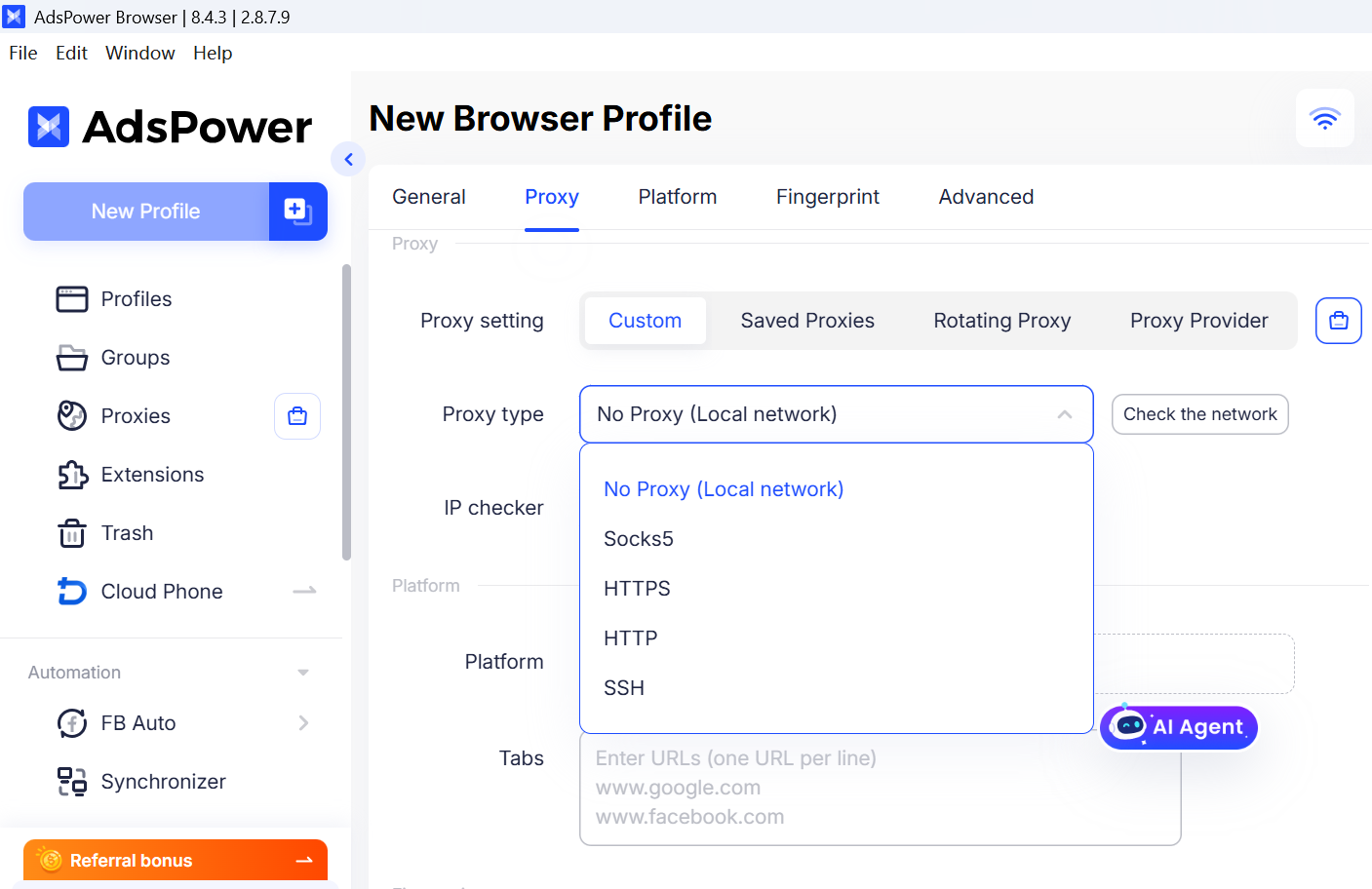
Proper proxy distribution adds another layer of isolation between accounts. AdsPower supports HTTP, HTTPS, and SOCKS5 proxies, and each proxy is tied to a separate profile as part of its digital fingerprint.
If you do not have a proxy yet, go to the Proxies - Buy Proxy section in AdsPower to select a static or dynamic proxy. You can also use the Computer Use feature in AI for mass creation of multiple profiles with proxy settings, which speeds up preparation for large-scale work.
Mistake 2: Mismatch between IP and digital fingerprint
Even with a good proxy, your setup can fail if the browser environment does not match the IP location.
Why this harms affiliate marketers
Anti-fraud systems compare multiple signals simultaneously: IP geolocation, time zone, language, locale, and even typical fonts for the given region. When these signals conflict, the profile looks artificial. For platforms like Google and Meta, this increases the likelihood of security checks, phone verification, or instant restrictions.
For older accounts, a sudden shift to a mismatched environment can be equally dangerous.
How to do it right
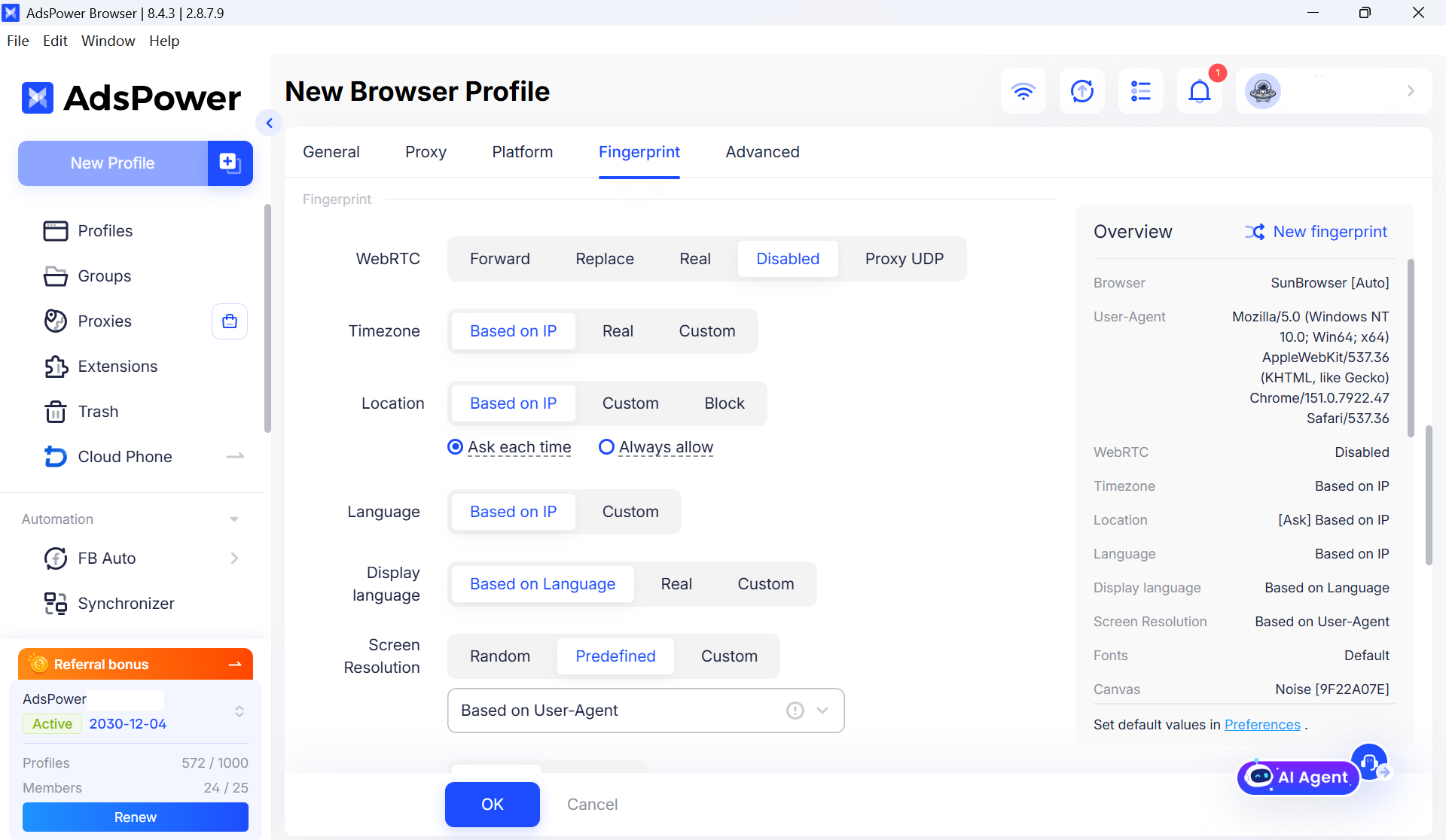
- Ensure consistency across all signals: proxy country, time zone, language, locale, currency, and core fingerprint elements (User-Agent, Canvas, WebGL, AudioContext, font lists, GPU and hardware properties). They should form a unified picture, not conflict with each other.
- Use realistic and consistent fingerprints instead of randomizing every parameter. A stable, logical environment is more important than maximum variety.
- Treat each profile as a separate digital identity. Do not copy the same fingerprint for multiple projects, especially on the same platform.
Before launching a profile, make sure the proxy configuration matches the required location. In AdsPower, click Check Proxy to confirm the outbound IP address and location before saving the profile. This quick check helps identify misconfigured proxies before they trigger security checks on platforms.
Mistake 3: Reusing a single profile for multiple accounts on one platform
One browser profile is used to log into multiple Facebook BMs, multiple Google Ads accounts, or a group of TikTok ad accounts. At first glance, this looks efficient, but in reality, it creates a direct link between all these accounts.
Why this harms affiliate marketers
All accounts in one profile share fingerprints, cookies, and behavioral history. Platforms easily detect this connection. If one account gets banned, the others will also be at high risk of getting restrictions. Mixing clean and high-risk traffic in one profile only makes the situation worse. Any issue can spill over to your safe accounts.
How to do it right
- Follow a simple rule: one fingerprint - one user. Do not log into multiple accounts of the same platform in one profile.
- Group accounts to simplify management for your team. This way, you can quickly find and open the right profile for each user or project.
- Clearly name and tag profiles (e.g., ClientA_US01, Client_TikTok02) and keep internal records of which profile is used for which account.
- If a profile was used for a banned or heavily restricted account, do not reuse it for new projects. Create a fresh profile with a new proxy and fingerprint.
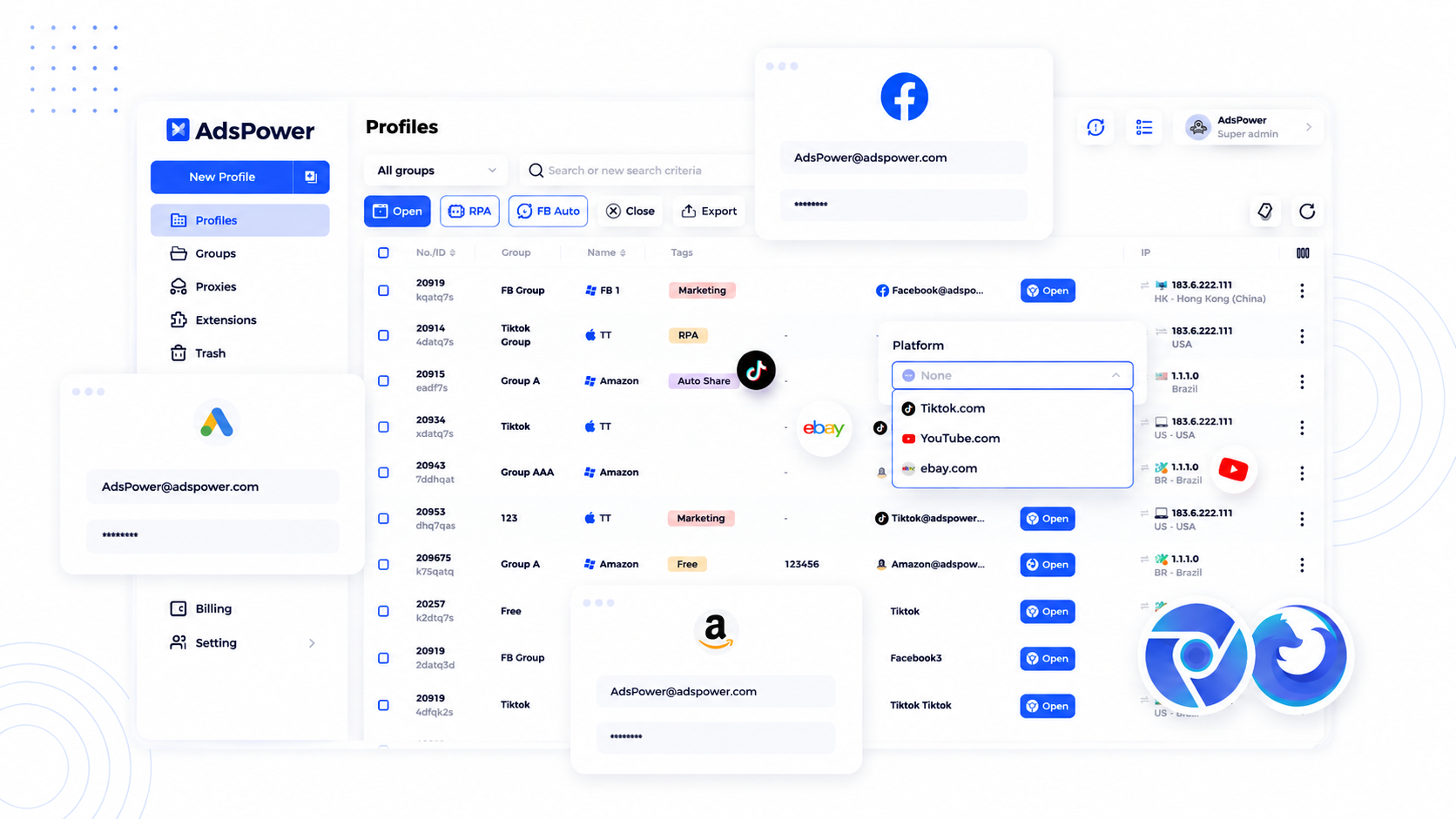
The folder and tag system in AdsPower makes this organization as simple as possible. To manage logins, go to the Platform section and select the platform you want to access from the dropdown list. Then you can enter the account email/phone and password so that login details are saved inside the profile for easier management.
Mistake 4: Over-automation and unnatural behavioral patterns
Automation and RPA are powerful tools for affiliate marketers, but they become a liability when used without common sense. Some teams launch multiple profiles with identical scripts: all accounts log into the system at the same time, create campaigns in the same sequence, and spend the budget at the same pace.
Why this harms affiliate marketers
Even if each profile has a different IP and fingerprint, strictly synchronized behavior is a strong signal of non-human activity. Platforms analyze behavioral patterns: when you log in, how you navigate through pages, and how much this scheme matches across different accounts. Once this is detected, platforms have clear grounds for mass restrictions.
How to do it right
- Use automation for repetitive, low-risk tasks, such as opening profiles or exporting data. Avoid automating account creation or mass campaign launches.
- Diversify creatives and copy, even when testing the same offer, change headlines, images, calls to action (CTA), and landing page structures across different accounts.
- For high-risk actions, such as creating a new account or major budget changes, always leave control to a human.
The workflow structure also matters. Isolating profiles in AdsPower ensures that each account operates in a separate environment with customizable fingerprint parameters, such as User-Agent, time zone, language, Canvas, and WebGL. When working as a team, assign different members to manage different profiles, which will reduce the risk of synchronized patterns that platforms can track.
Mistake 5: Skipping account warm-up on high-risk platforms
Many affiliate marketers treat new accounts as if they can be scaled immediately. They log in, create a BM or ad account, upload a few campaigns, and start spending hundreds of dollars on the very first day. On platforms with basic checks, this might work for a while. On high-risk platforms, such as Google, Meta, or Reddit, this is a direct path to restrictions.
Why this harms affiliate marketers
High-risk platforms monitor account behavior in the first days and weeks. Sudden high activity from a brand-new account is a clear red flag, even if the IP and fingerprint look clean. Behavioral signals often carry as much weight as technical ones.
How to do it right
- Treat the first few days as a warm-up stage. Start with light activity: log in, explore the interface, and create a simple campaign with a modest budget. AdsPower RPA can automate light warm-up tasks, but keep the frequency of actions low. Set conservative time intervals between actions to mimic natural human behavior, and avoid running the same script across all profiles at once.
- Gradually increase activity over several days. Add more campaigns, test more creatives, and raise budgets step by step, rather than all at once.
- For core accounts, consider a longer warm-up period before launching major spending. This is especially important for new domains, new payment methods, or new GEOs.
- Maintain stability of technical settings during the warm-up: unchanged IP, consistent environment, and no sudden changes in the profile configuration.
Checklist before launching anti-detect profiles
Before launching a new profile into operation, go through these six steps to ensure your setup is clean and consistent.
- Create a profile with a realistic environment - use a fingerprint preset that matches your target GEO. Avoid excessive randomization of parameters.
- Assign a dedicated clean proxy - one IP per profile. Choose stable and secure proxies relevant to your target audience. Maintain IP stability over time.
- Synchronize all geo-signals - verify that the time zone, language, locale, and currency match the proxy country.
- Run a quick leak test - ensure the visible IP matches your proxy, WebRTC does not leak your real IP, DNS goes through the proxy, and the time zone matches the GEO.
- Log in and warm up gradually - for new accounts, start with light activity and increase intensity over a few days, especially on high-risk platforms.
- Back up the profile - regularly save cookies and profile data so you can restore the environment if something goes wrong.
Conclusion
Anti-detect browsers are just tools. Success comes from consistency between your technical setup, behavior, and operational model. Avoiding these common mistakes does not guarantee you will never face restrictions or bans, but it will significantly reduce the risk of mass blocks and account loss.
To achieve maximum security and efficiency, professionals take a comprehensive approach. For example, marketers often combine robust profile isolation using AdsPower and high-quality cloaking through services like Cloaking.House. This combination allows you to reliably hide your Flows from moderators and bots, protecting not only ad accounts but also the final landing pages.
For affiliate marketers, this means more stable campaigns, longer account lifespans, and more time for optimization instead of constant reconfigurations. Treat each profile as a separate digital identity with its own proxy, environment, and behavioral pattern. With the right approach, these tools become the foundation for a scalable and sustainable affiliate business, rather than a constant source of headaches.






Be the first to share your opinion!
We value your feedback — share your thoughts.